Blog

  • Website Development Consultants: Their Role and Why They are Essential for Your Business

    Website Development Consultants: Their Role and Why They are Essential for Your Business

    Table of Contents

    Unlock Growth with Expert Website Development Consulting

    A well-developed website is no longer optional in today’s digital-first business world; it’s a necessity. But building a high-performing, visually compelling, and scalable website involves much more than picking a template and adding content. That’s where website development consultants come into play.

    From planning and strategy to choosing the right tech stack and ensuring seamless user experiences, website consultants offer the expertise needed to ensure your digital presence supports — and accelerates — your business goals.

    If you’re looking to maximize your website’s potential, hiring a website development consultant from a trusted agency like Ravens Digital can be one of the smartest moves you make.

    What Is a Website Development Consultant?

    A website development consultant is a digital expert who helps businesses plan, design, build, and optimize their websites. Unlike developers who focus on coding or designers who concentrate on visual aspects, consultants take a strategic, bird’s-eye view of your digital presence.

    They connect business objectives and technical execution. Their primary mission? To ensure your website functions as a true business asset — driving leads, conversions, and long-term growth.

    What Does a Website Development Consultant Do?

    Website development consultants perform a wide range of tasks, depending on your business’s goals, current website setup, and growth stage. Here’s a breakdown of their core responsibilities:

    1. Strategic Planning & Website Audits

    Our experts evaluate your current online presence to uncover areas for optimization and growth. This involves performance audits, SEO analysis, user experience reviews, and technical diagnostics. Based on this assessment, they create a comprehensive development roadmap tailored to your business goals.

    2. Technology Selection & Stack Recommendation

    Choosing the wrong content management system (CMS), eCommerce platform, or hosting solution can be costly. Consultants evaluate your needs and recommend the best-fit tech stack — from WordPress and Shopify to custom-built platforms using React, Laravel, or Node.js.

    3. Design & UX/UI Recommendations

    A good website must be both visually appealing and intuitively navigable. Consultants work with UI/UX designers to ensure a smooth, conversion-optimized journey across all devices.

    4. Vendor & Developer Coordination

    Whether you have an in-house team or are outsourcing web development, a consultant acts as your project manager — ensuring the project stays on time, within budget, and aligned with the original vision.

    5. Performance & SEO Optimization

    A website is only as good as its visibility and speed. Consultants help you meet modern SEO standards, optimize for mobile, improve Core Web Vitals, and ensure fast load times — all crucial for better search rankings and user retention.

    4 Most Common Web Consulting Services

    Here are the most in-demand services you can expect from experienced website development consultants like those at Ravens Digital:

    1. Website Strategy & Roadmap Development

    Before you build or redesign your site, you need a plan. This service includes market research, competitor analysis, and defining your website goals, architecture, and KPIs.

    2. Custom Web Development Consulting

    Not all businesses are satisfied with a basic website.  For complex functionalities — such as booking engines, membership platforms, eCommerce integrations, or custom dashboards — consultants guide the development of custom-coded solutions.

    3. Conversion Rate Optimization (CRO) Audits

    It’s not enough to get traffic. You need conversions. CRO consulting involves analyzing your existing user journey, identifying drop-off points, and implementing changes that increase leads, sales, or sign-ups.

    4. Website Redesign & Migration Planning

    If you’re moving from one CMS to another (e.g., Wix to WordPress or Magento to Shopify), consultants handle data migration, SEO preservation, content mapping, and risk mitigation.

    At Ravens Digital, these consulting services are offered with a focus on business impact, ensuring that design and development choices are aligned with measurable growth outcomes.

    Why Do You Need a Website Development Consultant?

    So, what makes hiring a website consultant a worthwhile investment instead of going straight to a developer or freelancer?

    Here are some compelling reasons:

    1. Align Tech with Business Goals

    Most business owners don’t speak “developer.” A consultant translates business goals into technical requirements and ensures the development process aligns with ROI-focused outcomes.

    2. Avoid Costly Mistakes

    Wrong CMS? Poor hosting? Security flaws? These are expensive errors. Consultants help you avoid pitfalls and ensure long-term scalability, saving you time and money.

    3. Faster Go-To-Market Time

    With a solid roadmap and expert oversight, your site gets built or improved faster — and smarter. Consultants eliminate bottlenecks by coordinating between design, development, and marketing.

    4. Improved SEO & User Experience

    From Core Web Vitals to mobile responsiveness and semantic markup, consultants make sure your site performs well — both for users and search engines.

    5. Objective Third-Party Expertise

    Unlike in-house teams that might be stuck in internal politics or limitations, a consultant brings fresh, unbiased insights and broader industry knowledge.

    5 Questions To Ask Website Development Consultants

    Before you hire a web development consultant, ask these key questions to ensure you find the right fit for your business.

    1. What experience do you have with businesses in our industry?

    Every industry has unique digital needs. Ask for case studies or examples of work with similar businesses to assess their relevance.

    2. Can you help with both strategy and execution?

    Some consultants only advise — others guide you through the full implementation. Ideally, you want someone who can do both or has a team (like at Ravens Digital) to handle strategy and delivery.

    3. Which technologies and platforms do you specialize in?

    From Shopify and WordPress to custom-coded web apps, consultants should have deep knowledge of the tools your business may need.

    4. How do you measure the success of a website?

    A results-driven consultant will talk about KPIs like bounce rate, conversion rate, search visibility, and load speed — not just pretty design.

    5. Do you offer ongoing support and optimization?

    Website development isn’t a one-time project. Continuous improvement is key. Check if they offer ongoing support packages, audits, or retainer-based consulting.

    Website Development Consulting Services at Ravens Digital

    At Ravens Digital, we offer comprehensive website consulting services designed to empower businesses with a digital edge. Here’s a breakdown of what we provide:

    🔹 Website Strategy Development

    We start by understanding your business, target audience, and competition to craft a website strategy that supports your goals — whether it’s generating leads, showcasing your brand, or driving eCommerce sales.

    🔹 Tech Stack Evaluation & Recommendations

    We analyze your needs and recommend the ideal tools — CMS platforms, hosting, analytics, security tools — ensuring your website is secure, scalable, and easy to manage.

    🔹 UI/UX Design Consulting

    Through user behavior analysis, we help create a seamless, mobile-friendly experience that improves engagement and encourages action.

    🔹 SEO & Performance Optimization

    Using tools like Google PageSpeed Insights, GTmetrix, and Lighthouse, we audit your site and implement SEO-friendly improvements, including metadata optimization, structured data, caching strategies, and mobile responsiveness.

    🔹 E-Commerce Development Consulting

    From choosing the right platform (Shopify, WooCommerce, Magento) to planning inventory systems and payment gateways, we consult on all aspects of building a high-converting online store.

    🔹 Web Analytics & CRO

    We don’t stop at launch. We help you track website metrics, analyze behavior, and run A/B tests that improve conversion rates and user satisfaction.

    🔹 Full-Service Web Design & Development

    Need more than advice? We provide comprehensive development, eliminating the need for various suppliers. From wireframes to launch, we’ve got you covered.

    Final Thoughts: Your Digital Growth Starts With Smart Consulting

    In a crowded and competitive online world, your website must work harder — and smarter — than ever before. A beautiful design alone won’t cut it.Successful growth hinges on a strategic approach, a reliable tech stack, and a clear path forward.

    That’s exactly what website development consultants bring to the table.

    Whether you’re building your first website, planning a redesign, or trying to troubleshoot performance issues, the right consultant can transform your digital presence from an online brochure into a true business growth engine.

    If you’re ready to elevate your website, get in touch with the experts at Ravens Digital — your trusted partner in strategy-driven website consulting and development.
  • Web Development Terms: 50 Must-Know Phrases for Beginners

    Web Development Terms: 50 Must-Know Phrases for Beginners

    Table of Contents

    50 Essential Web Development Terms Every Beginner Must Know

    Web development can seem like a foreign language to beginners, filled with acronyms, technical jargon, and complex systems. But understanding key terms is essential whether you’re learning to build websites, collaborating with developers, or managing digital projects.

    In this article, we’ve compiled 50 essential web development terms, broken down with clear explanations and real-world relevance. Mastering these will help you communicate better, make smarter decisions, and build more effectively.

    Frontend vs Backend: Understanding the Core

    1. Frontend

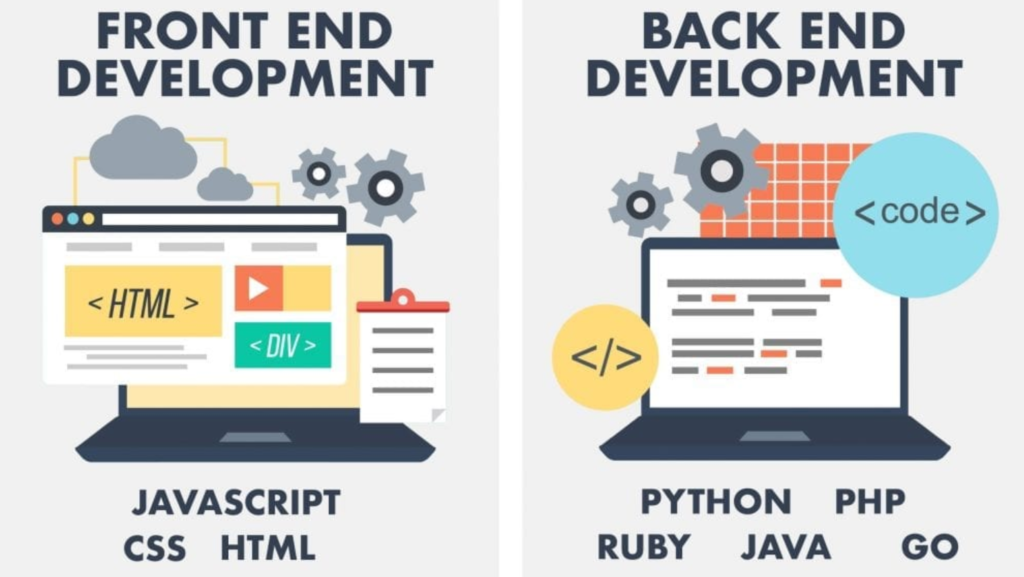
    Everything users visually encounter and interact with in the browser, including buttons, text, forms, and the site’s layout, constitutes the frontend. It’s built using HTML, CSS, and JavaScript to ensure smooth, engaging experiences.

    2. Backend

    Databases, server logic, and security are all managed by the backend, which operates behind the scenes. It handles storing data, processing input, and serving up content to the frontend.

    Frontend Development Essentials

    3. HTML (HyperText Markup Language)

    HTML forms the structure of all websites—it’s like the skeleton. Tags like <h1>, <img>, and <div> define elements such as headings, images, and containers.

    4. CSS (Cascading Style Sheets)

    CSS styles the HTML, controlling colors, fonts, layout, and animations. It allows a single structure (HTML) to have multiple designs across devices and screens.

    5. JavaScript

    JavaScript brings interactivity to web pages, from sliders and forms to dynamic content. It’s the language that powers animations, dropdowns, and real-time updates.

    6. Responsive Design

    Responsive design ensures websites work seamlessly on desktops, tablets, and phones. It adapts layouts, font sizes, and images based on the screen size.

    7. Media Queries

    Media queries are CSS rules triggered by screen characteristics like width or resolution. They help apply custom styling for specific devices or orientations.

    8. Frameworks

    Frameworks like Bootstrap (CSS) and React (JavaScript) offer reusable code libraries. They simplify and speed up development by solving common challenges.

    9. DOM (Document Object Model)

    The DOM provides a tree-like representation of HTML elements. JavaScript can access and manipulate the DOM to change content, structure, or styling dynamically.

    10. Viewport

    The viewport is the user’s visible browser window. Proper configuration (via <meta> tags) ensures your layout renders correctly on various devices.

    Backend Development Terms

    11. Server

    A server is a computer that stores website files and responds to requests from users’ browsers. It delivers content, handles form submissions, and executes backend code.

    12. Database

    A database stores structured data like user profiles, product info, or blog posts. Popular options include MySQL, PostgreSQL, and MongoDB.

    13. API (Application Programming Interface)

    APIs let different software systems communicate. They connect frontends with backends or integrate third-party services like Google Maps or payment gateways.

    14. CRUD (Create, Read, Update, Delete)

    CRUD refers to the four fundamental operations performed on data. Whether it’s adding a post or editing a user profile, these are the foundation of dynamic web apps.

    15. Authentication

    Authentication validates a user’s identity with credentials such as usernames and passwords. It’s the first step in granting access to protected areas of a site.

    16. Authorization

    Authorization determines what actions a user can take once authenticated. For example, admins may see settings that regular users cannot.

    17. MVC (Model-View-Controller)

    MVC separates web applications into three components: Model (data), View (UI), and Controller (logic). It improves code organization and scalability.

    Programming Languages & Frameworks

    18. PHP

    A prominent server-side scripting language, PHP is extensively employed in the creation of dynamic websites. It powers major platforms like WordPress.

    19. Python

    Python is known for clean syntax and versatility. In web development, it’s used with frameworks like Django and Flask.

    20. Ruby on Rails

    Rails, a robust web framework, prioritizes convention over configuration. It allows for rapid development and clean code.

    21. Node.js

    Node.js lets you run JavaScript on the server side. It’s ideal for building scalable and real-time applications.

    22. Express.js

    Express is a minimalist web framework for Node.js. The statement simplifies the management of routes and the application of middleware in server-side development.

    Tools & Workflow Essentials

    23. Git

    Git is a version control system that tracks and maintains a complete history of every change made to your code.

    24. GitHub

    GitHub is a cloud-based service that facilitates the sharing and collaborative development of Git repositories. It supports pull requests, issue tracking, and version history.

    25. Terminal / Command Line

    The terminal is a text interface for running scripts, navigating directories, and managing files. Developers use it daily for fast control over projects.

    26. Package Manager

    Package managers like npm or pip automate installing, updating, and managing libraries. They simplify dependencies and version control.

    27. IDE (Integrated Development Environment)

    More than just a code editor, an IDE provides built-in debugging capabilities, intelligent syntax highlighting, and support for extensions. VS Code is one of the most popular choices for web development.

    Web Hosting & Deployment

    28. Domain Name

    A domain is your website’s address (like ravensdigital.com). It’s what users type to visit your site and should reflect your brand.

    29. Hosting

    Hosting services store your website on servers and make it accessible online. Choices span shared hosting to cloud platforms..

    30. SSL Certificate

    SSL certificates encrypt data for secure (HTTPS) connections, crucial for protecting user data and boosting SEO.

    31. URL (Uniform Resource Locator)

    A URL is the full address of a web resource. It includes the protocol (https), domain, path, and optional parameters.

    32. DNS (Domain Name System)

    DNS translates human-readable domains into IP addresses. It’s how browsers know where to find your website.

    Performance & Optimization

    33. Caching

    Caching stores data temporarily to speed up repeat access. The server load is minimized, and page loading speeds are enhanced as a result.

    34. CDN (Content Delivery Network)

    A CDN distributes content across multiple global servers. It provides assets (such as images or scripts) from the closest server to the user, ensuring faster delivery.

    35. Lazy Loading

    Lazy loading delays loading images or other media until they’re needed. This speeds up initial loading and reduces data usage.

    36. Minification

    Minification strips out unnecessary characters (spaces, comments) from code to reduce file size. It improves site performance by loading faster.

    37. SEO (Search Engine Optimization)

    SEO is crucial for boosting your website’s position in search engine results. It includes technical improvements, keyword usage, and quality content.

    Security in Web Development

    38. HTTPS

    HTTPS ensures secure communication between a browser and server using SSL/TLS encryption. It is paramount for fostering user trust and safeguarding data.

    39. XSS (Cross-Site Scripting)

    XSS is a web security vulnerability that allows attackers to inject malicious scripts into websites. Proper input sanitization can prevent it.

    40. CSRF (Cross-Site Request Forgery)

    Users are manipulated by CSRF into unknowingly taking actions they never intended. It’s blocked by using secure tokens and SameSite cookies.

    41. Firewall

    A firewall monitors and controls incoming/outgoing traffic. Web application firewalls (WAF) add another layer of protection for websites.

    Development Process & Prototyping

    42. Wireframe

    Wireframes are simple, black-and-white layouts showing page structure without design elements. They’re used early in the design process to plan layout and functionality.

    43. Mockup

    Mockups are static designs that add color, branding, and imagery to a wireframe. They provide a realistic preview of the final UI.

    44. Prototype

    Prototypes are interactive models that simulate how a website will work. Their role is to assess user experience and system features prior to the start of development.

    45. Staging Environment

    Staging environments are test versions of websites where developers can preview changes before going live. They mimic the live site but aren’t visible to users.

    46. Production Environment

    The production environment is the live version of a site. It’s what end users interact with, so it must be stable and secure.

    CMS & Platforms

    47. CMS (Content Management System)

    A CMS allows non-developers to manage website content easily. It provides an admin dashboard to add, edit, and publish content without coding.

    48. WordPress

    WordPress is the most popular CMS globally. It’s flexible, extensible, and ideal for everything from blogs to eCommerce.

    49. Shopify

    Shopify is a hosted platform for building online stores. It’s beginner-friendly and includes everything needed to manage products, inventory, and payments.

    50. Webflow

    Webflow is a no-code visual development platform that generates clean HTML, CSS, and JS. It’s great for designers who want full control without touching code.

    Bonus Web Terms (Optional but Useful)

    51. Sitemap

    A sitemap lists all pages on your website. It helps search engines understand your site’s structure and improves SEO.

    52. Robots.txt

    This file tells search engine bots which pages to crawl or ignore. It helps control what gets indexed in search engines.

    53. Accessibility (a11y)

    Web accessibility ensures your site is usable by everyone, including people with disabilities. Following accessibility standards improves usability and compliance.

    54. Web Standards

    Web standards are guidelines set by the W3C to ensure websites are consistent, accessible, and compatible across all devices and browsers.

    55. Open Source

    Open source software is free to use and modify. It fosters collaboration and innovation through transparent codebases and community development.

    ✅ Final Thoughts

    Understanding these 50+ web development terms gives you a foundational language to build, manage, or collaborate on digital projects. Whether you’re diving into code or working alongside a development team, this glossary will help demystify the process.

    Ready to build your website with confidence?

    Ravens Digital is here to help you design, develop, and launch high-performing websites that convert and scale. Reach out today and let’s bring your digital vision to life.

  • The Complete Guide to Website Development: Stages, Tools, Checklist And Key Takeaways

    The Complete Guide to Website Development: Stages, Tools, Checklist And Key Takeaways

    Table of Contents

    A Complete Guide to Building Websites: Phases, Tools & Takeaways

    In the digital age, a website isn’t just a luxury—it’s a necessity. Whether you’re a business owner, startup founder, service provider, or content creator, your website is the core of your online presence. It’s your digital storefront, your communication hub, and often your first impression.

    At Ravens Digital, we believe that effective website development combines strategy, creativity, technology, and user-centric thinking. This comprehensive guide covers the entire website development process, from planning to optimization. We’ll also share 20 top tools to streamline development and a powerful checklist to help you avoid costly mistakes.

    What Is Website Development?

    Website development refers to the comprehensive process of building, deploying, and sustaining online platforms and applications.It encompasses diverse tasks:

    • Planning and strategy
    • Web design (UI/UX)
    • Front-end and back-end development
    • Content creation
    • Testing and QA
    • Deployment
    • Maintenance and optimization

    Website development is much more than just coding. It involves strategic thinking, business alignment, marketing goals, and continuous improvement.

    A well-developed website ensures a positive user experience, communicates your brand identity, converts visitors into customers, and supports long-term business growth.

    Why Following a Structured Website Development Process Matters

    Approaching web development without a clear roadmap often results in:

    • Missed deadlines
    • Budget overruns
    • Poor user experience
    • Functionality issues
    • SEO problems

    A well-defined development process helps ensure that:

    • Your goals are met with precision
    • Enjoy smooth performance on our website, no matter your device or browser.
    • Your brand is represented professionally
    • Your site ranks well in search engines

    Let’s explore the key stages of the website development lifecycle.

    7 Crucial Phases of Website Development

    1. Discovery & Planning

    This foundational stage involves laying the groundwork for your project. It’s where strategy meets clarity.

    Key Activities:

    • Goal Setting: Define what the website should achieve—brand visibility, lead generation, online sales, etc.
    • Target Audience Research: Who are your users? What problems are you solving for them?
    • Competitive Analysis: Study similar businesses to understand what works (and what doesn’t).
    • Site Architecture: Create a sitemap to outline all major pages and their hierarchy.
    • Technical Requirements: Decide on CMS, features (e-commerce, forms, integrations), and hosting solutions.
    • Timeline & Budgeting: Set realistic deadlines and determine how resources will be allocated.

    At Ravens Digital, we always begin with a thorough discovery workshop to ensure complete alignment.

    2. Wireframing & Prototyping

    Once you have the plan, it’s time to sketch the layout of each page. Wireframes are rough blueprints that show where content, images, buttons, and navigation elements will go.

    Benefits of Prototyping:

    • Helps visualize user flow early
    • Reduces revisions during design
    • Involves stakeholders early for feedback
    • Identifies usability issues before coding begins

    Modern prototyping tools even allow clickable mockups, simulating how the user will interact with the site.

    3. Visual Design (UI & UX)

    This is where form meets function. Designers bring your wireframes to life with branding elements, visual hierarchy, imagery, typography, and spacing.

    Important Design Principles:

    • Consistency: Unified color palette, font usage, and layout styles.
    • Simplicity: Clean, uncluttered design that guides users intuitively.
    • Responsiveness: Mobile-first designs that adapt to all screen sizes.
    • Accessibility: Guarantees your site is usable by people with disabilities.

    A stunning design isn’t just pretty; it’s a powerful tool for converting visitors into customers.

    4. Content Strategy & Development

    Your message matters. Content not only informs and persuades, but also plays a vital role in SEO, branding, and UX.

    What Makes Great Web Content?

    • Clear and concise messaging
    • SEO-optimized headlines and meta data
    • Proper use of keywords
    • Calls-to-action (CTAs) in strategic positions
    • Readability with short paragraphs and bullet points

    This stage includes all copywriting, blog planning, image selection, and even video scriptwriting if needed.

    5. Front-End & Back-End Development

    Now comes the build. Developers use coding languages and frameworks to create the visible and invisible parts of your website.

    Front-End (Client-Side)

    • HTML, CSS, JavaScript
    • Frameworks like React or Bootstrap
    • Responsive grid systems
    • Animation and interaction scripting

    Back-End (Server-Side)

    • Languages like PHP, Python, Node.js
    • CMS platforms like WordPress, Webflow, or custom solutions
    • Database integration (e.g., MySQL)
    • User management and security protocols

    Together, they ensure seamless functionality and an engaging experience.

    6. Testing, QA & Optimization

    Before launch, every part of your site must be tested for bugs, inconsistencies, and broken links.

    Testing Includes:

    • Cross-browser and cross-device testing
    • Form validation and email flow
    • Image loading and page speed
    • Broken link detection
    • Mobile responsiveness
    • Accessibility compliance
    • SEO readiness checks

    Load testing ensures your site can handle traffic spikes, and security audits ensure protection against cyber threats.

    7. Launch & Post-Launch Support

    With all checks complete, the website is deployed to its live environment. But this is just the beginning.

    Post-Launch Activities:

    • Monitor performance and traffic via Google Analytics
    • Setup backups and security plugins
    • Provide user training for content updates
    • Maintain plugins and CMS versions
    • A/B testing and heatmap tracking
    • Ongoing SEO and speed optimizations

    A website is a living asset—it evolves with your business and user needs.

    20 Tools to Streamline the Website Development Process

    Choosing the right tools makes the development journey more productive and efficient. Here’s a breakdown of 20 tools grouped by category:

    Code & Text Editors

    These tools help developers write, manage, and format code.

    1. Visual Studio Code: A lightweight, feature-rich editor with Git integration, syntax highlighting, and intelligent code completion.
    2. Sublime Text: Known for speed and power. Perfect for quick editing and multi-language projects.
    3. Atom: A customizable, open-source editor ideal for collaboration via GitHub.
    4. Brackets: Optimized for front-end development with real-time preview and visual tools.
    5. Notepad++: A simple and fast option for basic scripting and file editing.

    Prototyping & Wireframing Tools

    Bring your ideas to life with these visual tools.

    1. Figma: Cloud-based UI design and prototyping with real-time collaboration.
    2. Adobe XD: Ideal for creating wireframes, mockups, and clickable prototypes in one platform.
    3. Sketch: A Mac-based tool for pixel-perfect UI design and vector editing.
    4. InVision: allows you to build interactive prototypes and conduct user testing.
    5. Balsamiq: It is ideal for low-fidelity wireframes, emphasizing layout and logic.

    Collaboration & Project Management Tools

    Facilitate cross-team coordination, monitor advancements, and ensure live communication.

    1. Slack: Messaging, file sharing, and integration with 1000+ productivity apps.
    2. Trello: Kanban board for managing sprints, tasks, and deadlines.
    3. Asana: Task lists, workflows, and calendar tracking in one place.
    4. Jira: Popular among developers for agile project management.
    5. ClickUp: It integrates documents, tasks, goals, and communication into one unified interface.

    File Sharing & Development Resources

    Keep files organized and accessible.

    1. Dropbox: Easy file syncing and sharing with automatic backups.
    2. Google Drive: Real-time collaboration on docs, sheets, and designs.
    3. WeTransfer: Quick large-file transfers without login.
    4. GitHub: Powerful version control and repository hosting for code collaboration.
    5. Bitbucket: Git solution with private repositories, CI/CD, and Jira integration.

    What To Include in a Website Development Checklist

    Before going live, review this essential checklist to ensure everything is polished:

    ✔️ Design & Functionality

    • Responsive across all devices
    • No broken buttons, links, or images
    • Smooth scrolling and fast animations
    • Consistent styling across all pages

    ✔️ Content

    • All placeholder text replaced
    • Spelling and grammar reviewed
    • CTAs are action-oriented
    • Alt text added to all images

    ✔️ SEO & Performance

    • Meta tags and descriptions added
    • xml and robots.txt files submitted
    • Page load speed under 3 seconds
    • Internal linking in place

    ✔️ Technical & Security

    • SSL certificate active
    • Forms properly validated and routed
    • Backups scheduled
    • HTTPS enforced across site

    ✔️ Analytics & Integrations

    • Google Analytics and Search Console setup
    • Conversion tracking installed
    • CRM or email tool integrations confirmed
    • Social sharing functionality tested

    Website Development Process Takeaways

    Remember these key points:

    • Plan thoroughly: Never skip the discovery phase. It sets the stage for everything.
    • Design for users: Intuitive, attractive design drives engagement and trust.
    • Content is king: Words and visuals should inform, persuade, and convert.
    • Test rigorously: Every detail matters—from broken links to load time.
    • Optimize continuously: A website isn’t a one-time launch. It needs regular updates.

    Partner With Ravens Digital for Professional Web Development

    At Ravens Digital, we turn ideas into high-performing digital experiences. Whether you need a simple landing page or a robust e-commerce platform, our team is here to guide you through each phase of website development with clarity and confidence.

    ✅ Expert designers and developers

    ✅ Customized strategies for your industry

    ✅ SEO-friendly, mobile-first designs

    ✅ Scalable and secure solutions

    Let’s build something powerful together.

    Contact Ravens Digital today to begin your website project.

  • What Makes a Website High-Converting in 2025?

    What Makes a Website High-Converting in 2025?

    Table of Contents

    The Anatomy of a High-Converting Website in 2025

    Your website is far more than a digital brochure—it’s your most potent marketing and sales engine. By 2025, users will be hyper-connected, highly discerning, and exceptionally demanding. They expect more than just pretty designs—they want seamless experiences, lightning speed, clarity, and, most importantly, action.

    That’s where high-converting websites come into play.

    But what actually makes a website “high-converting” in today’s digital landscape? And how can businesses ensure their website is working for them—not against them?

    Let’s break down what conversion-focused design means in 2025 and how Ravens Digital helps businesses create websites that don’t just look good but drive measurable results.

    What Is a High-Converting Website?

    A high-converting website is designed to guide visitors toward a specific action—whether it’s making a purchase, filling out a form, booking a consultation, or downloading a resource.

    In other words, it’s not just about traffic—it’s about what that traffic does once it lands on your site.

    Conversions can include:

    • Contact form submissions
    • eBook or lead magnet downloads
    • Scheduling a demo or call
    • Making a purchase
    • Signing up for a newsletter

    Your website should strategically lead users down a path—through persuasive messaging, optimized layout, and clear calls-to-action (CTAs)—toward that desired result.

    Why Conversion-Focused Websites Matter More Than Ever

    In 2025, online competition is fierce. Consumers now compare options in seconds. Your brand has less than 5 seconds to make a strong first impression—and that starts with your website.

    Here’s why having a high-converting website is crucial in this environment:

    ✅ Rising Customer Expectations

    Today’s visitors are impatient and savvy. They expect speed, clarity, and trust from the get-go.

    ✅ SEO Isn’t Enough Anymore

    Even if you rank high on Google, a poor website experience will cost you conversions. Visibility means nothing without usability.

    ✅ Paid Ads Need Landing Pages That Work

    You’re investing in ads—but is your site turning clicks into clients? If not, you’re bleeding budget.

    ✅ Mobile-First Mindset

    With mobile traffic dominating, your site must be responsive, fast, and user-friendly on any device.

    Core Elements of a High-Converting Website in 2025

    Let’s dive into what separates a “meh” website from a conversion machine—and how Ravens Digital builds for results.

    ⚡ 1. Fast Load Speed

    Speed is non-negotiable. A Conversion rates can drop by 7% or more from just a one-second delay in load time.

    Ravens Digital’s websites are built for speed, using optimized code, image compression, and top-tier hosting architecture to ensure a smooth and snappy experience.

    Tips: Audit performance using tools like Google Page Speed Insights or GT metrix.

    🎯 2. Clear, Compelling CTA (Call-to-Action)

    Every page should have a clear goal and prompt users to take action.

    Examples:

    • “Schedule Your Free Consultation”
    • “Download Our Pricing Guide”
    • “Get a Custom Quote”

    Ravens Digital prioritizes conversion strategy during the wire framing phase, ensuring that CTAs are strategically placed, visually distinct, and emotionally persuasive.

    🔍 3. User-Centered UX/UI Design

    Today’s users are done with cluttered, confusing interfaces. Simplicity wins.

    Modern conversion-focused websites include:

    • Clean layouts
    • Easy navigation
    • Readable fonts and spacing
    • Intuitive mobile UX
    • Accessibility features

    Ravens Digital’s web designs are rooted in real user behavior, making sure every click and scroll is friction-free and conversion-ready.

    🧠 4. Strategic Messaging & Copywriting

    What you say matters, but so does how and where you say it.

    High-converting websites lead with:

    • Customer-focused headlines
    • Clear value propositions (“What’s in it for me?”)
    • Benefit-driven copy (not just features)
    • Social proof: testimonials, case studies, logos
    • Emotional triggers and urgency

    The team at Ravens Digital works closely with copywriters and brand strategists to ensure that messaging aligns with both SEO and conversions.

    “The right words at the right place can double your conversions.” — Conversion XL

    📱 5. Mobile-Optimized, Not Just Mobile-Friendly

    By 2025, mobile devices will account for over 70% of web traffic. If your site looks awkward or loads slowly on mobile, you’re losing leads.

    What does mobile-optimized really mean?

    • Buttons easy to tap
    • Fonts sized for readability
    • No horizontal scrolling
    • Sticky headers and CTAs
    • Mobile-first speed

    Ravens Digital designs every website mobile-first, ensuring performance and UX are just as strong on phones as on desktops.

    👥 6. Social Proof & Trust Signals

    Your website should immediately convey trust. In a noisy market, credibility = conversions.

    Include:

    • Client testimonials
    • Google reviews
    • Trust badges (SSL, awards, media mentions)
    • Industry affiliations
    • Real photos, not just stock

    Ravens Digital helps businesses implement trust-building sections in a way that blends naturally with the design—not as an afterthought.

    🧩 7. Custom Landing Pages for Campaigns

    If you’re running ads, you need targeted landing pages—not just sending traffic to your homepage.

    Ravens Digital builds custom landing pages tailored to specific funnels like:

    • Google Ads
    • Facebook Lead Gen
    • LinkedIn Campaigns
    • Email Marketing Funnels

    Each page is optimized for one clear action, removing distractions and improving conversion rates dramatically.

    📈 8. Conversion Tracking and Analytics

    A high-converting website is data-driven. You can’t improve what you don’t measure.

    That means:

    • Google Analytics 4 (GA4) setup
    • Goal/conversion tracking
    • Heatmaps (e.g., Hotjar or Clarity)
    • A/B testing tools (like VWO or Optimizely)

    Ravens Digital offers ongoing optimization services, helping clients review performance and improve conversions month after month.

    🧠 9. SEO-Optimized Structure

    While SEO and conversion are different goals, they work hand-in-hand.

    An SEO-optimized site:

    • Drives organic traffic
    • Uses clean URL structures
    • Loads fast
    • Has structured data
    • Is built with proper on-page SEO (headers, meta, alt tags)

    Ravens Digital bakes SEO best practices into every web build, ensuring you’re found and clicked.

    📦 10. Seamless Integrations (CRM, Forms, Chatbots)

    To turn visitors into leads, your site should integrate with:

    • CRM platforms (like HubSpot, Zoho, Salesforce)
    • Newsletter tools (Mailchimp, ConvertKit)
    • Live chat or chatbots
    • Online booking tools
    • Lead capture forms

    Ravens Digital ensures your tech stack works together, streamlining the user experience and automating your lead gen.

    🔄 Conversion Isn’t a One-Time Task—It’s an Ongoing Process

    Here’s the truth: A high-converting website isn’t built once and forgotten. It’s continuously monitored, tested, and optimized.

    That’s why Ravens Digital offers ongoing support, testing, and conversion rate optimization (CRO) services, so your website keeps improving over time—not falling behind.

    🎯 Real Results, Not Just Pretty Pages

    Looks win awards, but performance wins business.

    That’s the Ravens Digital promise: helping businesses turn their digital presence into measurable growth through:

    • Data-driven design
    • User-first strategy
    • SEO, performance, and CRO baked in

    From small businesses to large brands, Ravens Digital builds websites that do more than just look good—they work.

    Final Thoughts

    If your current website isn’t generating leads, sales, or engagement—it’s not a website issue. It’s a conversion issue.

    In 2025, a high-converting website will require more than just flashy design. It’s about aligning your site with what your audience needs, removing friction, and building trust at every scroll.

    Ready to build a website that doesn’t just exist—but performs?

    👉 Visit Ravens Digital today and start turning clicks into customers.

  • On-Page vs. Off-Page SEO: Key Differences And Why They’re Both Game-Changers

    On-Page vs. Off-Page SEO: Key Differences And Why They’re Both Game-Changers

    Table of Contents

    On-Page vs. Off-Page SEO: Differences & Importance

    In the digital age, appearing on the first page of Google is like owning prime real estate in the busiest part of town. It brings more visibility, more clicks, and more opportunities to grow your brand online. But how do you get there?

    The answer is SEO — search engine optimization. And more specifically, understanding the difference between on-page and off-page SEO.

    If you’re a business owner, entrepreneur, or marketer trying to grow your online presence, this guide is for you. At Ravens Digital, we specialize in helping brands like yours build real authority, drive organic traffic, and turn clicks into conversions using both sides of the SEO coin.

    Let’s break it down in a beginner-friendly way.

    ✅ What Is SEO in Simple Terms?

    SEO is optimizing your website and online presence to rank higher on search engines like Google for relevant searches.

    When someone types “best digital marketing agency” or “website design in Florida,” you want your site to appear at the top — right? That’s what SEO helps you do.

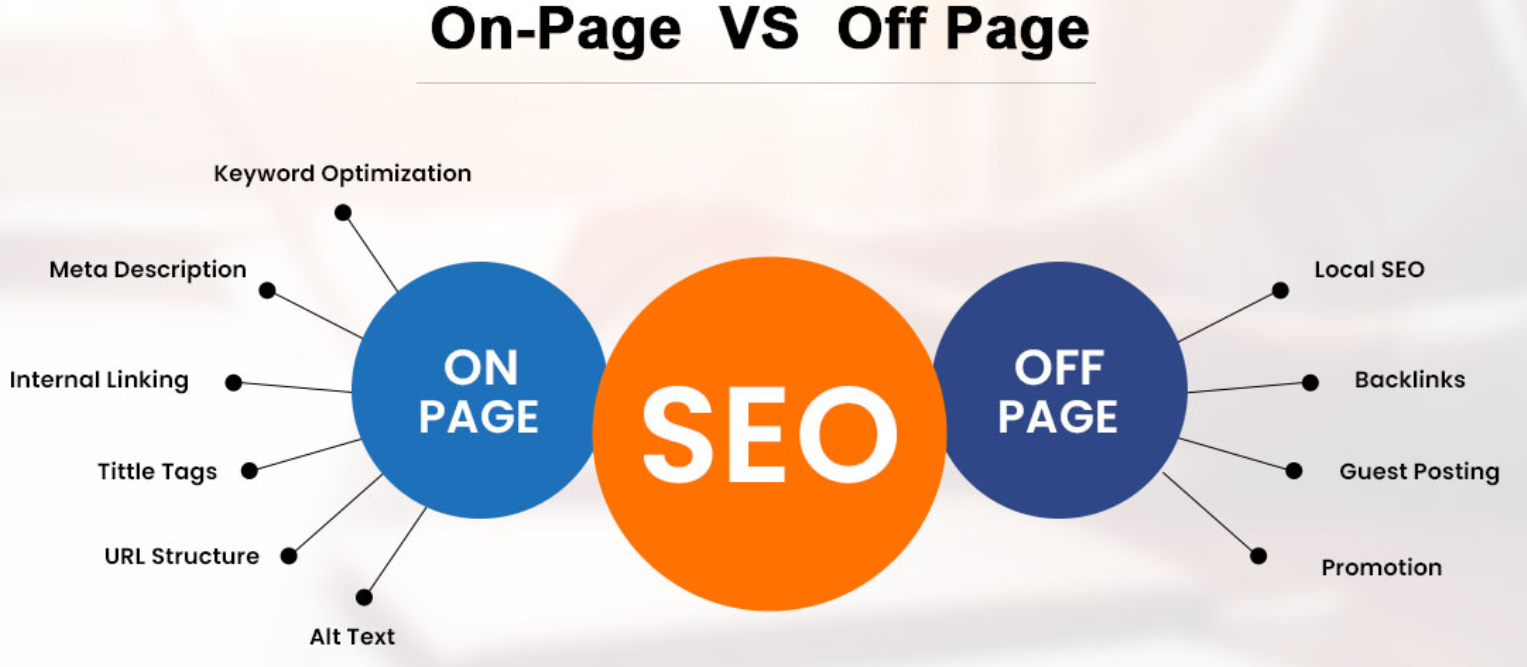
    SEO is made up of two main components:

    • On-page SEO: Everything you control on your website
    • Off-page SEO: Everything that happens outside your website that influences rankings

    Both are essential. Together, they form a balanced, high-impact SEO strategy — which is exactly what we implement at Ravens Digital for our clients.

    🧩 What Is On-Page SEO?

    👉 Definition:

    On-page SEO, also known as on-site SEO, optimizes website elements to improve search engine rankings.

    This includes:

    • Keywords
    • Headings and content
    • Meta tags
    • Internal links
    • Image optimization
    • Page speed
    • Mobile-friendliness
    • URL structure

    Think of on-page SEO as the foundation of your website. Without it, your site may never rank — no matter how great your services are.

    🔍 Why On-Page SEO Matters

    Search engines scan your site to understand:

    • What it’s about
    • Whether it’s relevant to the user’s search
    • How user-friendly it is

    The better optimized your pages are, the more likely they are to appear in top search results — bringing in free, high-intent traffic.

    At Ravens Digital, we focus heavily on on-page optimization because it sets the stage for all other digital marketing efforts. If your site structure or content isn’t right, your SEO campaigns won’t perform at their full potential.

    🧠 Key Elements of On-Page SEO

    1. Keyword Optimization

    We start by identifying what people are searching for (your target keywords), then naturally include them in:

    • Page titles
    • Meta descriptions
    • Headings (H1, H2)
    • Body text
    • Alt text (image descriptions)

    For example, if you’re a local business offering “SEO services in Florida,” your homepage and service pages should clearly reflect that keyword.

    2. Title Tags & Meta Descriptions

    These show up in search results. They should be:

    • Clear and concise
    • Include your main keyword
    • Encourage clicks

    Example:

    Title: SEO Services in Florida | Ravens Digital

    Meta: Boost your Google rankings and grow your brand with expert SEO strategies by Ravens Digital. Local SEO, on-page optimization, and more.

    3. Internal Linking

    We link related pages to help users navigate and to pass “SEO juice” between your pages. Example: linking your blog post about “local SEO” to your “SEO Services” page.

    4. Mobile Optimization

    Your site must work perfectly on phones and tablets. Google now uses mobile-first indexing — meaning your mobile site is what gets ranked first.

    5. Page Speed

    Slow sites hurt rankings. We compress images, clean up code, and use fast hosting to ensure your pages load in under 3 seconds.

    6. Content Quality

    We make sure your pages aren’t just optimized — but also valuable. That means:

    • Answering questions your audience is asking
    • Using clear structure (headings, bullet points, visuals)
    • Including calls to action

    🌐 What Is Off-Page SEO?

    👉 Definition:

    Off-page SEO refers to actions taken outside your website that affect your search rankings.

    The biggest factor? Backlinks — when other reputable websites link to yours. But it also includes:

    • Social signals (shares, engagement)
    • Online reviews
    • Brand mentions
    • Business listings
    • Guest posts and PR

    Off-page SEO is digital word-of-mouth. The more people talk about (and link to) your brand, the more trustworthy and authoritative you look in Google’s eyes.

    🔍 Why Off-Page SEO Matters

    Google uses authority and trust as ranking signals. So even if your on-page SEO is perfect, you still need off-page signals to compete — especially for competitive keywords.

    When done right, off-page SEO:

    • Builds credibility and brand awareness
    • Attracts high-quality backlinks
    • Drives referral traffic
    • Boosts rankings over time

    At Ravens Digital, we blend both organic and strategic methods to build backlinks and brand mentions naturally — no spam, no shortcuts.

    🔗 Key Elements of Off-Page SEO

    1. Backlinks (Inbound Links)

    Not all backlinks are created equal. We focus on earning:

    • Links from high-authority websites
    • Links that are relevant to your niche
    • Links with good anchor text (the clickable words)

    Example: A backlink from an industry blog that says “Ravens Digital offers top-tier web design services” is more powerful than a random link on a low-quality directory.

    2. Local Citations

    If you’re a local business, being listed on Google Business Profile, Yelp, Bing Places, and industry directories helps build trust and visibility.

    We help our clients clean up and optimize these listings to make sure your NAP (Name, Address, Phone) is consistent everywhere.

    3. Social Media Signals

    Even though social shares don’t directly impact rankings, they:

    • Increase brand exposure
    • Generate website traffic
    • Lead to more links and mentions

    We help businesses create shareable content that gets noticed on Facebook, LinkedIn, Instagram, and more.

    4. Online Reviews

    Google values businesses with positive customer feedback. We set up strategies to encourage reviews on:

    • Google Maps
    • Facebook
    • Industry platforms (like Clutch or Trustpilot)

    🧠 The SEO Balance: On-Page + Off-Page

    The truth is, on-page and off-page SEO work together.

    On-Page SEO Off-Page SEO
    You control it Others influence it
    Content, structure, keywords Backlinks, reviews, mentions
    Quick to change and update Long-term strategy
    Foundation of your site Boosts trust and authority

    At Ravens Digital, we combine both approaches to create a full-spectrum SEO strategy. We make sure your website is optimized from the inside out — and then build your reputation across the web.

    ✅ Why It Matters for Your Business

    Whether you’re a local business, national brand, or solo entrepreneur, SEO helps you:

    • Get found by real people
    • Outrank your competitors
    • Attract leads organically
    • Build long-term credibility

    But without a strong foundation (on-page) and a network of trust (off-page), you’ll always be playing catch-up.

    That’s where we come in.

    At Ravens Digital, our SEO experts analyze, optimize, and elevate your brand using strategies that follow Google’s best practices — not shortcuts.

    🚀 How Ravens Digital Helps with SEO

    Here’s what we offer:

    ✅ On-Page SEO Services

    • Full website audits
    • Keyword research
    • Meta and header optimization
    • Content strategy
    • Mobile and UX optimization

    ✅ Off-Page SEO Services

    • White-hat link building
    • Digital PR and outreach
    • Local citation building
    • Reputation and review management
    • Social content strategy

    We create custom SEO plans based on your goals, location, industry, and competition — because no two businesses are the same.

    🔚 Final Thoughts: Which Should You Focus On?

    Both.

    Think of SEO like growing a tree:

    • On-page SEO forms the strong, healthy, and structured roots of your website.
    • Off-page SEO provides the essential external support, much like sunlight and rain for a plant, that helps it grow.

    Without one or the other, your SEO will stall.

    We’re here to guide you through every stage of your journey.

  • Local SEO Tips to Help Your Business Rank Higher in Google Maps

    Local SEO Tips to Help Your Business Rank Higher in Google Maps

    Table of Contents

    Local SEO Strategies That Drive Real Results in Google Maps

    In today’s digital-first world, if your business doesn’t show up on Google Maps, it might as well not exist. Whether you’re a service-based company, a brick-and-mortar store, or a hybrid business, being visible in local search results is critical for driving foot traffic, phone calls, and conversions.

    At Ravens Digital, we’ve helped countless businesses improve their Google Maps rankings through proven local SEO strategies—and today, we’re sharing those tips with you. If you’re looking to boost your online presence and attract more local customers, this guide is for you.

    Why Google Maps Ranking Matters

    When someone searches for a product or service near them—like “coffee shop near me” or “roof repair in Palm Coast”—Google displays the Local Pack, a map with the top 3 business listings.

    Ranking in this map pack offers several benefits:

    • 📍 Higher Visibility: Appear above traditional search results.
    • 📞 More Phone Calls: Mobile users often call directly from Google Maps.
    • 📈 Increased Trust: Being featured signals credibility.
    • 🚗 More Foot Traffic: People use maps to find directions to your business.

    Local SEO is what makes all of that possible.

    1. Claim & Optimize Your Google Business Profile

    Start by claiming your Google Business Profile.

    🔧 Here’s how to optimize it:

    • Business Name: Please provide your official company name. Do not include keywords for search optimization.
    • Address & Service Area: Enter accurate, consistent info.
    • Phone Number: Match it with your website and directories.
    • Category: Select the primary category. (e.g., Digital Marketing Agency)
    • Business Hours: Keep them accurate and updated.
    • Description: Use local keywords and describe what makes you unique.
    • Photos & Videos: Upload high-quality media of your office, team, or portfolio.

    👉 At Ravens Digital, we help clients optimize every section for maximum ranking power.

    2. Get More 5-Star Reviews

    Google favors businesses with lots of positive, high-quality reviews.

    Why reviews matter:

    • They influence click-through rates.
    • They build trust and credibility.
    • Google uses them as a ranking signal.

    🎯 Tips to get more reviews:

    • Ask satisfied customers right after a service or purchase.
    • Make it easy—send a direct review link via email or SMS.
    • Respond to every review (even negative ones) professionally and quickly.

    Need help with a review-generation strategy? We’ve got tools and templates at Ravens Digital to help you build your online reputation fast.

    3. Consistent NAP Citations Across the Web

    NAP = Name, Address, Phone Number

    Make sure this core info is consistent across all platforms:

    • Your website
    • Google Business Profile
    • Facebook page
    • Online directories (Yelp, Yellow Pages, etc.)
    • Local chamber of commerce listings

    📌Inconsistent citations damage your search rankings.

    📋 Pro tip: Use tools like BrightLocal, Whitespark, or let Ravens Digital handle your citation cleanup and submission for you.

    4. Use Local Keywords on Your Website

    Optimize your site’s content for geo-specific keywords that match what locals are searching for.

    For example:

    • “Web design services in Hollywood”
    • “Digital marketing agency near Santa Monica Los Angeles”
    • “Google Maps SEO experts in United States”

    🎯 Where to use local keywords:

    • Page titles
    • Meta descriptions
    • Headings (H1, H2)
    • Service pages
    • Blog content
    • Image alt text

    Need help doing this without keyword stuffing? Ravens Digital’s Search Engine Optimization team knows how to keep it natural and Google-friendly.

    5. Add Location Pages (If You Serve Multiple Areas)

    If your business serves more than one city or region, create separate landing pages for each location.

    Each page should include:

    • City-specific keywords
    • Unique content (not copied)
    • Local testimonials
    • Google Maps embed
    • Local images (if available)

    This strategy can help you rank in multiple Google Maps results, expanding your visibility.

    6. Get Local Backlinks

    Backlinks (links from other websites to yours) are like votes of confidence in Google’s eyes. Local backlinks, in particular, are powerful for Maps rankings.

    Where to get them:

    • Local blogs or influencers
    • Business directories
    • Sponsorships or event listings
    • Local newspapers and media

    🔗 At Ravens Digital, we build white-hat backlinks from trusted local sources that improve your domain authority and search position.

    7. Embed Google Maps on Your Website

    Help Google link your site and location more quickly. Embed a Google Map with your exact business pin on your Contact or Location page.

    How to do it:

    • Go to your Google Business listing
    • Click “Share” > “Embed a Map”
    • Copy the code and paste it into your website’s HTML

    📍 Bonus: This also improves user experience and can lead to more in-person visits.

    8. Create Local Content Regularly

    Google loves fresh, relevant, and hyper-local content.

    Some ideas:

    • Blog about local events, news, or community involvement
    • Write how-to guides for your services within your city
    • Showcase case studies from local clients
    • Post updates about promotions available in specific neighborhoods

    🧠 Content not only helps SEO—it positions your brand as an authority in your area.

    9. Optimize for Mobile Users

    Local searches are primarily conducted on phones, especially by users on the go. Make sure your website:

    • Loads quickly (under 3 seconds)
    • Is responsive and mobile-friendly
    • Has click-to-call buttons
    • Displays your address and hours clearly

    📱 A seamless mobile experience can directly impact calls and conversions from Google Maps.

    10. Track & Improve with Google Analytics + GBP Insights

    Finally, monitor your progress using tools like:

    • Google Business Profile Insights (for views, clicks, calls)
    • Google Analytics (to track traffic and behavior)
    • Google Search Console (for search performance)

    💡 Tip: At Ravens Digital, we provide monthly reports to show exactly how your local SEO is performing—and where to improve.

    Final Thoughts: Show Up Where It Matters

    If you’re not showing up on Google Maps, your competitors are—and they’re getting the calls, visits, and sales that could be yours.

    Local SEO is no longer optional—it’s eseossential. At Ravens Digital, we specialize in helping businesses just like yours dominate local search. Whether you need a full SEO audit, citation cleanup, content optimization, or review-building strategies, our team is ready to help you rank higher, faster.

  • SEO + PPC: The Ultimate Duo for Explosive Growth in 2025

    SEO + PPC: The Ultimate Duo for Explosive Growth in 2025

    Table of Contents

    Unlock Explosive Growth in 2025 with the Power of SEO + PPC

    As we move deeper into the digital age, businesses are facing a hyper-competitive online environment. Whether you’re a startup or a scaling brand, having an online presence is no longer optional—it’s essential. But what’s the best way to boost your visibility, traffic, and ultimately conversions?

    Enter SEO (Search Engine Optimization) and PPC (Pay-Per-Click)—two powerful digital marketing tools that, when combined, can drive explosive growth. While each has its strengths, using them together in 2025 and beyond offers a strategic advantage that can elevate your business above the noise.

    This beginner-friendly guide will explore how SEO and PPC work, their individual benefits, and why integrating both into your digital marketing strategy is the ultimate formula for success.

    What Is SEO?

    SEO, or Search Engine Optimization, involves optimizing your website to appear higher in search results on platforms such as Google and Bing. The goal? Attract organic (unpaid) traffic to your site by making your content more relevant and valuable to users.

    Key Components of SEO:

    • On-Page SEO: Optimizing individual pages (e.g., titles, keywords, content structure).
    • Off-Page SEO: Building backlinks and external credibility.
    • Technical SEO: Ensuring fast load times, mobile responsiveness, and secure architecture.
    • Content Strategy: Creating high-quality, keyword-rich content that answers user queries.

    Why SEO Matters in 2025:

    • Long-Term ROI: SEO provides sustainable traffic and long-term ROI through gradual development.
    • User Trust: Top-ranking websites are often perceived as more credible.
    • Voice & AI Search: With voice assistants and AI tools on the rise, SEO ensures your content remains discoverable.

    What Is PPC?

    Pay-Per-Click (PPC) is a form of online advertising where you pay only when someone clicks on your ad. Platforms like Google Ads, Facebook Ads, LinkedIn, and Instagram offer robust PPC options to instantly reach your target audience.

    Types of PPC Ads:

    • Search Ads: Appear on Google or Bing when users search specific keywords.
    • Display Ads: Image or banner ads shown on partner websites.
    • Social Media Ads: Targeted ads based on user demographics, interests, and behavior.
    • Shopping Ads: Product listings shown directly on search engines.

    Why PPC Is Powerful in 2025:

    • Immediate Results: Launch a campaign today, start seeing clicks today.
    • Precision Targeting: Reach users based on location, age, interests, and search intent.
    • Budget Flexibility: Control spending with daily or campaign caps.
    • Performance Data: Real-time analytics help optimize campaigns quickly.

    SEO vs. PPC: What’s the Difference?

    Feature SEO PPC
    Cost Organic (no per-click cost) Pay per click/view
    Timeframe Long-term growth Instant visibility
    Traffic Type Steady, compounding traffic Fast, controlled traffic
    ROI Timeline Slower but lasting Faster but stops if paused
    Click-Through Rate (CTR) Often higher (credibility) Can be high with the right targeting

    Why Combine SEO + PPC?

    Many marketers view SEO and PPC as either/or—but that’s a mistake. These two tactics complement each other, creating a powerful synergy that can supercharge your marketing funnel in 2025.

    1. More SERP Real Estate

    By ranking organically and running ads, you occupy more space on search engine results pages. By enhancing your brand’s visibility, this approach also decreases competition.

    2. Faster Data Insights

    PPC campaigns offer quick feedback on which keywords convert best. You can use this data to adjust your SEO strategy and focus on high-performing search terms.

    3. Better Audience Understanding

    Running ads on platforms like Google and Facebook helps you learn what messaging resonates. Apply those insights to your organic content strategy for higher engagement.

    4. Boosted Brand Credibility

    When users see your brand both in ads and organic results, it builds trust and authority, increasing the chances of a click and a conversion.

    5. Improved Retargeting Opportunities

    You can retarget visitors who came to your site via SEO with PPC ads, keeping your brand top-of-mind and improving conversion chances over time.

    Real-World Example: SEO + PPC in Action

    Imagine you’re launching a new eco-friendly skincare line. This is how SEO and PPC can work in tandem.

    • Step 1: PPC Launch – Run Google Ads targeting “vegan face cream” and “natural skincare products.” You start getting traffic and sales immediately.
    • Step 2: SEO Optimization – Analyze PPC results to find high-converting keywords. Use those terms in blog posts, product pages, and meta tags.
    • Step 3: Retargeting Campaigns – Set up Facebook Ads to retarget visitors who viewed but didn’t purchase.
    • Step 4: Organic Growth – As your content ranks organically, your dependency on paid traffic decreases, saving you money long-term.

    The result? A self-sustaining funnel that brings in consistent, qualified traffic across multiple channels.

    Trends Shaping SEO and PPC in 2025

    1. AI-Powered Campaigns

    Both SEO tools and PPC platforms now use AI to automate bidding, optimize ads, and generate content recommendations.

    2. Voice & Visual Search

    Voice searches (“Hey Siri, find nearby coffee shops”) and image-based search tools are redefining keyword strategies. PPC campaigns now allow targeting for voice-related queries, while SEO needs schema markup and structured data.

    3. Hyper-Personalization

    Dynamic ad content and AI-driven SEO tools enable hyper-personalized messaging based on user behavior, interests, and preferences.

    4. First-Party Data Revolution

    With third-party cookies phasing out, marketers must leverage SEO for organic traffic and PPC for building robust first-party data strategies.

    How to Get Started

    For SEO:

    • To perform keyword research, utilize SEMrush, Ahrefs, or Google Keyword Planner.
    • Optimize your website’s structure, page speed, and content.
    • Start a blog that addresses user questions.
    • Build high-quality backlinks from reputable sources.

    For PPC:

    • Choose a platform (Google, Facebook, LinkedIn, etc.) based on your target audience.
    • Set a clear budget and campaign goals (clicks, conversions, leads).
    • Create compelling ad copy and use relevant keywords.
    • Monitor performance and optimize regularly.

    Final Thoughts

    In 2025, online success hinges on strategically combining SEO and PPC, not choosing between them.. SEO provides a strong, sustainable foundation. PPC offers speed and precision. But when combined, they deliver unmatched potential for visibility, credibility, and growth.

    Whether you’re building brand awareness, driving sales, or growing a community, the SEO + PPC duo can transform your digital marketing strategy. Start with small, measurable goals, test consistently, and scale what works.


  • The Future of Digital Marketing: Top Trends Shaping 2025

    The Future of Digital Marketing: Top Trends Shaping 2025

    Table of Contents

    Digital Marketing 2025: Future-Shaping Trends

    As we move deeper into the digital age, marketing is transforming faster than ever. Technologies are evolving, consumer behaviors are shifting, and businesses are adapting to keep up. In 2025, digital marketing isn’t just about being online—it’s about being smarter, faster, and more human.

    Whether you’re a startup founder, a small business owner, a freelancer, or just curious about the field, this guide will walk you through the top digital marketing trends shaping 2025—and why they matter for your brand’s future.

    Why Digital Marketing Continues to Dominate

    Before diving into trends, let’s understand why digital marketing is more essential than ever:

    • Global internet users now exceed 5.3 billion.
    • Social media has become the new storefront.
    • Smartphones are the primary device for online browsing.
    • Consumers expect personalization, speed, and relevance.

    Traditional marketing isn’t dead—it’s just digital-first now. In 2025, if you’re not engaging people online, you’re invisible.

    Key Digital Marketing Trends for 2025.

    Here are the biggest trends redefining digital marketing this year and beyond:

    1. AI-Powered Everything

    AI is no longer a future concept—it’s already powering much of the digital world.

    What’s happening:

    • AI tools are generating blogs, images, videos, and even ads.
    • Chatbots and virtual assistants provide 24/7 customer service.
    • AI helps brands predict customer behavior by analyzing data with machine learning.

    Why it matters:

    AI empowers marketers with faster scaling, personalized outreach, and smarter decision-making. It’s saving time, reducing costs, and increasing effectiveness.

    ✅ Tools to explore: ChatGPT, Jasper, SurferSEO, GrammarlyGO, and Meta AI Ads.

    2. Zero-Click & AI Search (Google SGE)

    In 2025, Google’s Search Generative Experience (SGE) is changing the SEO game. AI-generated answers now appear directly on the results page, reducing traditional clicks.

    What’s happening:

    • Users get summarized answers without visiting websites.
    • “Zero-click searches” are becoming more common.
    • Voice search and mobile search are rising.

    Why it matters:

    Your website and content need to be better structured, faster, and more helpful to stay relevant in AI-enhanced results.

    ✅ Tip: Focus on E-E-A-T (Experience, Expertise, Authoritativeness, Trustworthiness) and create FAQ-style content.

    3. Hyper-Personalization

    Generic marketing is out. In 2025, consumers want messages that feel custom-made.

    What’s happening:

    • Emails, ads, and product recommendations are tailored based on behavior.
    • Marketers leverage data for timely and relevant messaging.

    Why it matters:

    Personalized content gets better engagement, more clicks, and higher conversions.

    ✅ Tools to explore: Klaviyo, HubSpot, Salesforce Marketing Cloud, Segment.

    4. Short-Form Video Rules

    Video remains king—but not all video. Expect short-form video (under 60 seconds) to be the leading format by 2025.

    What’s happening:

    • TikTok, Instagram Reels, and YouTube Shorts continue to explode.
    • Algorithms favor quick, entertaining, and informative content.
    • Video shopping and “shoppable reels” are growing fast.

    Why it matters:

    Brands that don’t use video are falling behind. It’s not just about going viral—it’s about being seen.

    ✅ Tip: Use short videos for product highlights, customer testimonials, behind-the-scenes content, and quick tutorials.

    5. Influencer Marketing 2.0

    Influencer marketing is evolving. In 2025, it’s not just about celebrities—it’s about community trust and authenticity.

    What’s happening:

    • Micro and nano influencers (under 50k followers) are getting higher engagement.
    • Brands focus on long-term partnerships, not one-off posts.
    • AI-generated influencers are even entering the space.

    Why it matters:

    Real voices matter more than polished ads. Influencers bring authenticity and relatability.

    ✅ Tip: Focus on creators who align with your brand’s values—not just follower count.

    6. First-Party Data Strategy

    With growing privacy laws and the death of third-party cookies, marketers must rely on first-party data—data collected directly from customers.

    What’s happening:

    • More focus on email sign-ups, surveys, and loyalty programs.
    • Tools are being developed for responsible consent and user data management.
    • Customer trust is a major differentiator.

    Why it matters:

    Brands that collect and use first-party data effectively will outperform competitors in targeting and retention.

    ✅ Tip: Create value-driven ways for users to share their info (discounts, quizzes, gated content).

    7. Voice & Visual Search Growth

    Consumers aren’t just typing—they’re talking and snapping.

    What’s happening:

    • Voice search queries are more natural and conversational.
    • Visual search (using images instead of text) is on the rise via Google Lens and Pinterest Lens.

    Why it matters:

    Marketers must optimize for how people search—not just what they type.

    ✅ Tip: Use conversational content and descriptive alt text for images.

    8. Sustainable & Ethical Marketing

    Customers prefer to support brands that share their values. In 2025, authenticity, sustainability, and ethics are essential.

    What’s happening:

    • Brands showcase their environmental and social impact.
    • Consumers avoid businesses with questionable practices.
    • Transparency is a marketing strategy, not just a responsibility.

    Why it matters:

    Your brand story is part of your product. Honesty builds long-term trust.

    ✅ Tip: Highlight real initiatives—not performative statements.

    9. Content Strategy = Authority Building

    SEO and content marketing are merging into authority building. It’s no longer about ranking for keywords—it’s about becoming a recognized expert in your space.

    What’s happening:

    • Content hubs, pillar pages, and topical authority matter more.
    • Google wants original, experience-based content.
    • AI-generated fluff content is being penalized.

    Why it matters:

    Depth matters more than volume. Be the go-to source, not just another result.

    ✅ Tip: Use blogs, whitepapers, podcasts, and case studies to share real insights.

    10. Marketing Automation + Human Touch

    Automation isn’t about removing people—it’s about giving them more time to do meaningful work.

    What’s happening:

    •            Automated scheduling for email, ads, and social media.

    •            AI tools help segment audiences and suggest content.

    •            Smart CRMs track behavior and trigger timely actions.

    Why it matters:

    You save time, reduce errors, and connect more personally, even at scale.

    ✅ Tools to explore: ActiveCampaign, Mailchimp, Zapier, Notion AI, Make.com.

    Key Stats for 2025

    • 72% of consumers say they’re more likely to buy from a brand that personalizes communications.
    • Over 85% of all internet traffic consists of video content.
    • 80% of brands say they’ll increase investment in AI tools this year.
    • Nearly two-thirds of consumers have made direct purchases via social media.

    What Should You Do Next?

    If you’re just getting started in digital marketing or looking to refresh your strategy:

    1.           Audit your current presence – Where are you online? How are you performing?

    2.           Experiment with new formats – Try short videos, blog posts, email campaigns, or AI tools.

    3.           Focus on audience needs – Not just what you want to say, but what your audience wants to hear.

    4.           Stay informed – Trends evolve fast. Subscribe to newsletters, follow marketing blogs, and keep testing.

    Final Thoughts

    The future of digital marketing is fast, personalized, AI-powered, and human-centered. Brands that embrace these shifts—while staying authentic and adaptive—will stand out in 2025 and beyond.

    You don’t need to do everything at once. Start small. Test. Learn. Improve. The goal is not to keep up with every trend—it’s to know which ones matter most to your audience.

  • What Is Content Writing and Why Every Business Needs It in 2025

    What Is Content Writing and Why Every Business Needs It in 2025

    Table of Contents

    Content Writing in 2025: A Business Essential

    In today’s hyper-digital world, customers no longer rely solely on advertisements or cold calls to make purchasing decisions. Instead, they research, compare, and analyze — all through content they consume online. From blog posts and product descriptions to social media captions and email newsletters, content is the currency of attention.

    But what powers all this information? Content writing.

    As we move into 2025, content writing is not just a trend—it’s a business necessity. For any organization, from a startup to a global enterprise, content writing plays a crucial role in audience attraction, information, and conversion.

    In this article, we’ll break down what content writing is, how it works, and why your business can’t afford to ignore it in 2025.

    What Is Content Writing?

    Attracting, informing, and converting your audience hinges on effective content writing, no matter if you’re a startup, local provider, e-commerce brand, or global enterprise.. It includes:

    • Blog posts
    • Website copy
    • Product descriptions
    • Social media content
    • Email newsletters
    • Whitepapers
    • Ebooks
    • Landing pages
    • Scripts for videos or podcasts

    While the formats vary, the goal remains the same: To communicate with your audience in a way that adds value, solves problems, and builds trust.

    What Makes Content Writing Effective?

    Not all content writing is created equal. High-quality content writing in 2025 must be:

    Strategic

    It should align with your marketing goals—brand awareness, lead generation, SEO, or conversions.

    SEO-Friendly

    Content must be optimized for search engines to help users find it. This includes keyword research, meta descriptions, and proper formatting.

    Audience-Focused

    It should speak directly to the audience’s pain points, desires, and questions.

    Clear and Engaging

    No one wants to read robotic or overly complex content. The writing must be clear, conversational, and persuasive.

    Actionable

    Great content guides readers toward a next step—whether it’s subscribing, purchasing, sharing, or contacting you.

    Why Is Content Writing So Important in 2025?

    As buyer behavior shifts and digital platforms evolve, content writing is becoming more vital than ever. Here are several reasons why every business needs content writing in 2025:

    1. Search Engines Still Rule

    Google processes over 8.5 billion searches per day, and most of those searches lead people to blogs, articles, or service pages.

    In 2025, Google’s AI-driven algorithms favor high-quality, helpful content that answers users’ queries clearly and thoroughly.

    If your business wants to be found online, you need content that:

    • Targets the right keywords
    • Follows on-page SEO best practices
    • Provides real value to the reader
    • No content = No visibility.

    2. Today’s Buyers Are Self-Educating

    Customers research independently before speaking with a salesperson. In fact, studies show that 70%+ of the buyer’s journey is complete before direct contact with a company.

    Where do they go? Your content.

    They read:

    • Blog posts to understand problems
    • Comparison articles to weigh options
    • FAQs to address concerns
    • Case studies to see success stories

    Without written content, your brand is invisible during these key decision-making moments.

    3. Content Builds Trust and Authority

    In 2025, people don’t just buy products—they buy confidence.

    When your business consistently publishes educational, thoughtful, and well-written content, you show your audience that you:

    • Know what you’re doing
    • Understand their needs
    • Care enough to provide value for free

    The undisputed currency of modern marketing is trust, a value earned primarily through content.

    4. It Drives Organic, Long-Term Growth

    Unlike ads that stop performing once your budget ends, well-written content:

    • Ranks in search engines for years
    • Attracts backlinks and shares
    • Builds your brand over time

    A single blog post or landing page can generate traffic, leads, and revenue for months or even years after it’s published.

    This is called compounding ROI—and it’s why content writing is one of the most cost-effective marketing strategies available.

    5. It Enhances the Entire Customer Journey

    From the first impression to the final sale, content guides users through the full funnel:

    Funnel Stage Type of Content Role
    TOFU (Top) Blog posts, How-to guides, Listicles Attract & Educate
    MOFU (Middle) Case studies, Whitepapers, Comparison posts Nurture & Build Trust
    BOFU (Bottom) Sales pages, Product descriptions, Testimonials Convert & Close

    Whether someone just discovered your brand or is ready to make a purchase, content supports them every step of the way.

    Types of Content Writing

    Types of Content Writing Businesses Need in 2025 To stay competitive, businesses must diversify their content strategy. Here are some content types your business should focus on this year

    1. Blog Articles

    • Drives organic traffic via SEO
    • Educates and nurtures leads
    • Positions you as an authority
    • Works great for TOFU marketing

    Example: “10 Common Mistakes New Homeowners Make and How to Avoid Them”

    2. Website Copy

    • Includes your homepage, service pages, and about section
    • Clear, benefit-driven writing improves user experience and conversions

    Example: “Why Our Landscaping Service Is Trusted in Palm Coast, FL”

    3. Product Descriptions

    • Descriptive, persuasive writing that highlights features and benefits
    • Critical for eCommerce success Its waterproof qualities make this vinyl flooring an excellent choice for moisture-prone areas like kitchens and bathrooms, as well as heavily used spaces

    4. Email Newsletters

    • Engages your audience directly
    • Drives traffic back to your site
    • Builds long-term customer relationships

    Example: “This Week’s Tips for Better Home Office Productivity + Free Download”

    5. Social Media Captions

    • Short-form writing that boosts engagement, clicks, and shares
    • Needs to be punchy and on-brand

    Example: “Want your backyard to stand out this summer? “The wait is over! Our brand-new hardscape packages are officially live.

    6. Lead Magnets & eBooks

    • Used in exchange for email addresses
    • Longer-form content that offers deep value

    Example: “The Ultimate Guide to Small Business Marketing in 2025

    7. Landing Pages

    • Designed for specific campaigns or promotions
    • Needs strong copywriting to convert visitors

    Example: “Sign Up for Our Free 7-Day Email Course on Building a Personal Brand

    Content Writing Trends to Watch in 2025

    The content writing landscape continues to evolve. Here’s what businesses need to be aware of:

    AI + Human Collaboration

    AI tools like ChatGPT are helping writers work faster and smarter, but human creativity, tone, and empathy remain essential. Forward-thinking companies combine these two approaches to achieve scalable growth without compromising quality

    Search Intent Optimization

    SEO in 2025 is not just about keywords, but understanding user intent. Writers must match their content to what the reader is truly looking for—answers, advice, comparison, or inspiration.

    Mobile-First Formatting

    Most users now consume content on mobile. This means:

    • Short paragraphs

    • Clear headings

    • Visuals and white space

    • Scannable formats

    Conversational & Personalized Tone

    Dry, formal writing is out. Audiences respond better to friendly, conversational content that feels like it’s speaking to them, not at them.

    How to Get Started With Content Writing for Your Business

    If you’re new to content writing or haven’t invested in it yet, here’s how to begin:

    1. Understand Your Audience – Know their problems, language, and questions.

    2. Define Your Goals – More traffic? Leads? Sales? Loyalty?

    3. Choose Content Types – Blogs, emails, landing pages, etc.

    4. Build a Content Calendar – Plan your topics for weeks or months in advance.

    5. Hire a Content Writer or Team – Skilled writers know how to write for both humans and search engines.

    6. Measure and Improve – Use analytics to see what works and double down on winning content.

    Conclusion:

    Content Writing Is No Longer Optional— It’s Essential In 2025, content writing isn’t just a marketing tool—it’s a business pillar. It’s crucial for audience education, trust-building, SEO, funnel performance, and revenue generation. Without it, your business is silent in a noisy digital world. Whether you’re a one-person brand or a growing company, investing in strong, strategic content writing is one of the smartest moves you can make this year.

  • The Art of Website Designing: What It Is and Why It’s Important

    The Art of Website Designing: What It Is and Why It’s Important

    Table of Contents

    The Art of Website Design: Why It Matters

    In today’s digital era, your website often acts as the front door to your business or personal brand. It’s where visitors first get a feel for who you are, what you offer, and why they should care. But creating a website that truly stands out is more than just slapping some text and images onto a page — it’s an art form known as website designing.

    If you’re new to the concept or just curious about why so much emphasis is placed on website design, this comprehensive guide is for you. We’ll explore exactly what website designing means, why it’s considered an art, the core principles behind effective design, and why investing in great web design is critical for your success online.

    What Is Website Designing? Breaking It Down

    At its core, website designing is the process of planning, creating, and arranging the visual and functional elements of a website. It combines creativity, technical skills, and user psychology to build a digital space that’s both beautiful and effective.

    The Two Main Aspects of Website Designing

    1. Visual Design — This covers everything you see on the website: colors, fonts, images, layout, buttons, icons, and the overall aesthetic. Think of it as the “look and feel” of the website. Good visual design creates an emotional connection with visitors and reflects the brand personality.
    2. User experience (UX) design — UX concentrates on how effortless and pleasurable it is for visitors to navigate and interact with the website. This means intuitive navigation, quick access to information, mobile responsiveness, and making sure visitors can accomplish their goals (like making a purchase or signing up for a newsletter) effortlessly.

    Website designing is where art meets science — balancing creativity with usability.

    Why Website Designing Is Truly an Art

    Designing websites is often called an art because it involves creative expression, problem-solving, and storytelling — all wrapped into a digital experience.

    Creativity and Strategy in Harmony

    A website isn’t just a digital billboard; it’s a carefully crafted journey for users. Designers use colors, shapes, spacing, and typography strategically to evoke emotions, highlight calls-to-action, and guide visitors’ eyes.

    For instance, the color red can convey a sense of urgency, while blue tends to evoke trust. Typography choices communicate tone — a playful font feels casual, while a serif font feels formal and trustworthy.

    Good website designers understand this language of visual communication and use it masterfully.

    Storytelling Without Words

    A meticulously crafted website serves as a narrative that encapsulates your brand — your identity, your offerings, and your significance. The layout, images, and colors create a narrative that draws visitors in and encourages engagement.

    Imagine landing on a website with a messy layout, clashing colors, and tiny text — you’d likely leave quickly. On the other hand, a clean, attractive site with clear messages invites you to explore more.

    Constant Evolution and Adaptation

    Web design is never static. Trends change, technologies evolve, and user expectations grow. What was considered modern five years ago might feel outdated today.

    The art of website designing involves continuously learning, experimenting, and innovating to keep sites fresh, relevant, and competitive.

    Core Principles of Effective Website Design

    To appreciate why website design is so important, it helps to understand the foundational principles designers follow:

    1. Simplicity

    Simplicity is key. Overly complex sites confuse visitors and increase bounce rates. Effective design prioritizes clarity and minimalism:

    • Use whitespace strategically to avoid clutter
    • Limit the color palette to maintain focus
    • Only include essential elements on each page

    Simplicity improves user focus and speeds up decision-making.

    2. Consistency

    Consistency creates familiarity and trust. Visitors expect a seamless experience where:

    • Colors, fonts, and buttons are uniform across pages
    • Navigation menus don’t change unexpectedly
    • Branding elements remain intact

    This professionalism builds confidence and improves user retention.

    3. Visual Hierarchy

    Visual hierarchy means arranging elements to highlight their importance:

    • Headlines are larger and bolder
    • Calls-to-action stand out with contrasting colors
    • Crucial information is positioned ‘above the fold’ (visible without scrolling), ensuring easy access for readers.

    Effective hierarchy guides visitors naturally through your content.

    4. Mobile Responsiveness

    With more than half of web traffic originating from mobile devices, it is crucial for your website to have an appealing design and flawless functionality across all screen sizes.

    Responsive design means the layout adapts to smartphones, tablets, and desktops seamlessly.

    5. Fast Loading Speed

    Speed matters. It is expected that web pages should load within 2 seconds for visitors. Poorly optimized sites annoy visitors and damage search engine results.

    Designers optimize images, use efficient code, and leverage caching to keep load times minimal.

    6. Accessibility

    Designing for accessibility ensures your website can be used by everyone, including those with disabilities:

    • Using alt text for images for screen readers
    • Ensuring sufficient color contrast for readability
    • Making all navigation keyboard-friendly

    Accessible design expands your audience and reflects social responsibility.

    Why Is Website Designing So Important?

    Now that we understand what website designing is and its artistic nature, let’s explore why it’s a vital investment.

    First Impressions Are Everything

    In an instant, individuals form an impression of your website — sometimes even within milliseconds. A professional, visually appealing design sends the message that your business is credible and trustworthy.

    If your site looks outdated, cluttered, or unprofessional, visitors will quickly lose interest.

    Enhances User Experience and Engagement

    A well-designed website makes it easy and enjoyable for visitors to find information, engage with content, and take desired actions.

    If users struggle to navigate or if the site feels confusing, they’ll leave — increasing your bounce rate and reducing conversions.

    Boosts SEO Performance

    Search engines reward websites that provide a good user experience:

    • Fast loading speeds
    • Mobile-friendly design
    • Clear site structure

    All these elements depend heavily on good website design and improve your chances of ranking higher on Google.

    Strengthens Your Brand Identity

    Your website is an extension of your brand. Consistent use of colors, fonts, and imagery reinforces your brand message and makes your business memorable.

    Increases Conversion Rates

    Effective design influences visitor behavior, nudging them toward actions like signing up for a newsletter, requesting a quote, or making a purchase.

    Effective design minimizes resistance, provides clear answers to user queries, and fosters trust — all essential for achieving successful conversions.

    Different Styles and Approaches to Website Design

    Website design is not one-size-fits-all. Here are common styles and approaches used depending on goals and audiences:

    Static Websites

    Simple sites with fixed content. Great for portfolios, personal sites, or small businesses without frequent updates.

    Dynamic Websites

    Sites that update content regularly — blogs, news sites, e-commerce platforms. It often works with content management systems (CMSs) such as WordPress.

    Responsive Design

    Ensures your website looks great on all devices by fluidly adapting layouts.

    Adaptive Design

    Uses multiple fixed layouts optimized for specific screen sizes.

    Minimalist Design

    Focuses on simplicity, lots of whitespace, and clean typography. Popular for luxury brands and portfolios.

    Material Design

    Google’s design system using bold colors, shadows, and smooth animations to create intuitive interfaces.

    The Website Design Process: Step-by-Step

    Understanding the process helps demystify website design:

    1. Research & Planning

    • Define your audience, goals, and competitors
    • Choose site structure and features

    2. Wireframing

    • Create low-fidelity sketches outlining page layouts and navigation

    3. Visual Design

    • Develop mockups showing colors, typography, and graphics

    4. Development

    • Convert designs into code or use website builders

    5. Testing

    • Check usability, responsiveness, and browser compatibility

    6. Launch

    • Publish the site live

    7. Maintenance

    • Regular updates, backups, and performance monitoring

    Popular Tools & Technologies for Website Designing

    Some commonly used tools:

    • Design: Figma, Adobe XD, Sketch
    • Website Builders: WordPress, Wix, Squarespace
    • Coding: HTML, CSS, JavaScript frameworks (React, Vue)
    • Plugins: SEO tools, contact forms, analytics

    These tools help designers and developers create modern, functional websites efficiently.

    How You Can Learn Website Designing

    If you desire to build a website without enlisting the help of a professional:

    • Take courses on platforms like Coursera, Udemy, freeCodeCamp
    • Follow tutorials on YouTube channels such as The Net Ninja, Traversy Media
    • Read blogs like Smashing Magazine, CSS-Tricks
    • Practice by building your own projects and experimenting

    Common Website Design Mistakes to Avoid

    • Overcrowding pages with too much content
    • Poor or confusing navigation
    • Neglecting mobile users
    • Using slow-loading images or plugins
    • Inconsistent branding or typography
    • Ignoring accessibility standards

    Avoiding these mistakes ensures your site delivers a positive experience.

    Future Trends in Website Designing

    Looking ahead, these trends are shaping the future:

    • Voice user interfaces (VUI) for hands-free browsing
    • Augmented Reality (AR) integration
    • AI-driven personalization of content
    • Dark mode for low-light environments
    • Micro-interactions and animations for engagement

    Staying updated keeps your design fresh and competitive.

    Final Thoughts: Investing in the Art of Website Designing

    Website designing is far more than just aesthetics — it’s a strategic investment in your brand’s digital presence. A thoughtfully designed website builds trust, delights users, boosts SEO, and drives conversions.

    Add Your Heading Text Here