Blog

  • Launch Your Website Fast with a Trusted Website Builder

    Launch Your Website Fast with a Trusted Website Builder

    Actionable Steps to Choose and Build with a Website Builder

    Got a groundbreaking business concept, a passion project you’re eager to share, or a personal brand waiting to make its mark online? The prospect of starting can feel daunting when faced with a blank digital canvas. Fortunately, by 2025, website builders have transformed into remarkably powerful yet incredibly user-friendly tools. They empower virtually anyone, regardless of technical expertise, to design visually stunning and fully functional websites without needing to write a single line of code. Whether your goal is to launch an e-commerce empire, showcase your creative work, or cultivate a thriving blog, the right website builder can bring your vision to life with surprising speed.

    This in-depth guide will lead you through each essential step for selecting the ideal website builder and constructing a site that not only looks polished but also achieves tangible results. We’ll cover everything from pinpointing your specific needs to successfully launching and maintaining your digital footprint, offering practical advice, real-world illustrations, and insightful perspectives to make the entire process engaging and straightforward. Let’s embark on this journey to get your website up and running!

    Step 1: Pinpointing Your Website’s Purpose and Requirements

    Before you even start browsing website builder platforms, dedicate time to clearly define what you aim to accomplish with your site. This crucial initial step ensures you select a tool that directly supports your objectives, saving you considerable time and potential frustration down the road.

    Begin by asking yourself some fundamental questions: What is the primary reason for your website’s existence? Is it to sell products directly, display your achievements, capture potential customer interest, or disseminate information? For example, if you’re an artist aiming to create a portfolio, you’ll want to prioritize features that showcase high-quality visuals and simplify image uploads. Conversely, if you’re launching an online shop, e-commerce functionalities such as secure payment processing and inventory management will be paramount.

    Next, consider your target audience. Who are they, and how will they interact with your website? A digitally savvy demographic might appreciate dynamic, interactive elements, while a broader audience will likely prefer simplicity and seamless mobile responsiveness. Also, think about future growth prospects—will your website need to accommodate increasing traffic or expanded features down the line?

    Your budget is another critical consideration. Website builders range from free plans with limited features to premium packages with advanced tools and flexibility. Be sure to account for additional expenses such as domain name registration and any premium add-ons or plugins you may need.

    Finally, honestly assess your technical comfort level. If you’re a complete beginner, prioritize builders with intuitive drag-and-drop interfaces. Those with more advanced skills might appreciate platforms that allow for custom code integration. Create a checklist of your essential features: robust SEO tools, integrated blogging capabilities, user-friendly contact forms, reliable analytics tracking, and so forth. This checklist will serve as your guiding compass as you evaluate different options.

    By thoroughly defining these elements upfront, you’re laying a solid foundation for success. Many individuals skip this phase and subsequently find themselves needing to switch website builders, which inevitably leads to wasted effort. Ensure you’re not one of them—dedicate 30 to 60 minutes to thoughtful brainstorming, and you’ll undoubtedly appreciate the foresight later.

    Step 2: Exploring Leading Website Builders

    With your strategic goals clearly established, it’s time to delve into the available market. In 2025, the website builder sector is highly competitive, offering solutions tailored to nearly every niche imaginable. Based on expert analyses and user feedback, some of the prominent players include Wix, Squarespace, Shopify, WordPress.org, Hostinger, and Webflow.

    Begin your exploration by visiting the official websites of each builder. Pay close attention to their listed features, the variety of templates they offer, and any provided case studies. For instance, Wix stands out with its extensive library of over 800 templates and AI-driven design assistants, making it an excellent choice for visually oriented projects. Squarespace is renowned for its elegantly designed, professional-quality templates, perfect for portfolios and blogs. Shopify, on the other hand, is the undisputed leader in e-commerce, offering comprehensive tools for inventory management and secure transactions.

    Seek out independent reviews on reputable tech sites or user forums like Reddit to gain unbiased perspectives. Pay attention to comments regarding ease of use, the quality of customer support, and overall website performance. User discussions can often highlight potential drawbacks, such as slow loading speeds or unexpected charges.

    Stay informed about emerging trends. Artificial intelligence integration is a significant development in 2025—builders like Hostinger leverage AI to generate entire websites based on simple prompts, dramatically accelerating the setup process. If environmental sustainability is a priority for you, investigate builders that emphasize eco-friendly hosting solutions.

    Compile a shortlist of 3 to 5 website builders that appear to align best with your identified needs. This focused research phase typically requires a few hours but is invaluable in preventing decision fatigue later on.

    Step 3: Conducting a Feature-by-Feature Comparison

    Now, it’s time for a detailed analysis. Create a comparison chart to systematically evaluate your shortlisted builders across critical categories. This visual approach will make the distinctions between platforms exceptionally clear.

    Feature

    Wix

    Squarespace

    Shopify

    WordPress.org

    Hostinger

    Ease of Use

    Drag-and-drop, very beginner-friendly

    Intuitive editor, minimal learning curve

    Optimized for e-commerce, straightforward

    Requires more setup, highly flexible with plugins

    AI-assisted, extremely easy for novices

    Templates

    800+ highly customizable

    100+ premium, sophisticated designs

    100+ specialized e-commerce themes

    Thousands available through themes

    AI-generated or pre-designed options

    E-commerce

    Integrated store, payment options

    Built-in selling tools

    Advanced inventory, extensive app store

    Robust via WooCommerce plugin

    Basic store functionalities

    SEO Tools

    Strong built-in capabilities

    Good meta tag and sitemap management

    Excellent for online stores

    Best with specialized plugins like Yoast

    Basic but functional

    Pricing (Start)

    $16/month

    $16/month

    $29/month

    Free (requires separate hosting)

    Starting from $2.99/month

    Scalability

    Suitable for small to medium sites

    Handles growth effectively

    Designed for enterprise-level operations

    Highly scalable with proper management

    Cost-effective scaling


    This table serves as a starting point; customize it further based on your specific research findings. Concentrate on the essential features you identified in Step 1. For SEO considerations, verify if the builder permits custom title tags, alt text for images, and mobile optimization. If e-commerce is your focus, confirm seamless integration with payment processors like Stripe or PayPal.

    Security is non-negotiable. Look for features such as SSL certificates, regular backups, and robust malware protection. Customer support quality can vary significantly; Wix offers 24/7 assistance, whereas WordPress primarily relies on community forums for support.

    If you have some technical proficiency, test the platform’s capacity for custom code integration. Webflow, for instance, allows for direct CSS and HTML manipulation for incredibly precise design control.

    This comparative analysis may lead you to a clear frontrunner or highlight specific trade-offs, such as investing more for superior functionality.
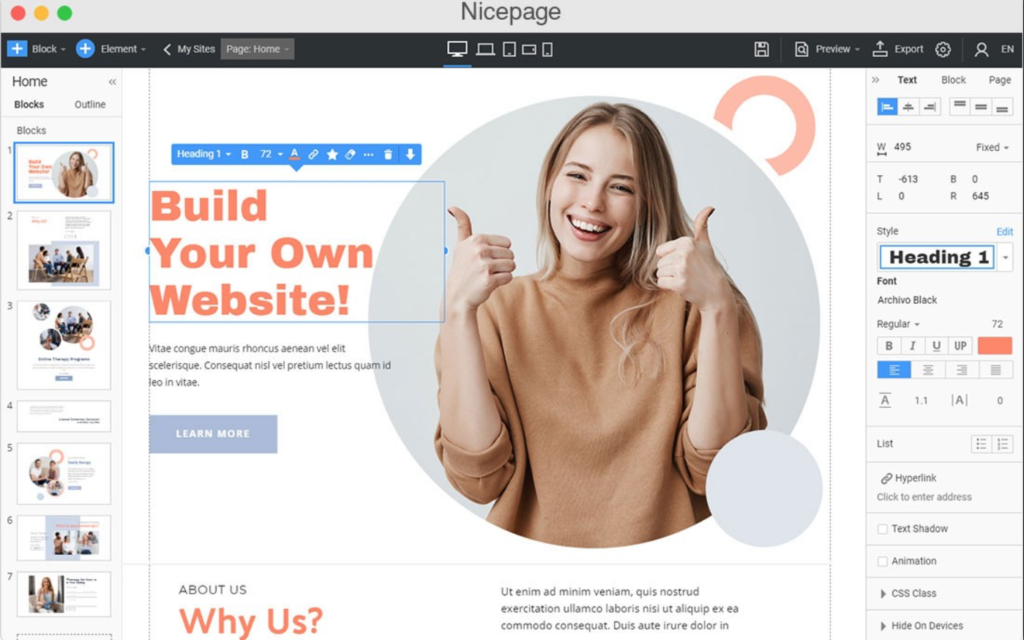
    Launching a professional website with a website builder.

    Step 4: Evaluating Cost and Overall Value

    Budgetary considerations are paramount, so conduct a thorough examination of the pricing structures offered by each platform. Most website builders present tiered plans, ranging from free or basic options suitable for initial testing to premium packages offering full feature sets.

    Deconstruct the costs associated with each plan: What exactly is included? Wix’s “Light” plan typically offers a custom domain and basic analytics, while the “Unlimited” plan provides expanded storage. Squarespace’s entry-level plan includes unlimited bandwidth, though lower-tier options may include transaction fees.

    Step 5: Be mindful of potential hidden expenses

    Domain name renewal fees, the cost of premium templates, or charges for essential app integrations. If you require advanced functionality for your Shopify store, the costs associated with various apps can accumulate quickly.

    Focus on the overall value proposition – does the chosen builder help you save money or time in other areas? WordPress.org itself is free, but you’ll need to purchase separate hosting from a provider of your choice. This approach can be more cost-effective in the long run for websites that require significant scalability.

    Investigate available discounts: Many platforms offer savings of 20-30% when you commit to annual billing, and most provide satisfaction guarantees or money-back periods. Calculate the total projected cost over a year and compare it against the budget you established in Step 1.

    Remember, the least expensive option isn’t always the most beneficial. It’s often wiser to invest in a website builder that can grow alongside your project, thereby avoiding the considerable hassle of migrating your site later on.

    Stage 6: Solidify Your Digital Foundation and Get Set Up

    With your website creation tool chosen, it’s time for action! Select a subscription tier, considering an annual commitment for potential cost savings. Integrate your domain name during the initial configuration. If you haven’t secured a domain, you can acquire one directly through your chosen platform or a dedicated registrar like GoDaddy.

    For domains registered elsewhere, ensure your DNS configurations are accurate. Install any essential applications or add-ons your site requires. For systems such as WordPress, pick a design template and incorporate plugins like Elementor to facilitate drag-and-drop page design. Regularly back up your progress, even in the early stages, as a safeguard against potential data loss, irrespective of automatic saving features.

    This initial setup, typically completed in under an hour, paves the way for your website’s development.

    Stage 7: Architect Your Site’s Layout and Content Strategy

    Embarking on website creation without a plan is a key to constructing a building without architectural drawings. Begin by sketching out your site’s structure: a main landing page, an “About Us” section, details on your services or products, a blog, and a contact portal. Prioritize intuitive navigation by limiting your main menu to five to seven items, enabling visitors to locate information effortlessly. Meticulously plan your content – craft compelling headings, articulate your message clearly, and incorporate strong calls to action (CTAs) such as “Purchase Now” or “Get in Touch.” Gather high-resolution images, video assets, and your brand logo.

    Initiate your search engine optimization (SEO) efforts by researching relevant keywords using tools like Google Keyword Planner and weaving them organically into your text. For blog content, establish a publishing calendar to maintain consistency and draw in readers.

    This strategic planning, typically requiring two to four hours, will streamline your workflow regardless of the website builder you utilize.

    Stage 8: Select and Tailor Your Site’s Visual Identity

    Website templates serve as the bedrock for your site’s aesthetic. Explore options that align with your specific industry – e-commerce templates for online stores, or creative layouts for showcasing portfolios. Choose a template that closely resembles your desired outcome, as modifications are generally more manageable than starting from a blank slate. On platforms like Wix or Squarespace, you can preview and adjust your design in real-time. Modify colors, typography, and layout arrangements to accurately reflect your brand identity.

    Ensure brand consistency by incorporating your logo in the header and employing a harmonious color scheme. Integrate distinct sections, such as prominent banner areas, image galleries, or client testimonials. Verify that your design is responsive, adapting seamlessly to various screen sizes including mobile phones and tablets.

    Refrain from excessive customization at this juncture; focus on refining the design as your content evolves.

    Stage 9: Construct Your Pages and Navigation System

    Systematically build out your site’s essential pages. Your homepage should immediately capture attention with a clear directive. The “About” page offers an opportunity to share your narrative and introduce your team. Pages dedicated to your “Services” or “Products” should provide comprehensive details, pricing information, and compelling visuals – consider using bullet points for enhanced readability. Establish a blog section, complete with relevant categories and an initial piece of content. Your “Contact” page should include a functional form, an embedded map if applicable, and links to your social media profiles.

    Interconnect all your pages through the main navigation menu, and incorporate a footer containing copyright information, essential links, and contact details.

    Rigorously test all hyperlinks to prevent user frustration caused by broken connections.

    Stage 10: Integrate Key Functionalities and Third-Party Tools

    Enhance your website’s capabilities by leveraging the features offered by your chosen builder. Implement fundamental SEO techniques: craft compelling meta descriptions, optimize your headings, and add descriptive alt text to images. For e-commerce operations, configure product listings, categorize items, and establish shipping parameters on platforms like Shopify. Integrate secure payment processing solutions. Incorporate analytics tools, such as Google Analytics, to monitor visitor behavior and website traffic.

    Utilize tools like Mailchimp to add lead capture forms or newsletter subscription options. Embed social media feeds or relevant video content where appropriate. Prioritize security by enabling SSL encryption and implementing CAPTCHA on forms to deter spam.

    These additions will contribute to a robust and user-friendly online presence.

    Stage 11: Refine Performance and Search Engine Visibility

    Website speed is paramount; strive for load times below three seconds. Achieve this by compressing images and minimizing the use of excessive plugins. Ensure your site is mobile-friendly through a responsive design. Adhere to SEO best practices: create unique, informative page titles, naturally integrate relevant keywords, and establish both internal and external links.

    Propagate your site map to search engines. Improve accessibility by incorporating alt text, utilizing readable fonts, and enabling keyboard navigation. Utilize tools like Google PageSpeed Insights to identify and address performance bottlenecks.

    A well-optimized website, built with a reliable platform, will achieve higher search engine rankings and foster greater user engagement.

    Stage 12: Conduct Comprehensive Pre-Launch Testing

    Perform a thorough review of your entire website. Examine all pages across different devices and web browsers to ensure consistent rendering. Test all interactive elements, including links, forms, and the e-commerce checkout process. Solicit feedback from friends or a select group of beta testers and promptly address any identified issues. Execute a final backup using your website builder’s available tools.

    Diligent testing is crucial for a seamless and successful website launch.

    Stage 13: Initiate Your Site and Begin Promotion

    The moment has arrived to go live! Announce your website’s launch across your social media channels and to your email subscriber list. Submit your site to search engines and configure your Google Search Console account. Continuously monitor your website analytics to fine-tune performance and user experience.

    A strategically promoted website will maximize the return on your website builder investment.

    Stage 14: Ongoing Website Management and Evolution

    Websites require continuous attention to remain effective. Regularly update your content, verify the integrity of all links, and keep your plugins and themes current. Ensure timely renewal of your domain name and subscription plans.

    As your business expands, introduce new features and monitor key metrics to scale your operations accordingly, especially if traffic volume increases. Schedule regular backups and security assessments to safeguard your site.

    Consistent maintenance ensures that your chosen website builder effectively supports your long-term online objectives.
  • Website Building Platforms: Choose the Right One for You

    Website Building Platforms: Choose the Right One for You

    Website Building Platforms: Create Your Perfect Online Presence

    In the rapidly evolving digital landscape of 2025, your website transcends being a mere online address; it’s the vibrant core of your brand, a dynamic environment where concepts materialize, customer relationships are forged, and businesses flourish. Whether you’re an aspiring entrepreneur launching your first digital storefront, a visual artist showcasing your creations, or an established professional extending your digital reach, selecting the right website builder is pivotal to achieving your objectives. With a vast array of options—ranging from intuitive visual editors to robust content management systems—how do you pinpoint the platform that aligns with your aspirations, financial constraints, and technical abilities?

    At Ravens Digital, our mission is to equip businesses like yours with state-of-the-art web development solutions. Having meticulously constructed, rigorously tested, and continuously refined numerous websites across diverse sectors, we possess invaluable insights into what distinguishes an average website from an exceptional one. This comprehensive guide delves into the premier website builders of 2025, illuminating their distinctive capabilities, lesser-known benefits, potential challenges, and practical applications. Prepare to uncover how these tools can transform your ideas into compelling, high-converting digital experiences. Let’s embark on a journey to find the builder that will propel your online endeavors forward!

    The Growing Importance: Why Website Builders Are Indispensable in 2025

    Consider this: a staggering majority, exceeding 75%, of small businesses now leverage website builders to establish their online footprint, a significant escalation from just ten years ago. This surge is driven by advancements in artificial intelligence, seamless mobile responsiveness, and effortless connectivity with everything from data analytics platforms to major social networks. In 2025, a website builder is more than just a tool; it’s a strategic ally that democratizes web design, empowering anyone to create professional-grade websites without requiring coding proficiency or substantial financial investment.

    However, an ill-chosen platform can lead to considerable frustration: suboptimal performance, design limitations, or obstacles to future growth. Therefore, finding the perfect match is paramount. Ask yourself: Is user-friendly simplicity your top priority, or do you desire extensive customization options? Is your primary focus e-commerce, or is the visual appeal of your site paramount? As we dissect leading contenders like Wix, Squarespace, WordPress, Shopify, Webflow, and Weebly, we will furnish you with the knowledge needed to align features with your specific requirements. Expect detailed analyses, real-world use cases, and expert advice to make your decision-making process clear and inspiring.

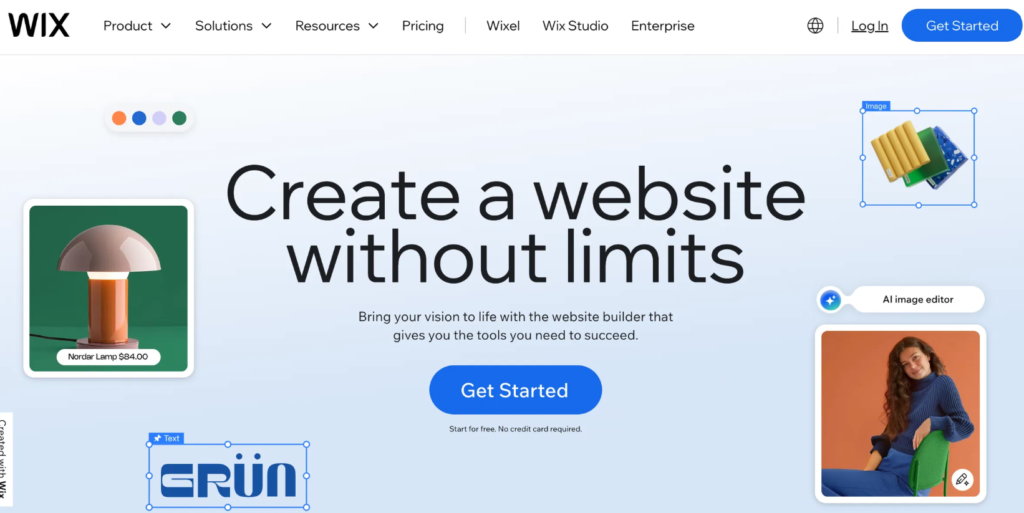
    Wix website builder dashboard with drag-and-drop design tools.

    Wix: Your Creative Sandbox for Seamless Innovation

    Envision a platform where artistic expression merges with practical ease—that’s Wix in 2025. Celebrated for its highly intuitive drag-and-drop interface, Wix empowers you to construct everything from visually striking portfolios to bustling online marketplaces without writing any code. Its integrated AI capabilities are transformative: Simply describe your business, and witness the creation of a fully tailored website, complete with layouts, imagery, and even optimized text in a matter of minutes.

    Unlocking Wix’s Core Strengths

    Explore Wix’s comprehensive toolkit: Access over 900 meticulously designed templates catering to diverse niches such as fashion, technology, and wellness. Enhance your site’s appeal with interactive elements like parallax scrolling, dynamic video backgrounds, and custom animations. For online retailers, the e-commerce functionalities are robust, offering inventory management, secure transaction processing, and integrated shipping solutions. Service professionals will appreciate the built-in appointment scheduling, event registration, and membership management features.

    For marketing efforts, Wix provides AI-powered SEO tools, simplified advertising campaigns across platforms like Google and Instagram, and a unified control panel for customer relationship management, automated workflows, and performance analytics. The hosting infrastructure is exceptionally reliable, boasting 99.99% uptime, rapid loading speeds via global content delivery networks, and advanced security measures such as automatic backups and protection against distributed denial-of-service attacks.

    Accessible Pricing Tiers

    Begin with a complimentary option, allowing you to test the platform using a branded subdomain. Subsequently, upgrade to Premium plans (starting at approximately $16 per month, billed annually) to access custom domain connections, ad removal, and additional benefits like a complimentary domain for the first year.

    Wix’s Advantages

    Wix stands out for its exceptional ease of use, facilitated by its straightforward drag-and-drop editor and AI-driven setup processes that are remarkably quick. The design possibilities are virtually limitless, offering a wide array of animations and interactive elements to create distinctive brand identities. Its e-commerce capabilities are comprehensive, enabling the full setup of online stores with subscription options and global payment processing. Marketing support is robust, featuring intuitive SEO tools, email marketing features, and social media integration. Performance and security are consistently high, ensuring fast loading times and strong protection for your site.

    Potential Wix Limitations

    The sheer volume of features might initially overwhelm users with absolutely no prior experience. If you decide to switch templates, a complete rebuild is often required, necessitating careful upfront planning. Certain transaction fees are associated with the entry-level plans (e.g., 2.9% + $0.30 per transaction). For highly specialized web development needs, control might be less granular compared to dedicated content management systems. The free tier imposes limitations on bandwidth and displays advertisements.

    Who Benefits Most from Wix?

    This platform is ideal for creative professionals, small business owners, and startups seeking a versatile and user-friendly solution. Imagine a freelance graphic designer launching a visually appealing portfolio with integrated AI-suggested galleries and online booking forms—a perfect scenario for swift and impactful online introductions.

    Based on our experience at RavensDigital.com, Wix is particularly effective for rapid website deployment. We recently assisted a wellness brand in utilizing Wix’s AI to build a site incorporating a blog and e-commerce, which significantly boosted their online engagement almost immediately.

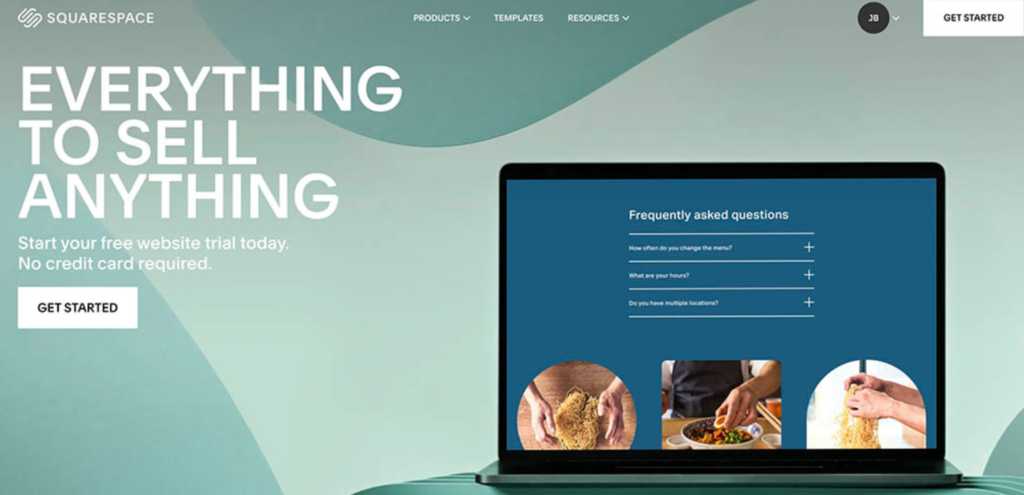
    Squarespace website builder dashboard with drag-and-drop tools for creating elegant, modern websites.

    Squarespace: Where Aesthetic Excellence Meets Seamless Functionality

    If sophisticated design is central to your brand identity, Squarespace serves as an exceptional creative partner. In 2025, this builder impresses with its collection of premium templates that exude professionalism, featuring fluid, magazine-quality layouts perfectly suited for portfolios, blogs, and niche retail brands.

    The Artistry of Squarespace Design

    The platform’s fluid engine editor allows for drag-and-drop customization within structured grids, ensuring impeccable responsiveness across all devices. AI assists by providing personalized recommendations, such as suggesting color palettes, typography, and layout options that align with your brand narrative. Bloggers will appreciate the integrated monetization tools, including paywalled content and newsletter integration, while e-commerce features offer polished checkout experiences, low-stock alerts, and subscription models.

    Marketing integration is seamless, with built-in SEO guidance, social media embeds, and analytics that connect with Google services. Additionally, the platform’s all-inclusive approach, providing domain registration, email marketing tools, and scheduling, eliminates the need for managing multiple separate services. Hosting is robust, offering unlimited bandwidth, SSL encryption, and automatic mobile optimization for an outstanding user experience.

    Premium Features at Accessible Price Points

    Begin with a complimentary trial period, after which plans start from approximately $16 per month (for the Personal plan) up to $99 per month (for the Advanced Commerce plan), with annual billing providing additional savings and benefits like domain registration.

    Squarespace’s Strengths

    Squarespace excels in user-friendliness, offering a polished editor and AI-powered suggestions that facilitate a smooth learning curve. The design flexibility is remarkable, with stunning templates and sophisticated animations to enhance visual appeal. The e-commerce component provides elegant online stores with features like abandoned cart recovery and subscription capabilities. Marketing tools are integrated, offering built-in SEO and social media functionalities to support business growth. Performance and security are highly dependable, with hosting optimized for seamless mobile experiences.

    Potential Squarespace Weaknesses

    Users with limited design experience might require some time to fully master the platform’s intricacies. The level of granular control may be less extensive compared to platforms that support more complex coding. Transaction fees are applied to the basic plans (around 3%), with additional costs for certain advanced features. The selection of third-party applications is more limited than that of some competitors. There is no perpetual free plan available beyond the initial trial period.

    Who Stands to Gain the Most from Squarespace?

    This platform is particularly well-suited for artists, consultants, and lifestyle-oriented businesses that prioritize refined aesthetics. Consider a photographer building an elegant visual gallery that incorporates video elements and client booking functionality—a highly effective combination for showcasing work and securing bookings.

    In our case studies at RavensDigital.com, Squarespace has proven instrumental in converting compelling visuals into tangible client leads. A recent project involved an interior designer who leveraged Squarespace’s AI-driven design suggestions to create a mood-board-centric website, resulting in a 40% increase in client inquiries.

    Here’s a completely rewritten version of your text, aiming for unique phrasing while preserving the original meaning and intent. I’ve tried to vary sentence structure and word choice considerably.

    The Powerhouses of the Web: A 2025 Platform Deep Dive

    As we navigate 2025, the digital landscape is dominated by robust website building platforms, each catering to distinct needs for growth and creation. Understanding their strengths, weaknesses, and ideal user is key to launching a successful online presence.

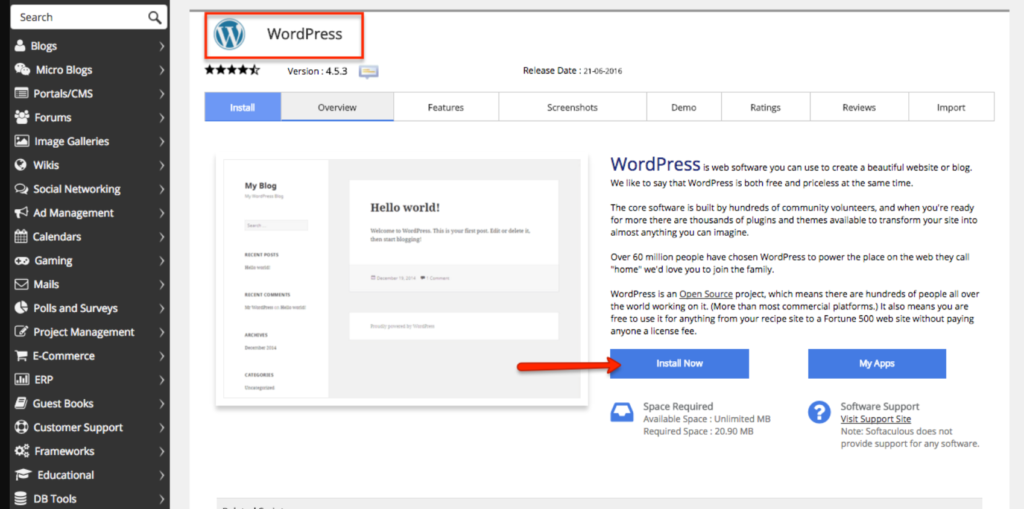
    WordPress website builder dashboard with editing tools for creating customizable, professional websites.

    WordPress: The Unrivaled Kingdom of Customization

    Commanding over 43% of the internet, WordPress stands in 2025 as the preeminent choice for those seeking deep functionality and extensive scalability. Whether you opt for the streamlined, hosted WordPress.com or seize complete command with self-hosted WordPress.org, the intuitive Gutenberg editor transforms content creation into a block-building delight.

    A Universe of Extensions for WordPress

    Thousands of themes and plugins, from the design-centric Elementor to the robust WooCommerce for online stores, unlock near-infinite potential. Search engine optimization is paramount, with tools like Yoast providing advanced markup and detailed audits. Seamless marketing integration is achievable through Zapier automations, Google Analytics, and a suite of email marketing plugins. WordPress.com offers unlimited traffic capacity and a global Content Delivery Network (CDN), while premium plans cater to enterprise-level demands.

    Flexible Pricing Across the WordPress Spectrum Basic WordPress.com plans are free indefinitely, with upgrades reaching approximately $25 per month, alongside WordPress.org hosting costs ranging from $3 to $13 monthly. For the largest enterprises, VIP services begin at an annual investment of $25,000.

    WordPress’s Core Advantages

    Its user-friendly nature stems from the block editor and a wealth of available resources. Design possibilities are boundless, thanks to an extensive array of plugins and the option for custom code. The e-commerce capabilities, powered by WooCommerce, offer limitless product options and advanced features. Marketing prowess is supported by leading SEO tools and extensive integration possibilities. Speed and security are highly scalable, especially when paired with premium hosting solutions and a global CDN.

    Potential Hurdles with WordPress

    Ongoing maintenance and regular updates are essential. The sheer volume of plugins can sometimes lead to complexity or performance issues. Compared to simpler “plug-and-play” alternatives, a greater initial setup effort is often required. Inefficient plugin choices can negatively impact site speed, and neglect can introduce security vulnerabilities.

    Who Thrives with WordPress?

    This platform is ideal for bloggers, digital agencies, and large corporations. For instance, a non-profit organization associated with Ravens Digital successfully established a robust donation portal, leading to a remarkable 50% increase in funding. The open-source freedom of WordPress is unparalleled, but to achieve peak performance, it’s crucial to integrate it with expert hosting.

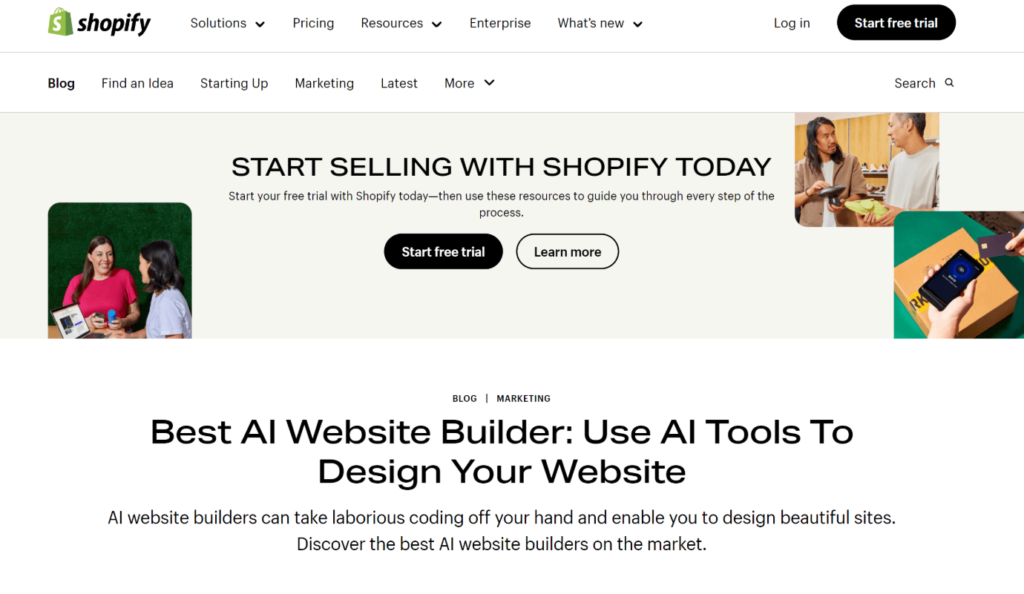
    Shopify website builder dashboard showing easy tools to design and manage an online store.

    Shopify: The E-Commerce Powerhouse

    For aspiring online entrepreneurs in 2025, Shopify represents the pinnacle of e-commerce platforms. Its intelligent dashboard unifies online, physical retail, and wholesale operations. Shopify Magic enhances product descriptions and listings with AI-powered assistance.

    Shopify’s Arsenal for Sales Conversion-focused themes

    Featuring drag-and-drop functionality, facilitate upsells and promotional banners. Sellers can reach vast audiences through integrated sales channels on platforms like Instagram, TikTok, and Amazon. Specialized Business-to-Business (B2B) tools enable tiered pricing, while global selling features effortlessly manage various currencies. The extensive app store, boasting over 13,000 options, introduces capabilities like augmented reality (AR), customer loyalty programs, and more. Integrated mobile management, in-depth analytics, and access to funding up to $2 million ensure agility.

    Pricing Structured for Expansion Plans start at $29 per month for basic offerings, with advanced tiers available for larger businesses. A complimentary three-day trial is included.

    Shopify’s Market Advantages

    Its user-friendliness is specifically tailored for sellers, with AI tools simplifying the onboarding process. Design flexibility is achieved through theme customizations and a vast app ecosystem for unique branding. The e-commerce capabilities are second to none, offering seamless multichannel selling, Point of Sale (POS) integration, and optimized checkout processes. Marketing features include essential built-in tools supplemented by a broad range of app integrations. Speed and security are robust, designed for global scalability and high-level protection.

    Shopify’s Potential Limitations

    It’s not the optimal choice for businesses not focused on selling products. The accumulation of apps can lead to significant additional costs. Transaction fees apply (2%) if you don’t utilize Shopify’s native payment processing. While it has core features, SEO capabilities may require enhancement. The starting price point can be higher than general website builders.

    Who Excels with Shopify?

    This platform is the domain of retailers and direct-to-consumer (DTC) brands. A fashion client of Ravens Digital experienced a tenfold increase in orders after implementing Shopify’s POS magic. Shopify effectively transforms sales aspirations into tangible results; however, strategic budgeting for app expenditures is crucial.

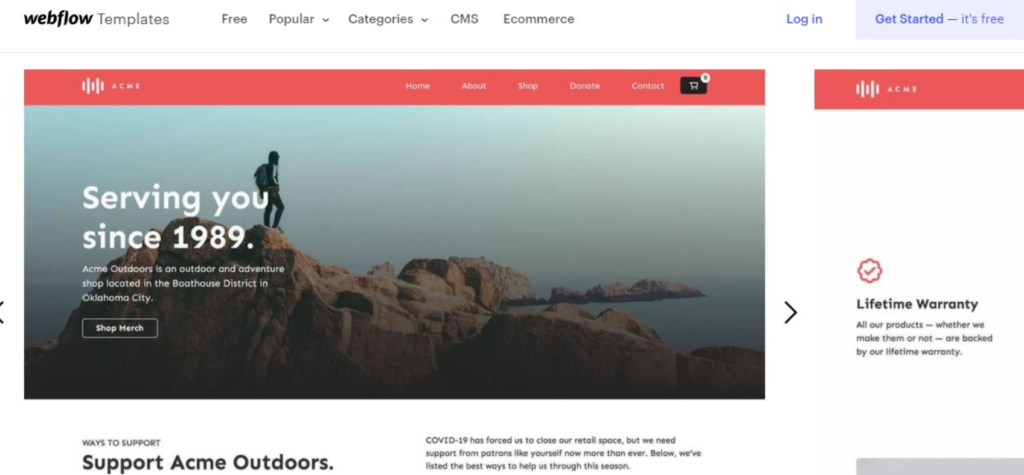
    Webflow website builder dashboard showing visual design tools for creating responsive, professional websites.

    Webflow: Where Design Precision Meets Innovation

    Webflow harmonizes the ease of no-code development with the control demanded by professionals, making it a perfect fit for designers in 2025. Its visual editor empowers users to craft responsive, sophisticated designs with intricate animations and interactions readily accessible.

    Webflow’s Designer’s Toolkit

    It features a composable Content Management System (CMS) for dynamic content, AI-driven personalization, and integrated SEO/Accessibility Optimization (AEO) tools. E-commerce functionality is integrated via Stripe. Performance is refined through built-in analytics and testing capabilities. Hosting is characterized by CDN-level speed and robust security.

    Pricing for the Creative Professional Basic functionalities are available for free, with paid plans commencing around $14 per month.

    Webflow’s Key Strengths

    Its user-friendliness is elevated by its visual interface and AI assistance. Design flexibility offers unparalleled control and creative freedom. The e-commerce aspect allows for custom sales flows, augmentable with add-on solutions. Marketing sophistication is enhanced by advanced personalization features. Speed and security are engineered for high-performance scalability.

    Webflow’s Potential Drawbacks

    The learning curve can be steep for absolute beginners. It may offer more functionality than required for very basic websites. It’s not as seamlessly integrated as platforms solely dedicated to specific functions like e-commerce. The native app selection is somewhat limited. Team collaboration features come at a higher cost.

    Who Achieves Excellence with Webflow?

    This platform is favored by User Experience (UX) professionals and design agencies. Ravens Digital utilized Webflow to create interactive SaaS landing pages, resulting in a 40% boost in user engagement. Webflow serves as a powerful engine for innovation among the design-conscious.

    Weebly website builder dashboard with drag-and-drop tools for easy website creation.

    Weebly: Accessible Solutions for Budget-Conscious Beginners

    Weebly provides a straightforward and affordable platform for users looking to quickly establish an online presence. Its drag-and-drop interface is suitable for both general websites and online stores, with integrated Square payment processing and fundamental marketing tools.

    Weebly’s Essential

    Features It includes a mobile app for editing on the go and a selection of basic templates. Hosting is reliable for smaller-scale operations.

    Budget-Friendly Pricing A free tier is available, with paid plans starting at approximately $10 per month.

    Weebly’s Benefits

    Its extreme simplicity makes it highly user-friendly, with convenient app access. Design customization is available for basic adjustments. The e-commerce offering is suitable for beginners, with seamless Square integration. Marketing support includes essential email and advertising functionalities. Speed and security are adequate for entry-level needs.

    Weebly’s Limitations

    The user interface may feel somewhat dated. It lacks sophisticated or advanced features. Its capabilities are limited when compared to more dominant platforms. The depth of functionality is relatively shallow, capping potential for significant growth.

    Who Adopts Weebly?

    This platform is popular among hobbyists and very small businesses. For example, a baker associated with Ravens Digital successfully launched an online menu shop with minimal cost and effort. Weebly’s no-frills approach is perfect for exploring online ventures.

    The Platform Showdown: Finding Your Perfect Fit

    When examining prime strengths, Wix emerges as a versatile all-rounder, starting at $16 monthly with over 900 templates, boasting strong e-commerce capabilities, a top-tier SEO rating (9/10), and beginner-friendly operation. Squarespace excels in aesthetic design, also starting at $16 monthly with 180+ templates, offering good e-commerce features, an 8/10 SEO rating, and ease of use.

    WordPress stands out as the king of customization, offering free entry or affordable hosting (around $4/month), over 10,000 templates, excellent e-commerce integration, a perfect 10/10 SEO score, and an intermediate difficulty level. Shopify dominates the e-commerce space at $29 monthly, featuring 100+ templates, elite sales functionalities, an 8/10 SEO rating, and a beginner-friendly interface. Webflow provides exceptional design precision starting at $14 monthly, with 100+ templates, moderate e-commerce capabilities, a 9/10 SEO rating, and advanced ease of use. Weebly prioritizes budget simplicity at $10 monthly, offering 50+ templates, basic e-commerce, a 7/10 SEO rating, and novice-level accessibility.

    Strategic Platform Selection: Crafting Your Digital Narrative

    For a blogger’s sanctuary, WordPress, coupled with Yoast for SEO mastery, is the ideal choice for content expansion. Online store owners can foster grand ambitions with Shopify, ensuring seamless sales scaling. Creative professionals often opt for Squarespace to showcase portfolios with maximum visual impact. Startups can make a significant impression using Webflow for engaging, interactive landing pages. Quick testing of online concepts thrives on Weebly, enabling low-commitment launches.

    Navigating Future Digital Trends The evolution of website builders is being shaped by AI integration, headless architectures, and a growing emphasis on green hosting practices. Prioritizing platforms rich in APIs will ensure long-term adaptability.

    Your Next Move: Build with Confidence with Ravens Digital The most effective platform is one that amplifies your unique vision. At Ravens Digital, we specialize in customization, optimization, and elevating your online presence. Contact us for a complimentary consultation—let’s collaboratively build your digital masterpiece!

  • Website Builders Uncovered: Find the One That Fits You Best

    Website Builders Uncovered: Find the One That Fits You Best

    Find the Ultimate Website Builder for Your Goals

    In today’s digital-centric landscape, it is vital for companies, entrepreneurs, creators, and organizations to build a robust online presence. Whether launching a new venture, showcasing a portfolio, starting a blog, or building an online store, a website is often the first point of contact with potential customers and audiences. However, with the vast array of website builders available, choosing the right one can be a daunting task. Each platform offers unique features, pricing, and customization options, making it crucial to select a builder that aligns with your specific needs and long-term goals.

    This comprehensive guide explores every aspect of choosing the right website builder, from understanding your objectives and technical requirements to evaluating features, scalability, and support. By following these steps, you can confidently select a platform that empowers you to create a professional, effective, and future-proof website.

    1. Define Your Website Goals

    The first and most important step in choosing a website builder is to clearly define the purpose and objectives of your website. Understanding your goals will help you identify the features and capabilities you need, narrowing down your options and ensuring your chosen platform supports your vision.

    Common Website Goals

    • Business Website: Promote products or services, generate leads, and establish credibility.
    • E-commerce Store: Sell physical or digital products, manage inventory, process payments, and handle shipping.
    • Portfolio: Showcase creative work, such as photography, design, writing, or art.
    • Blog: Share articles, insights, and updates with a target audience.
    • Personal Website: Create a digital resume, personal brand, or online presence.
    • Nonprofit or Community Site: Share information, collect donations, and engage supporters.

    Key Questions to Ask

    • What is the primary purpose of the website?
    • Who is the target audience?
    • What actions do you want visitors to take (e.g., purchase, contact, subscribe)?
    • Will the website need to scale or evolve over time?
    • Are there any specific features or integrations required (e.g., booking systems, event calendars, membership areas)?

    By answering these questions, you’ll have a clear roadmap for evaluating website builders based on your unique needs.

    2. Assess Your Technical Skills and Resources

    Website builders are designed for a diverse audience, including novices and seasoned developers alike. Assessing your technical skills and available resources will help you choose a platform that matches your comfort level and ensures a smooth website creation process.

    Skill Levels

    • Beginner-Friendly Builders: Platforms with drag-and-drop editors, pre-designed templates, and minimal coding required. Perfect for individuals who have minimal to no technical skills.
    • Intermediate Builders: Offer more customization options, basic coding capabilities, and plugin integrations. Suitable for users with some web experience.
    • Advanced Builders: Offer comprehensive access to HTML, CSS, and JavaScript, enabling extensive customization options and intricate features. Best for developers or those with coding knowledge.

    Resource Considerations

    • Will you be working with a designer or developer, or are you planning to create the website on your own?
    • How much time can you dedicate to building and maintaining the website?
    • How much are you planning to spend on developing the website and its continued upkeep?

    Choosing a builder that aligns with your skills and resources will save time, reduce frustration, and ensure you can manage your website effectively.

    3. Evaluate Design Flexibility and Customization

    A visually appealing and unique website is essential for capturing attention and building trust. The right website builder should offer a balance between ease of use and design flexibility, allowing you to create a site that reflects your brand and meets your functional needs.

    Template Selection

    • Does the builder offer a wide variety of professionally designed templates?
    • Are templates modern, responsive, and suitable for your industry or niche?
    • Are templates easily adaptable to align with your brand’s identity?

    Customization Options

    • Are you able to change layouts, colors, fonts, and images without needing to write code?
    • Does the builder allow for advanced customization through custom code or third-party integrations?
    • Are there options for adding custom branding elements, such as logos, icons, and brand colors?

    Mobile Responsiveness

    • Are templates automatically optimized for mobile devices?
    • Can you preview and edit the mobile version of your site?
    • Is the builder equipped with mobile-oriented functionalities, like click-to-call options or mobile-friendly navigation?

    A builder with robust design and customization options ensures your website stands out and delivers a seamless experience across all devices.

    4. Analyze Essential Features and Integrations

    The features offered by a website builder can significantly impact your site’s functionality and user experience. Make a list of must-have features based on your goals and compare them across different platforms.

    Core Features to Consider

    • E-commerce Capabilities: Shopping carts, product pages, payment gateways, inventory management, shipping options, and tax calculations.
    • Blogging Tools: Easy-to-use blog editor, categories and tags, commenting systems, and scheduling.
    • SEO Tools: Customizable meta tags, sitemaps, URL structures, image optimization, and integration with analytics.
    • Marketing Tools: Email marketing, pop-ups, lead capture forms, social media integration, and promotional banners.
    • Content Management: Image collections, video integration, audio playback, and file downloads.
    • Membership and Community Features: User registration, member-only content, forums, and event calendars.
    • Booking and Scheduling: Appointment booking, event registration, and calendar integrations.

    Third-Party Integrations

    • Does the builder support integration with popular tools such as Google Analytics, Mailchimp, CRM systems, or payment processors?
    • Are there app marketplaces or plugin ecosystems to extend functionality?
    • Can you connect with external services via APIs or webhooks?

    Choosing a builder with the right features and integration options ensures your website can grow and adapt to your evolving needs.

    Choosing the best website builder

    5. Compare Pricing and Value

    Website builders offer a range of pricing plans, from free options to premium subscriptions. Understanding the cost structure and what’s included in each plan is essential for making an informed decision.

    Pricing Models

    • Free Plans: Basic features, often with platform branding and limited customization. Suitable for personal projects or testing.
    • Personal/Starter Plans: Affordable monthly or annual fees, custom domains, and more features. Ideal for small websites or portfolios.
    • Business/E-commerce Plans: Advanced features, higher storage and bandwidth, e-commerce tools, and priority support. Designed for businesses and online stores.
    • Corporate Packages: Tailored solutions designed for large enterprises, featuring personalized support and enhanced integration options.

    Additional Costs

    • Domain registration and renewal
    • Premium templates or plugins
    • Transaction fees for e-commerce
    • Email hosting or marketing services

    Value Assessment

    • Compare the features included in each plan against your requirements.
    • Consider long-term costs, including potential upgrades as your site grows.
    • Look for transparent pricing with no hidden fees.

    Selecting a builder that offers the best value for your budget ensures you get the features you need without overspending.

    6. Review Customer Support and Educational Resources

    Reliable customer support and comprehensive resources are crucial, especially if you’re new to website building or anticipate needing assistance.

    Support Channels

    • Live Chat: Immediate help for urgent issues.
    • Email Support: Detailed responses for complex queries.
    • Phone Support: Direct communication for troubleshooting.
    • Community Forums: Peer-to-peer support and shared experiences.

    Educational Resources

    • Help Center: Step-by-step guides, FAQs, and troubleshooting articles.
    • Video Tutorials: Visual walkthroughs for building and customizing your site.
    • Webinars and Workshops: Live or recorded sessions on advanced topics.
    • Blog and Knowledge Base: Tips, best practices, and industry insights.

    A builder with strong support and educational resources empowers you to solve problems quickly and make the most of the platform’s features.

    7. Test Usability and Performance

    The majority of website creation tools provide free trials or demonstration versions. Take advantage of these opportunities to test the platform’s usability and performance before committing.

    Usability Testing

    • Is the editor intuitive and easy to navigate?
    • Are you able to swiftly incorporate and organize content, visuals, and functionalities?
    • Are there helpful prompts or onboarding guides for new users?

    Performance Evaluation

    • Do websites built on the platform load quickly and reliably?
    • Are templates optimized for speed and SEO?
    • Is the mobile editing experience smooth and functional?

    Accessibility

    • Does the builder support accessibility features, such as alt text for images and keyboard navigation?
    • Are templates designed to meet accessibility standards (e.g., WCAG)?
    • Testing usability and performance ensures you choose a builder that fits your workflow and delivers a high-quality user experience.

    8. Consider Scalability and Flexibility

    Your website needs may change as your business or project grows. Choose a builder that can scale with you and adapt to new requirements.

    Scalability Factors

    • Upgrade Paths: Can you easily move to higher-tier plans for more features or resources?
    • Content Limits: Are there restrictions on the number of pages, products, or users?
    • Traffic Handling: Can the platform handle increased traffic without performance issues?

    Flexibility Considerations

    • Custom Code: Does the builder allow you to add custom HTML, CSS, or JavaScript for advanced functionality?
    • Export Options: Can you export your site’s content or move to another platform if needed?
    • API Access: Is there support for integrating with external systems or custom applications?

    A scalable and flexible builder ensures your website remains effective and adaptable as your needs evolve.

    9. Read Reviews and Compare Alternatives

    Researching user reviews and expert opinions provides valuable insights into each builder’s strengths and weaknesses. Comparing alternatives helps you make an informed decision.

    Where to Find Reviews

    • Independent review sites and blogs
    • User testimonials on the builder’s website
    • Social media groups and online communities
    • Case studies and success stories

    What to Look For

    • User satisfaction with features, support, and ease of use
    • Common complaints or limitations
    • Real-world examples of websites built with the platform
    • Comparisons with similar builders

    Taking the time to read reviews and compare options can help you avoid potential pitfalls and choose a builder that meets your expectations.

    10. Popular Website Builders: In-Depth Overview

    Here’s a closer look at some of the most widely used website builders, each with unique strengths and ideal use cases:

    Canva Websites

    • Strengths: User-friendly, visually focused, ideal for portfolios, landing pages, and small business sites. Provides an extensive selection of templates and design components.
    • Best For: Creatives, freelancers, small businesses, and anyone seeking a visually stunning site with minimal effort.

    Wix

    • Strengths: Drag-and-drop editor, extensive template library, app marketplace, and flexible design options. Supports e-commerce, blogging, and bookings.
    • Best For: Users seeking versatility and ease of use, from personal sites to small businesses and online stores.

    Squarespace

    • Strengths: Elegant, modern templates, strong blogging and e-commerce features, built-in analytics, and marketing tools.
    • Best For: Creatives, photographers, bloggers, and businesses prioritizing design and aesthetics.

    Shopify

    • Strengths: Specialized for e-commerce, robust inventory and payment tools, scalable for growing stores, and extensive app ecosystem.
    • Ideal For: Business owners and entrepreneurs dedicated to online product sales.

    WordPress.com

    • Strengths: Flexible content management, large plugin ecosystem, strong blogging capabilities, and customizable themes.
    • Best For: Bloggers, content creators, and businesses needing advanced customization and scalability.

    Weebly

    • Strengths: Simple interface, good for small businesses and personal sites, integrated e-commerce, and affordable pricing.

    Best For: Beginners and small businesses seeking an easy, budget-friendly solution.

    Best website builder selection

    11. Practical Steps to Choosing the Right Website Builder

    Step 1: List Your Requirements

    Write down all the features, design elements, and integrations you need. Prioritize them as “must-have,” “nice-to-have,” and “optional.”

    Step 2: Research and Shortlist

    Explore different website builders, focusing on those that align with your requirements and budget. Create a shortlist of 2-4 platforms.

    Step 3: Try Free Trials or Demos

    Sign up for free trials or demos to test each builder’s interface, features, and templates. Build a sample page or two to get a feel for the workflow.

    Step 4: Compare Pricing and Support

    Review the pricing plans and support options for each shortlisted builder. Take into account the ongoing expenses and the accessibility of assistance for customers.

    Step 5: Read Reviews and Case Studies

    Look for user reviews, testimonials, and case studies to understand real-world experiences with each platform.

    Step 6: Make Your Decision

    Choose the builder that best meets your needs, offers the features and flexibility you require, and fits within your budget.

    12. Common Mistakes to Avoid

    • Choosing Based on Price Alone: The cheapest option may lack essential features or scalability.
    • Ignoring Mobile Responsiveness: Ensure your site looks and works great on all devices.
    • Ignoring SEO Tools: Effective SEO is essential for enhancing visibility and fostering growth.
    • Neglecting Support and Resources: Reliable support can save time and prevent frustration.
    • Failing to Plan for Growth: Choose a builder that can scale with your business or project.

    13. Frequently Asked Questions

    What is the significance of having a personalized domain?

    A custom domain (e.g., www.yourbusiness.com) enhances professionalism, builds trust, and improves branding. Most website builders offer domain registration or allow you to connect an existing domain.

    Can I switch website builders later?

    Some builders allow you to export content, but migrating a site can be complex. It’s best to choose a platform that meets your long-term needs from the start.

    Will I require programming knowledge to operate a website builder?

    Most modern builders are designed for users without coding experience. However, some platforms offer advanced customization for those with coding knowledge.

    How do I ensure my website is secure?

    Choose a builder that offers SSL certificates, regular updates, and security features. Follow best practices for passwords and data protection.

    Conclusion

    Choosing the right website builder is a foundational decision that impacts your online presence, brand image, and business growth. By defining your goals, assessing your skills, evaluating features, and considering scalability, you can confidently select a platform that empowers you to create a professional and effective website.

    Take the time to research, test, and compare your options. Prioritize builders that offer the design flexibility, features, support, and value you need. With the right website builder, you can bring your vision to life and achieve your digital goals.

    For expert guidance, personalized recommendations, and professional website solutions, visit Ravens Digital.

  • Implementing Web Development Trends: Why Partnering With Experts Like Ravens Digital Is the Smartest Move

    Implementing Web Development Trends: Why Partnering With Experts Like Ravens Digital Is the Smartest Move

    Smart Web Development Trends Start with Ravens Digital

    By the time you’ve landed here, you already understand that web development trends matter. You know that mobile-first design, AI integration, fast-loading pages, and modern frameworks aren’t just buzzwords—they directly influence how customers engage with your business online.

    The question is no longer “Should I follow web development trends?” The real question at this stage is:

    👉 “How do I implement them effectively, without wasting time, money, or opportunities?”

    That’s where decision-making gets serious. At this point, you’re likely weighing options:

    • Should you try to implement these trends in-house?
    • Should you hire freelancers?
    • Or is it better to partner with a specialized web development agency like Ravens Digital?

    This article will help you make that decision with confidence. We’ll explore the real-world challenges of implementation, the risks of DIY approaches, the advantages of working with experts, and how Ravens Digital can help you adopt web development trends in a way that drives measurable business results.

    The Reality Check: Why Implementing Web Development Trends Is Harder Than It Looks

    On the surface, implementing new web trends sounds simple. You’ve read about progressive web apps (PWAs), responsive design, or AI-driven personalization. You may even have developers on staff who can code. A significant chasm separates theoretical knowledge from its flawless practical application.

    Here are the most common challenges businesses face when attempting trend implementation on their own:

    1. Technical Complexity

    Many modern trends—like serverless architecture, AI chatbots, or single-page applications—require advanced coding knowledge and infrastructure. Without specialized skills, mistakes can cause performance issues or security vulnerabilities.

    2. Costly Missteps

    DIY attempts often lead to rework. For example, launching a mobile-first site without proper optimization might hurt SEO rankings. The cost of post-facto correction frequently exceeds the initial investment of executing a task accurately from the outset.

    3. Fragmented Strategy

    Businesses often adopt trends piecemeal—adding features without considering how they align with larger goals. This results in fragmented customer journeys and squandered resources.

    4. Resource Strain

    Your internal team already has full plates. Redirecting their focus towards experimenting with new web trends can hinder productivity and potentially result in burnout.

    5. Constant Change

    Web development trends evolve rapidly. What works today might not be relevant in two years. Staying updated requires ongoing monitoring and adaptation.

    Team of web development experts working on modern website trends with Ravens Digital

    DIY vs. Professional Implementation: A Clear Comparison

    When deciding how to move forward, many businesses weigh DIY vs. professional solutions. Let’s break it down:

    Factor

    DIY / In-House Approach

    Partnering With Ravens Digital

    Cost

    Appears cheaper upfront but leads to costly fixes later

    Transparent pricing, scalable solutions, ROI-focused

    Expertise

    Limited to your team’s current skill set

    Access to specialists across frameworks, UX, SEO, security, AI

    Speed

    Slower due to trial and error

    Faster implementation with proven processes

    Scalability

    Hard to adapt as needs grow

    Future-proof strategies designed to scale

    Quality Assurance

    Risk of bugs, missed optimizations

    Rigorous testing, cross-device QA, compliance checks

    Strategic Alignment

    Often tactical, not strategic

    Aligned with business objectives and customer journeys

    Conclusion: While DIY may seem tempting, serious businesses recognize that professional implementation ensures long-term success.

    What Implementing Web Development Trends Looks Like With Ravens Digital

    At Ravens Digital, we specialize in helping businesses not just “follow” trends, but strategically implement them in ways that deliver growth, performance, and customer satisfaction.

    Here’s how we approach implementation:

    1. Comprehensive Website Audit & Consultation

    Before implementing new features, we evaluate your existing site with a full technical audit.

    This baseline allows us to identify exactly which trends will benefit your business most, ensuring you’re not wasting money chasing fads.

    2. Strategic Planning Aligned With Your Goals

    We don’t implement trends for the sake of “looking modern.” We align every change with your business goals:

    • Do you want more conversions?
    • Higher rankings?
    • Stronger customer loyalty?

    Each decision is ROI-driven. For example, if your goal is eCommerce sales, we may prioritize AI personalization and PWA development. If your focus is local visibility, we emphasize mobile-first design and voice search optimization.

    3. Implementation by Experts

    From coding SPAs with React to integrating AI-powered chatbots, our team handles the heavy lifting. Unlike DIY, there’s no guesswork—just proven processes delivered by seasoned developers and designers.

    4. Rigorous Testing & Optimization

    Every implementation goes through:

    • Cross-device and cross-browser testing
    • Speed optimization
    • Accessibility compliance (WCAG standards)
    • Security hardening

    We ensure your site not only looks good but functions flawlessly under real-world conditions.

    5. Ongoing Monitoring & Updates

    Web development is not “set it and forget it.” Trends evolve, algorithms update, and user expectations shift. We provide ongoing monitoring and optimization to keep your site future-proof.

    Case Studies: How Businesses Benefit From Trend Implementation

    Case Study 1: Local Business Adopts Mobile-First + Voice Search

    A Miami-based law firm partnered with Ravens Digital to modernize its outdated website.

    • Challenge: Their old site wasn’t mobile-friendly, and they missed out on local voice searches.
    • Solution: We implemented a responsive, mobile-first design and optimized content for voice search.
    • Result: Within six months, mobile traffic increased by 70%, and phone inquiries rose by 45%.

    Case Study 2: eCommerce Store Implements AI Personalization + PWA

    An online clothing retailer needed a faster, smarter shopping experience.

    • Challenge: Slow loading times and low conversion rates.
    • Solution: We built a Progressive Web App and integrated AI-driven product recommendations.
    • Result: Page load speed dropped to under 2 seconds, conversions increased by 32%, and repeat customer purchases grew by 18%.

    Case Study 3: Tech Startup Moves to Serverless Architecture

    A SaaS startup required scalability without heavy infrastructure costs.

    • Challenge: Their in-house team couldn’t manage server loads during peak traffic.
    • Solution: We transitioned them to a serverless architecture using AWS Lambda.

    Result: Hosting costs dropped by 40%, and the system handled 3x more traffic seamlessly.

    The Business Impact of Implementing Web Development Trends

    When done strategically, the impact goes beyond aesthetics. Businesses experience:

    • Higher Engagement – Features like microinteractions keep users active.
    • Enhanced SEO – Contemporary techniques are in line with Google’s ranking criteria.
    • Increased Conversions – Faster, mobile-optimized experiences reduce friction.
    • Better Security – Protects customer data and builds trust.
    • Future-Proofing – You won’t fall behind competitors when new technologies roll out.

    How Ravens Digital Makes Implementation Easy

    Unlike many agencies, we don’t just sell cookie-cutter websites. We partner with you to:

    • Identify trends that deliver measurable ROI.
    • Implement solutions tailored to your unique business.
    • Provide ongoing support to adapt as trends evolve.

    You’re not just buying a website—you’re investing in a long-term digital strategy.

    Why Choose Ravens Digital Over Other Options?

    • Local Expertise: Based in Miami, we understand regional markets while delivering global-quality work.
    • Full-Service Approach: From web design to SEO and digital marketing, we integrate everything for maximum impact.
    • Proven Results: Our case studies and client testimonials showcase real ROI, not just promises.
    • Scalable Solutions: Whether you’re a small business or a growing enterprise, we build websites designed to grow with you.

    Getting Started: Your Next Steps

    If you’re ready to implement web development trends the right way, here’s how to get started:

    1. Boosted SEO – Modern strategies align with Google’s ranking standards.
    2. Receive a Website Audit – We’ll analyze where you stand and what improvements matter most.
    3. Get a Customized Roadmap – We’ll outline the exact steps and technologies that will future-proof your site.
    4. Partner for Growth – Let our team handle the implementation while you focus on running your business.

    Final Thoughts

    You already know implementing web development trends is essential—now it’s about how you’ll do it.

    Trying to handle it in-house may feel cheaper, but the risks—delays, errors, lost customers—are real. Partnering with experts like Ravens Digital ensures your website isn’t just trendy—it’s strategically built to drive growth, conversions, and long-term success.

    👉 Are you prepared to update your website and maintain an edge over your rivals? Contact Ravens Digital today to start your transformation.

  • Exploring Web Development Trends: A Comprehensive Guide

    Exploring Web Development Trends: A Comprehensive Guide

    Key Web Development Trends to Follow

    The digital landscape is evolving at an unprecedented pace, and web development stands at the forefront of this transformation. Businesses, entrepreneurs, and developers must stay ahead of the curve to remain competitive and deliver exceptional user experiences. As the backbone of online presence, web development trends shape how brands interact with their audiences, drive conversions, and foster growth. This comprehensive guide delves into the latest web development trends, offering actionable insights and strategies for businesses looking to elevate their digital presence.

    The Evolution of Web Development

    The evolution of web development has significantly progressed from the initial era of static HTML websites. Today, it encompasses a wide array of technologies, frameworks, and methodologies that enable the creation of dynamic, interactive, and responsive websites. The progression of web development is fueled by shifting user demands, advancements in technology, and the necessity for smooth digital interactions.

    Key Milestones in Web Development

    • Static Websites (1990s): Simple HTML pages with minimal interactivity.
    • Dynamic Websites (2000s): Introduction of server-side scripting (PHP, ASP.NET) and databases.
    • Responsive Design (2010s): Mobile-first approach and CSS frameworks like Bootstrap.
    • Modern Web Apps (2020s): Progressive Web Apps (PWAs), Single Page Applications (SPAs), and headless CMS.

    Current Web Development Trends

    Keeping abreast of the newest trends is essential for companies that strive to deliver meaningful digital experiences. Below are the most significant web development trends shaping the industry in 2024 and beyond.

    1. The Rise of Progressive Web Apps: Bridging Websites and Mobile Apps

    PWAs combine the best of web and mobile applications, offering offline capabilities, push notifications, and fast load times. They provide a native app-like experience directly from the browser, making them a popular choice for businesses seeking to enhance user engagement.

    Benefits of PWAs:

    • Improved performance and reliability
    • Enhanced user engagement
    • Lower development and maintenance costs

    2. Seamless Browsing with Single-Page Applications

    SPAs load a single HTML page and dynamically update content as users interact with the app. This approach results in faster load times and a smoother user experience, which is essential for retaining visitors and reducing bounce rates.

    Popular SPA Frameworks:

    • React.js
    • Angular
    • Vue.js

    3. The Shift Toward Serverless Computing

    Serverless computing allows developers to build and run applications without managing server infrastructure. This trend reduces operational complexity, lowers costs, and enables rapid scaling.

    Key Advantages:

    • Automatic scaling
    • Reduced server management
    • Cost efficiency

    4. Smarter Websites with AI and Chatbots

    AI and ML are transforming web development by enabling personalized experiences, chatbots, and advanced analytics. Integrating AI-driven features can help businesses automate tasks, improve customer service, and gain valuable insights.

    Applications of AI in Web Development:

    • Chatbots and virtual assistants
    • Personalized content recommendations

    Predictive analytics

    Comprehensive guide exploring the latest web development trends shaping the digital future

    5. Designing for Voice Search and Conversational Queries

    As smart speakers and voice assistants gain popularity, enhancing websites for voice search is becoming more essential. Voice search requires a focus on natural language processing, conversational keywords, and structured data.

    Voice Search Optimization Strategies:

    • Use of long-tail keywords
    • Implementation of schema markup
    • Creation of FAQ sections

    6. Bringing Websites to Life with Motion and Interactivity

    Motion UI and microinteractions enhance user engagement by providing visual feedback and guiding users through the website. SDelicate animations, seamless transitions, and engaging interactive features enhance the overall user experience, making it feel more immersive.

    Examples of Microinteractions:

    • Button hover effects
    • Loading animations
    • Interactive form validations

    7. Building Flexible Platforms with API-First Development

    API-first development prioritizes the creation of robust APIs before building the frontend or backend. This approach enables seamless integration with third-party services and supports omnichannel experiences.

    Benefits of API-First Development:

    • Faster development cycles
    • Improved scalability
    • Enhanced flexibility

    8. Why Website Security Is More Important Than Ever

    As cyber threats become more sophisticated, prioritizing cybersecurity and data privacy is essential. Implementing secure coding practices, SSL certificates, and GDPR compliance measures protects user data and builds trust.

    Key Security Measures:

    • HTTPS encryption
    • Regular security audits
    • Multi-factor authentication

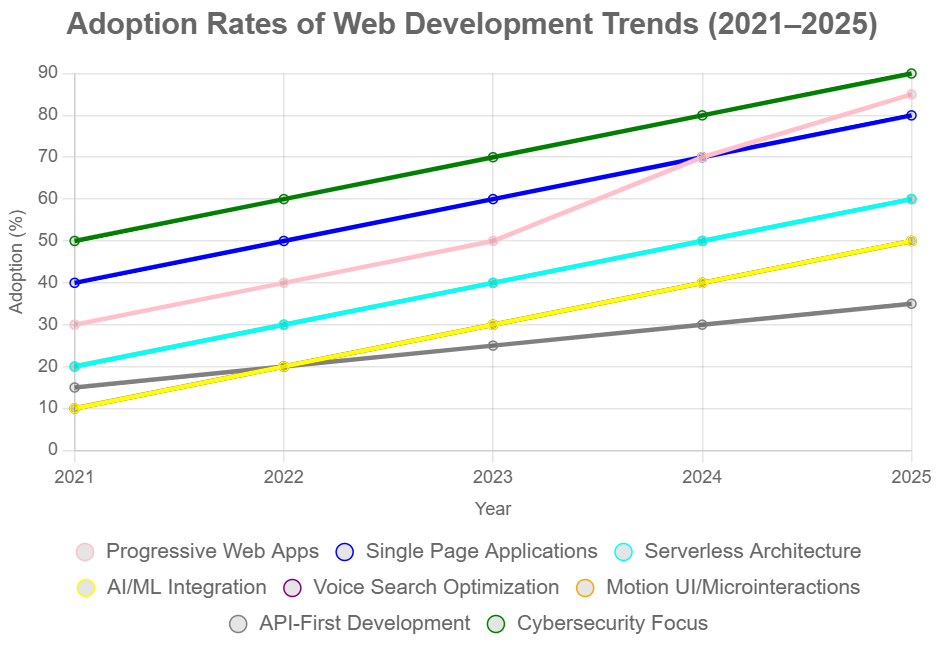
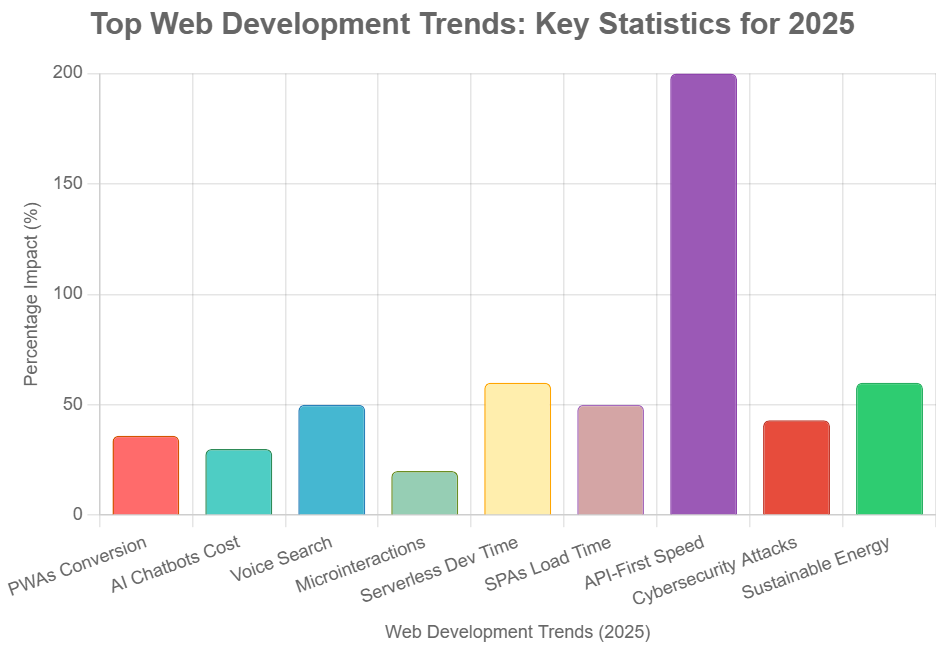
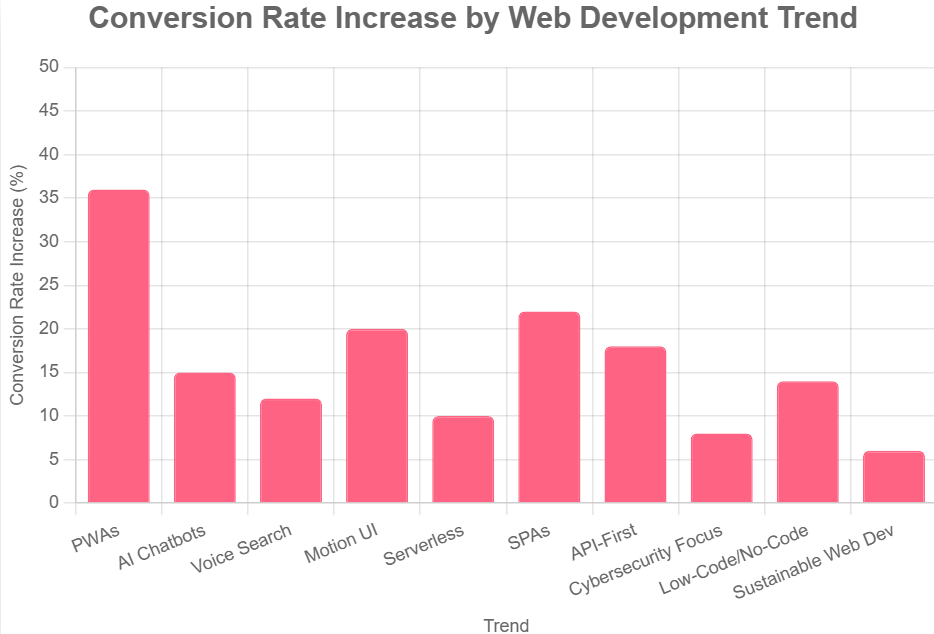
    Visualizing Web Development Trends

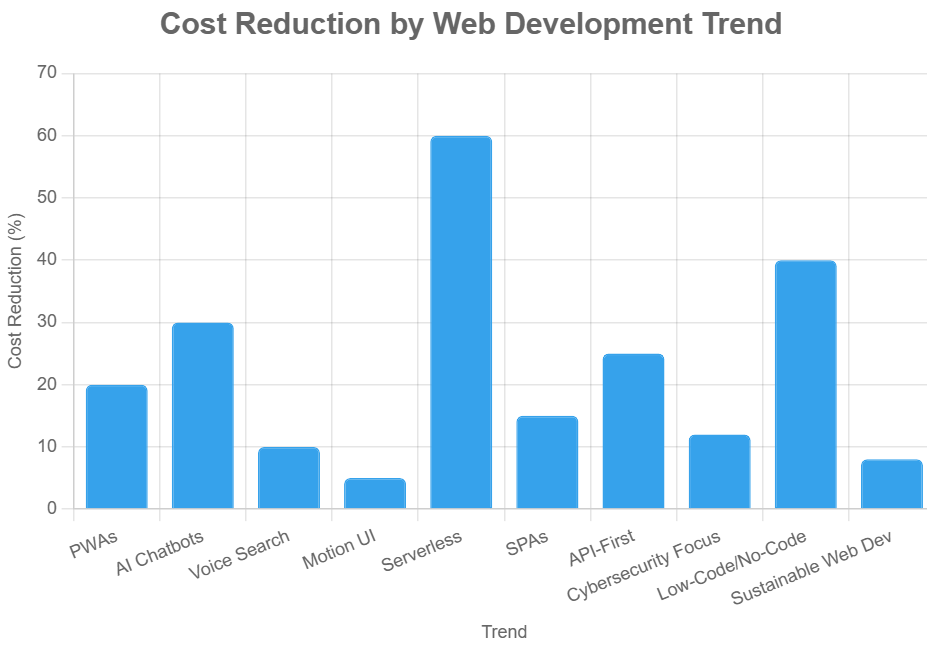
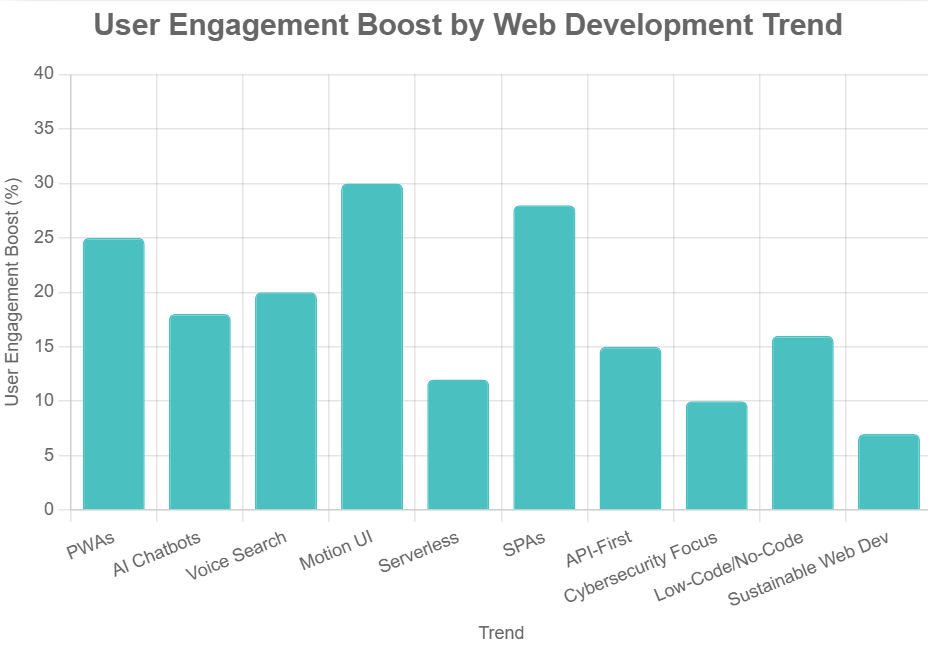
    Below are visual representations of the adoption rates and impact of key web development trends.

    Adoption Rates of Web Development Trends (2021-2025)

    Adoption rates of web development trends 2021–2025

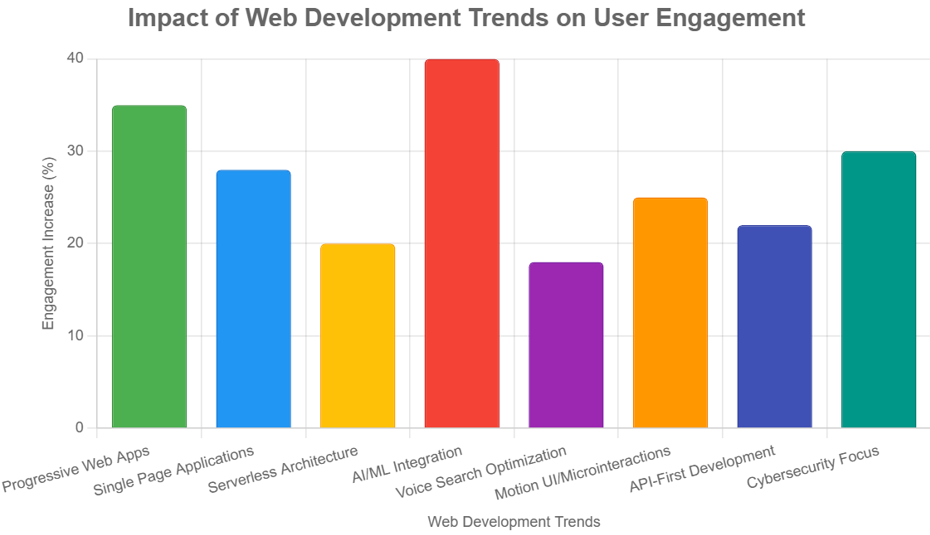
    Impact of Web Development Trends on User Engagement

    Impact of web development trends on user engagement

    Implementing Web Development Trends for Business Growth

    Adopting the latest web development trends can significantly impact business growth, customer satisfaction, and brand reputation. Here are actionable steps for integrating these trends into a digital strategy.

    1. Assess Current Website Performance

    Begin by evaluating the current website’s performance, user experience, and security. Identify areas that require improvement and prioritize updates based on business goals.

    2. Prioritize Mobile-First and Responsive Design

    With the majority of users accessing websites via mobile devices, ensuring a mobile-first and responsive design is non-negotiable. Make use of frameworks such as Bootstrap or Tailwind CSS to enhance and expedite the development process.

    3. Integrate Progressive Web App Features

    Enhance the website with PWA features such as offline access, push notifications, and fast loading times. This not only improves user engagement but also boosts SEO rankings.

    4. Leverage AI and Automation

    Implement AI-powered chatbots for customer support, personalized content recommendations, and predictive analytics to gain insights into user behavior.

    5. Optimize for Voice Search

    Update website content to include conversational keywords, structured data, and FAQ sections to capture voice search traffic.

    6. Enhance Security Measures

    Regularly update software, implement SSL certificates, and conduct security audits to protect user data and maintain compliance with regulations.

    7. Adopt API-First Development

    Develop robust APIs to enable seamless integration with third-party services, mobile apps, and other digital platforms.

    8. Focus on Accessibility

    Ensure the website is accessible to all users, including those with disabilities. Adhere to WCAG standards and implement semantic HTML to enhance accessibility.

    Case Studies: Successful Adoption of Web Development Trends

    Case Study 1: E-Commerce Brand Implements PWA

    An e-commerce brand transitioned its website to a Progressive Web App, resulting in a 40% increase in mobile conversions and a 30% reduction in bounce rates. The ability to function offline, along with push notifications, ensured that users remained involved, even during periods of unreliable connectivity.

    Case Study 2: SaaS Company Leverages AI Chatbots

    A SaaS company integrated AI-powered chatbots to handle customer inquiries, reducing response times by 60% and increasing customer satisfaction scores. The chatbots also provided personalized product recommendations, boosting upsell opportunities.

    Case Study 3: Local Business Optimizes for Voice Search

    A local service provider optimized its website for voice search, leading to a 25% increase in organic traffic from voice-enabled devices. The addition of FAQ sections and schema markup improved visibility in voice search results.

    Future Outlook: What’s Next in Web Development?

    The future of web development promises even more innovation, with emerging technologies set to redefine digital experiences.

    1. WebAssembly (Wasm)

    WebAssembly enables high-performance applications to run in the browser, opening the door for complex games, video editing, and other resource-intensive tasks.

    2. Augmented Reality (AR) and Virtual Reality (VR)

    AR and VR are poised to revolutionize web experiences, particularly in e-commerce, education, and entertainment. Interactive 3D models and immersive environments will become more prevalent.

    3. Blockchain Integration

    Blockchain technology offers enhanced security, transparency, and decentralized applications. Its integration into web development will impact industries such as finance, supply chain, and healthcare.

    4. Low-Code and No-Code Platforms

    Low-code and no-code platforms empower non-developers to create and manage websites, accelerating digital transformation and reducing development costs.

    Conclusion

    Web development is an ever-evolving domain that consistently adjusts to new technological innovations and the shifting needs of users. By embracing the latest trends—such as Progressive Web Apps, AI integration, server less architecture, and voice search optimization—businesses can create engaging, secure, and high-performing websites that drive growth and foster customer loyalty.

    For organizations seeking to stay ahead in the digital landscape, partnering with a forward-thinking web development agency is essential. Ravens Digital specializes in leveraging cutting-edge technologies to deliver tailored web solutions that meet the unique needs of each client. Explore more at ravensdigital.com and take the next step toward digital excellence.

    Frequently Asked Questions

    What are the most important web development trends in 2024?

    Key trends include Progressive Web Apps, Single Page Applications, serverless architecture, AI integration, voice search optimization, motion UI, API-first development, and enhanced cybersecurity.

    How can businesses benefit from adopting these trends?

    Adopting modern web development trends leads to improved user engagement, higher conversion rates, better security, and a competitive edge in the digital marketplace.

    What is the ideal frequency for updating a website to remain aligned with current trends?

    Websites should be reviewed and updated at least annually to incorporate new technologies, improve performance, and address security vulnerabilities.

    Get Started with Ravens Digital

    Ready to transform your digital presence? Contact Ravens Digital for a consultation and discover how the latest web development trends can elevate your business. Visit ravensdigital.com for more information.

  • Top 10 Web Development Trends to Watch: Actionable Insights for 2025 and Beyond

    Top 10 Web Development Trends to Watch: Actionable Insights for 2025 and Beyond

    Top 10 Web Development Trends Shaping 2025 and Beyond

    The digital landscape is evolving at an unprecedented pace, and web development sits at the heart of this transformation. Businesses, entrepreneurs, and developers must stay ahead of the curve to deliver engaging, secure, and high-performing web experiences. Understanding the latest trends is essential for anyone looking to build or upgrade a website that stands out in a crowded online marketplace.

    This comprehensive guide explores the top 10 web development trends shaping the industry in 2025 and beyond. Each trend is explained in detail, supported by recent statistics and actionable steps to help businesses and developers implement these innovations effectively. Whether launching a new project or optimizing an existing site, these insights will empower decision-makers to create future-ready digital experiences.

    1. Progressive Web Apps (PWAs)

    What Are PWAs?

    By blending the advantages of web and mobile technology, Progressive Web Apps offer users speed, reliability, and seamless engagement directly in their browsers. PWAs work offline, load quickly, and can be installed on a user’s device without visiting an app store.

    Why PWAs Matter

    • According to Google, more than half (53%) of users leave a website if it takes over three seconds to load (Google).
    • PWAs can increase conversion rates by up to 36% (Forrester).

    Actionable Steps

    • Audit your current website for speed and mobile responsiveness.
    • Use frameworks like React, Angular, or js to build PWA features.
    • Implement service workers for offline functionality.
    • Add a web app manifest for installability.

    2. Artificial Intelligence and Chatbots

    The Rise of AI in Web Development

    AI is transforming the way websites engage with their visitors. AI-powered chatbots provide instant support, answer queries, and guide users through the customer journey.

    Key Stats

    • 80% of businesses plan to use chatbots by 2025 (Business Insider).
    • AI chatbots can reduce customer service costs by up to 30% (IBM).

    Actionable Steps

    • Integrate AI chatbots using platforms like Dialogflow or Microsoft Bot Framework.
    • Utilize frequently asked questions and customer information to instruct bots for tailored replies.
    • Monitor chatbot performance and update scripts regularly.

    3. Voice Search Optimization

    The Shift to Voice

    As smart speakers and voice assistants become increasingly widespread, it is essential to enhance websites for voice search optimization.  Voice queries are more conversational and often longer than typed searches.

    Key Stats

    • 58% of consumers use voice search to find local business information (Search Engine Watch).
    • By 2025, voice searches are expected to account for 50% of all online searches (Comscore).

    Actionable Steps

    • Use natural language and question-based keywords in content.
    • Optimize for featured snippets and local SEO.
    • Ensure website speed and mobile-friendliness.

    4. Motion UI and Microinteractions

    Enhancing User Engagement

    Motion UI employs animations and transitions to lead users, deliver responses, and craft unforgettable experiences. Microinteractions—small, interactive animations—make websites feel more dynamic and intuitive.

    Key Stats

    • 88% of users are more likely to stay on a site with engaging animations (Adobe).
    • Websites with microinteractions see a 20% increase in user engagement (UX Collective).

    Actionable Steps

    • Incorporate subtle animations for buttons, menus, and loading indicators.
    • Use libraries like Framer Motion or GreenSock for advanced effects.
    • Test animations for performance and accessibility.
    Bar chart "Top Web Development Trends: Key Statistics for 2025" showing percentage impact of PWAs, AI Chatbots, Voice Search, and more. API-First Speed hits 200%, others range 20-60%, with unique colors.

    5. Serverless Architecture

    What Is Serverless?

    With serverless architecture, applications can be developed and deployed without the burden of server management. Cloud providers handle scaling, maintenance, and security, enabling faster development and reduced costs.

    Key Stats

    • The serverless market is projected to reach $21.1 billion by 2025 (MarketsandMarkets).
    • Companies adopting serverless report a 60% reduction in development time (O’Reilly).

    Actionable Steps

    • Consider adopting serverless technologies such as AWS Lambda, Microsoft Azure Functions, or Google Cloud Functions.
    • Identify parts of your application that can be offloaded to serverless functions.
    • Monitor usage and optimize for cost efficiency.

    6. Single Page Applications (SPAs)

    The SPA Advantage

    Single Page Applications load a single HTML page and dynamically update content as users interact. This approach delivers faster, app-like experiences and reduces server load.

    Key Stats

    • SPAs can improve page load times by up to 50% (Google Developers).
    • 67% of developers prefer SPAs for new projects (Stack Overflow).

    Actionable Steps

    • Use frameworks like React, Angular, or Vue.js to build SPAs.
    • Implement client-side routing for seamless navigation.
    • Optimize for SEO using server-side rendering or pre-rendering.

    7. API-First Development

    Building for Integration

    In API-first development, the focus is on designing strong APIs before constructing the frontend. This approach enables seamless integration with third-party services, mobile apps, and IoT devices.

    Key Stats

    • 83% of web traffic is API-driven (Akamai).
    • Companies using API-first strategies launch products 2x faster (Postman).

    Actionable Steps

    • Design RESTful or GraphQL APIs with clear documentation.
    • Use tools like Swagger or Postman for testing and collaboration.
    • Ensure APIs are secure, scalable, and versioned.
    Person typing on laptop with "Development" workflow (Problem Solving, Analysis, Planning) on screen, desk with charts and water glass.

    8. Cybersecurity and Privacy

    The Security Imperative

    With cyber threats on the rise, robust security measures are non-negotiable. Users expect privacy and data protection as standard.

    Key Stats

    • 43% of cyber attacks target small businesses (Verizon).
    • 85% of consumers won’t do business with a company if they have concerns about its security practices (PwC).

    Actionable Steps

    • Implement SSL certificates and HTTPS.
    • Use secure authentication (OAuth, 2FA).
    • Regularly update software and monitor for vulnerabilities.
    • Comply with privacy regulations like GDPR and CCPA.

    9. Low-Code and No-Code Development

    Democratizing Web Development

    Low-code and no-code platforms empower non-developers to build websites and applications using visual interfaces. This accelerates digital transformation and reduces reliance on specialized talent.

    Key Stats

    • The low-code market is expected to reach $65 billion by 2027 (Forrester).
    • Gartner predicts that by 2025, 70% of new business applications will be built using low-code or no-code platforms.(Gartner).

    Actionable Steps

    • Evaluate platforms like Webflow, Bubble, or Wix for rapid prototyping.
    • Train team members on using visual development tools.
    • Integrate low-code solutions with existing systems via APIs.

    10. Sustainable Web Development

    Building for the Planet

    Eco-friendly web development prioritizes minimizing the ecological footprint of websites. Efficient coding, green hosting, and optimized assets contribute to lower energy consumption.

    Key Stats

    • The internet accounts for 3.7% of global greenhouse emissions (The Shift Project).
    • Optimizing images and code can reduce website energy use by up to 60% (Website Carbon Calculator).

    Actionable Steps

    • Optimize images, videos, and code for faster load times.
    • Choose eco-friendly hosting providers.
    • Minimize third-party scripts and unnecessary plugins.

    Educate users and stakeholders about digital sustainability.

    Visualizing the Trends: Charts and Stats

    Bar chart "Conversion Rate Increase by Web Development Trend" with PWAs at 35%, others 5-25%, pink bars.
    Bar chart "Cost Reduction by Web Development Trend" with Serverless at 60%, others 5-30%, blue bars.
    Bar chart "User Engagement Boost by Web Development Trend" with Serverless at 35%, Motion UI at 30%, others 5-25%, teal bars.

    Action Plan: Implementing the Top Web Development Trends

    1. Assess Current Website:

    Perform a thorough assessment to pinpoint opportunities for enhancement and embrace emerging trends.

    2. Prioritize Trends Based on Business Goals:

    Align trend adoption with strategic objectives such as user engagement, cost reduction, or sustainability.

    3. Develop a Roadmap:

    Create a phased plan to implement selected trends, starting with quick wins and moving to more complex initiatives.
    4. Invest in Training and Tools:

    Upskill teams and invest in the necessary frameworks, platforms, and security measures.

    5. Monitor and Optimize:

    Track performance metrics, gather user feedback, and iterate to maximize the impact of each trend.

    Case Studies: Real-World Impact

    Case Study 1: Retailer Adopts PWAs and AI Chatbots

    A leading online retailer implemented a Progressive Web App and integrated an AI-powered chatbot. The result was a 28% increase in mobile conversions and a 40% reduction in customer service response times.

    Case Study 2: Service Provider Embraces Voice Search and Motion UI

    A local service provider optimized its website for voice search and added microinteractions. Organic traffic grew by 22%, and average session duration increased by 35%.

    Case Study 3: SaaS Startup Goes Serverless and API-First

    A SaaS startup migrated to a serverless architecture and adopted an API-first approach. Development cycles shortened by 50%, and the platform scaled seamlessly during peak demand.

    Frequently Asked Questions

    How can businesses choose which web development trends to adopt?

    Evaluate trends based on business goals, target audience, and available resources. Conduct a comprehensive evaluation to identify areas for improvement and adopt new trends as they arise.

    Are these trends suitable for small businesses?

    Absolutely. Many trends, such as low-code development and PWAs, are accessible and cost-effective for small businesses.

    What is the recommended frequency for updating a website to ensure it remains up-to-date?

    Regular updates are essential. Review and refresh your website at least quarterly, and monitor emerging trends annually.

    What is the biggest risk of ignoring web development trends?

    Falling behind competitors, losing user engagement, and exposing your business to security vulnerabilities.

    Conclusion

    The field of web development is continually evolving, bringing forth fresh trends each year. Staying informed and taking action on these trends is essential for businesses aiming to deliver exceptional digital experiences, drive growth, and maintain a competitive edge. From Progressive Web Apps and AI chatbots to sustainable web development, each trend offers unique opportunities to innovate and connect with users in meaningful ways.

    For expert guidance and tailored web solutions, visit ravens digital. Embrace the future of web development and position your business for long-term success.

  • Taking Action to Build Your Business Website: A Blueprint for Success with Ravens Digital

    Taking Action to Build Your Business Website: A Blueprint for Success with Ravens Digital

    Build Your Website. Grow Your Business

    In the digital age of 2025, your business website is not just a virtual storefront—it’s the engine driving your growth. With global e-commerce sales projected to reach $4.32 trillion this year, businesses without a high-performing online presence are missing out on unprecedented opportunities. At Ravens Digital, we don’t just create websites; we craft digital ecosystems that deliver measurable results, helping brands like Nike, Disney, and Salesforce dominate their markets. This article guide to taking decisive action to build or revamp your business website. Packed with actionable steps, real-world success stories, and data-driven insights—including a detailed chart and table—we’ll show you why partnering with Ravens Digital is the key to unlocking your business’s full potential.

    This isn’t about theoretical advice; it’s about empowering you to act now. Your competitors are already leveraging the 71% of small businesses with websites to fuel faster growth. Don’t let them take the lead. Let’s dive into why a website is critical, how to build one that converts, and why Ravens Digital is your ultimate partner.

    Why Your Business Website is Non-Negotiable in 2025

    The digital landscape is evolving rapidly, and a website is your business’s foundation for success. In 2025, 28% of all business activity occurs online, and this share is growing steadily. Yet, 28% of small businesses still lack a website, leaving them invisible to the 99% of consumers who search for local businesses online. For those with a website, the payoff is clear: 81% of U.S. small businesses report that their website has directly contributed to growth, enabling them to reach broader audiences and convert visitors 24/7.

    The mobile revolution amplifies the stakes. By mid-2025, mobile devices are projected to account for 64.35% of global website traffic, a significant increase from 59.7% earlier in the year. However, a significant challenge remains: over half (53%) of mobile users abandon sites that take longer than three seconds to load, directly impacting conversion rates. Businesses with mobile-optimized sites see up to 62% higher sales post-optimization. Meanwhile, e-commerce continues its meteoric rise, with global retail e-commerce sales expected to hit $8.3 trillion in 2025, even with slight economic deceleration.

    At Ravens Digital, we’ve seen this firsthand. Our client, Michael R., CEO of an e-commerce brand, saw a 150% revenue surge in just three months after we overhauled their site. The message is clear: a website isn’t optional—it’s your digital HQ, and the time to act is now.

    The ROI of a Professional Website: Key Statistics

    A professional website delivers tangible returns across sales, visibility, and credibility. To illustrate, here’s a breakdown of critical stats that highlight the impact of a well-crafted site:


    Metric

    Statistic

    Source

    E-commerce Sales Growth

    Global e-commerce sales to reach $4.32 trillion in 2025

    [48]

    Small Business Website Adoption

    71% of small businesses have a website, driving faster growth

    [39, 26]

    Organic Search Traffic

    53.3% of web traffic comes from organic search

    [61]

    Mobile Traffic Share

    64.35% of global website traffic is mobile as of mid-2025

    [67]

    Mobile Load Time Impact

    53% of mobile visits abandoned if load time exceeds 3 seconds

    [8]

    Conversion Rate Boost

    Optimized sites see 2-4% conversion rates, with desktops at 3.9%, mobile 1.8%

    [30, 36]

    SEO Impact

    A strong 91% of marketers say SEO improves website performance.

    [59]

    Credibility via Design

    75% of consumers judge business credibility by website design

    [12]

    Live Chat ROI

    79% of businesses with live chat see improved sales and loyalty

    [28]


    This chart illustrates the impact of website optimization on conversion rates across various platforms.

    Bar chart comparing conversion rates across desktop, mobile, and tablet platforms.

    This chart underscores the importance of optimizing for all devices, particularly mobile, where conversion rates lag but hold massive potential. At Ravens Digital, we ensure your site maximizes these metrics, driving conversions and revenue.

    Your Action Plan: Building a High-Performance Website

    Ready to take the leap? Below is a step-by-step guide to building a website that delivers results, designed for immediate action and aligned with 2025 trends.

    Step 1: Audit Your Current Digital Footprint

    Start by evaluating your existing online presence. If you’re among the 28% of small businesses without a site, prioritize creation. For those with a site, use tools like Google Analytics to assess traffic, bounce rates, and conversions. A common issue we find is that 70% of small business websites lack clear calls-to-action (CTAs), undermining conversions. Our team at Ravens Digital conducts thorough audits to identify and fix such gaps, ensuring your site is primed for success.

    Step 2: Set Clear, Measurable Goals

    Define what your website needs to achieve—sales, leads, or brand authority. Data guides us here: e-commerce sites average 2-4% conversion rates, but strategic optimization can push this higher. Organic search, accounting for 53.3% of all traffic, makes SEO an indispensable cornerstone. At Ravens Digital, we align your goals with data-driven strategies, ensuring every element of your site serves a purpose.

    Step 3: Invest in Responsive Design and UI/UX

    With 64% of traffic coming from mobile devices, responsive design is critical. A positive user experience (UX) is crucial; 72% of users share good experiences with five or more people, significantly expanding your reach. Avoid DIY solutions; while 32% of small businesses build their own sites, professional designs yield superior ROI. We specialize in minimalist, user-centric designs that engage and convert.

    Step 4: Embed SEO from the Ground Up

    SEO isn’t an afterthought—it’s foundational. Since 68% of online experiences begin with a search engine, and 91% of marketers report SEO’s positive impact, optimization is non-negotiable. Fast-loading sites retain 47% more visitors, so we prioritize speed alongside keyword strategies. Our client, Sarah L., saw a 300% organic traffic increase after we optimized their site for SEO.

    Step 5: Incorporate Conversion-Driven Features

    Features like live chat (boosting loyalty by 79%), targeted PPC landing pages, and compelling content are essential. Google Ads conversions average 7.52%, but our PPC campaigns consistently outperform, as seen with Emily R., who doubled leads while halving ad costs. We integrate these elements seamlessly to maximize ROI.

    Step 6: Launch, Monitor, and Optimize

    Launch your site, but don’t stop there. Use analytics to track performance and iterate. A/B testing can improve conversions by up to 30%. Our team monitors KPIs like traffic sources (53.3% organic) and conversion rates, ensuring continuous improvement.

    Pitfalls to Avoid When Building Your Website

    Building a website without a strategy can backfire. Here are common mistakes and how Ravens Digital sidesteps them:

    • Ignoring Mobile Optimization: With 64% of traffic from mobile, unoptimized sites lose 53% of visitors. We ensure responsive designs across all devices.
    • Neglecting SEO: Missing out on 53.3% of organic traffic is a death knell. Our SEO strategies keep you visible.
    • Poor UX Design: 88% of users won’t return after a bad experience. Our UI/UX expertise ensures intuitive navigation.
    • Weak CTAs: 70% of small business sites lack clear CTAs. We embed compelling CTAs to drive action.
    • Overlooking Security and Speed: Slow or insecure sites deter users. We prioritize speed (under 3 seconds) and robust security.

    Why Choose Ravens Digital?

    At Ravens Digital, we are not just an agency; we are your growth partner. Our services—Design & Development, SEO, PPC, Digital Marketing, Online Reputation Management, and Content Writing—are tailored to deliver results. Trusted by industry giants like J.P. Morgan, Chanel, and Airbnb, we’ve earned our reputation through proven outcomes.

    Our clients’ success stories highlight our impact:

    • Michael R., CEO, E-Commerce Brand: “Ravens Digital transformed our business! Revenue soared by 150% in three months with their data-driven strategies.”
    • Sarah L., Marketing Director, SaaS Company: “From buried in search results to dominating Google’s first page with a 300% traffic increase.”
    • James W., Founder of a Tech Startup, declared, “Best decision we made—now we lead search rankings.”
    • Emily R., Marketing Director at a Digital Agency, achieved significant results: Leads doubled, and ad costs were cut in half. They turn clicks into customers.”
    • Focus on the action and result: “Benjamin R., a Marketing Strategist at Growth Hub, revolutionized our marketing by optimizing ad spend.”
    • Alexander T., Business Consultant, Enterprise Solutions: “A game-changer for attracting customers while reducing costs.”

    Our approach combines data-driven precision with creative firepower, ensuring your site doesn’t just exist—it dominates.

    Real-World Impact: Ravens Digital’s Success Stories

    Consider our e-commerce client who struggled with low conversions. After a mobile-optimized, SEO-driven site revamp, they saw a 150% revenue increase, aligning with the 62% sales boost from responsive designs. A SaaS company we worked with went from obscurity to Google’s first page, achieving a 300% traffic surge. A tech startup leveraged our PPC expertise to double leads while cutting costs, mirroring industry trends where optimized campaigns maximize ROI.

    These results aren’t outliers—they’re what we deliver consistently, leveraging 2025 trends like AI personalization and voice commerce, which are reshaping how consumers interact online.

    Take the Leap with Ravens Digital

    The data is undeniable: with e-commerce projected at $7.4 trillion in 2025 and 73% of small businesses leveraging websites for growth, you can’t afford to wait. Your website is your best salesperson, working 24/7 to drive conversions, build credibility, and dominate your market.

    Partner with Ravens Digital to transform your online presence into a revenue-generating powerhouse. Visit https://ravensdigital.com/ and use our support chat or contact form to get started. Your competitors are moving—don’t let them redefine your market. Let’s build your digital empire together.

  • Understanding the Role of a Website in Your Business Strategy

    Understanding the Role of a Website in Your Business Strategy

    Why Your Business Website Matters More Than Ever

    In today’s digital-first world, your website is far more than a static online presence. It is the foundation of your brand’s digital identity, the central hub for customer interaction, and one of the most powerful assets in your overall business strategy. Whether you’re a startup, a local business, or an established enterprise, understanding the role of a website in your business strategy is not optional — it’s essential.

    A strategically developed website can increase your brand’s visibility, build trust with customers, capture leads, drive conversions, and offer ongoing support. From design and user experience to SEO and conversion optimization, each element of your website plays a vital role in shaping how customers engage with your brand.

    At Ravens Digital, we specialize in crafting purpose-driven websites that go beyond aesthetics. We build digital platforms designed to meet business goals and deliver measurable results.

    Section 1: The Website as Your Business’s Digital Headquarters

    Your Website Is Your First Impression

    Usually, the first place potential customers go to discover information about your business is your website. It’s your digital storefront — open 24/7, accessible from anywhere, and capable of influencing decisions in mere seconds.

    An outdated, slow, or non-mobile-friendly website will likely cause visitors to leave before reading anything. On the other hand, a well-designed, user-friendly website immediately builds credibility and gives users a reason to stick around.

    Your Website: Beyond Just Marketing.

    Your website isn’t just a marketing tool — it’s an operational asset. It can:

    • Handle customer service via chatbots or help centers
    • Offer eCommerce capabilities to process transactions
    • Act as a recruiting platform with job boards
    • Provide educational content to train clients or partners
    • Serve as a reporting hub with dashboards for customers or internal teams

    Whether you’re collecting leads, managing orders, publishing blog content, or distributing information, your website is the platform where it all happens.

    Business strategy enhanced through an effective website

    Section 2: Key Strategic Roles a Website Plays in Business

    1. Branding and Positioning

    Your website sets the tone for your brand. Through color schemes, typography, voice, and design, your website tells users what kind of business you are and what they can expect from you. Branding consistency across your homepage, service pages, blog posts, and calls to action helps establish trust and authority.

    A website that effectively communicates your brand:

    • Highlights your Unique Value Proposition (UVP)
    • Reinforces your mission and values
    • Positions you competitively in the marketplace

    2. Lead Generation and Conversion

    The best websites don’t just inform — they convert. This means converting visitors into leads and then into paying customers. Effective lead generation tools embedded within your site include:

    • Contact forms
    • Newsletter signups
    • Free downloadable resources
    • Webinars or appointment bookings
    • Chatbots that qualify prospects

    Optimizing your website with the right funnel structure and compelling CTAs (Calls-to-Action) can significantly boost your lead conversion rate.

    3. Sales Enablement

    Your website is a silent salesperson that works around the clock. It can:

    • Showcase products or services through visual demos
    • Provide detailed pricing or value-based packages
    • Offer customer testimonials and case studies
    • Host a knowledge base or FAQ to reduce objections

    Well-designed product/service pages paired with persuasive copy and trust signals help your website close more deals.

    4. Data Collection and Customer Insights

    Modern websites come equipped with tools for tracking user behavior. From Google Analytics to heatmaps and CRM integration, you can analyze:

    • Visitor demographics and locations
    • Time spent on page and bounce rates
    • Conversion paths and drop-off points

    This data helps you improve UX, identify what content resonates, and make informed decisions about marketing, sales, and product development.

    Section 3: Integrating the Website with Broader Business Objectives

    Aligning Website Goals with Business Goals

    A website that isn’t aligned with your business goals can easily become a vanity project — pretty to look at, but ineffective.

    Start with clarity around your business objectives:

    • Want to increase online sales? Optimize your product pages and checkout process.
    • Looking to boost local visibility? Prioritize local SEO and Google Maps
    • Trying to educate prospects? Build out a robust blog and learning center.

    When your website is purpose-built to support business priorities, it becomes a revenue-generating asset.

    Website as Part of the Customer Journey

    Your website should support all stages of the customer journey:

    • Awareness Stage – Blog posts, infographics, and landing pages help attract attention.
    • Consideration Stage – Comparison charts, testimonials, and downloadable guides support research.
    • Decision Stage – Clear pricing, compelling CTAs, and trust signals drive conversions.
    • Post-Purchase Stage – Account portals, FAQs, and feedback forms help with retention and satisfaction.

    Mapping your site content to this funnel ensures users are guided from curiosity to commitment.

    Integrating with Your Tech Stack

    To maximize effectiveness, your website should integrate with other tools in your business ecosystem:

    • CRM (Customer Relationship Management) platforms like HubSpot or Salesforce
    • Marketing Automation tools like Mailchimp, ActiveCampaign, or Klaviyo
    • eCommerce Platforms like Shopify or WooCommerce
    • Analytics Tools like Google Analytics or Hotjar
    • Scheduling & Booking Tools like Calendly or Acuity

    Integrations turn your website into a connected system that streamlines operations, automates tasks, and enhances marketing precision.

    Section 4: Core Features of a Business-Ready Website

    Here’s what every strategically designed business website must include:

    1. Mobile Responsiveness

    Mobile devices account for over 60% of web traffic. A mobile-friendly design ensures that your content is accessible and engaging across all screen sizes.

    2. Fast Load Times

    Speed is essential for both UX and SEO. Google considers site speed as a ranking factor, and users expect pages to load in under 3 seconds.

    3. Search Engine Optimization (SEO)

    Optimizing for search is a must. SEO-friendly sites are built with:

    • Keyword-optimized content
    • Structured data/schema markup
    • Clean URL structures
    • Meta titles and descriptions
    • Fast and secure hosting (HTTPS)

    4. Security

    Website security is non-negotiable. SSL certificates, firewalls, and routine updates protect user data and build customer trust.

    5. Accessible Design

    Your site should meet WCAG accessibility standards, ensuring that it can be used by everyone, including those with disabilities.

    6. Content Management System (CMS)

    A scalable CMS like WordPress allows you to easily update content, add blog posts, or launch new pages without relying on developers for every change.

    Section 5: Common Business Website Types and Their Strategic Use

    Different businesses require different types of websites. Every component has a distinct purpose within a strategic plan.

    Informational Websites

    For consultants, service providers, and local businesses — these websites highlight expertise, provide contact info, and build trust.

    eCommerce Websites

    Retail and product-based businesses use online stores to sell directly to consumers. Integrated inventory, payment gateways, and CRM make these powerhouses of digital sales.

    Portfolio Websites

    Ideal for creatives like designers, photographers, or writers. These sites showcase past work and include inquiry forms or direct booking.

    SaaS or App-Based Platforms

    Software companies often rely on websites to offer demos, signups, documentation, and subscription management.

    Landing Pages and Microsites

    Used for targeted campaigns or product launches, these are conversion-focused and often tied to paid advertising efforts.

    Website driving business growth and strategic success

    Section 6: Real Business Benefits from a Strategic Website

    Let’s summarize the key benefits a well-designed website brings to your business:

    • Brand Awareness – A professional online presence makes your brand discoverable and memorable.
    • Customer Trust – A clean design, secure browsing, and clear messaging boost credibility.
    • Sales and Revenue – Optimized sales funnels and eCommerce capabilities drive direct conversions.
    • Cost Savings – Automating services like booking, FAQs, and support reduces manual workload.
    • Marketing Reach – Integrated with SEO and PPC, your website becomes a marketing engine.
    • Scalability – Easily add features or expand services without rebuilding from scratch.
    • Analytics and Data – Monitor behavior and optimize your strategy with real-time data insights.

    Section 7: What Sets Ravens Digital Apart

    At Ravens Digital, we don’t just build websites — we craft digital growth platforms that align with your long-term business strategy. Our process includes:

    1. Discovery & Research – Through discovery and research, we understand your goals, audience, and competitive landscape.
    2. Strategy-First Design – Every design decision is based on achieving business outcomes.
    3. Custom Development – No cookie-cutter templates. We build what your business needs.
    4. SEO & Speed Optimization – You get a site that looks great and performs in search.
    5. Ongoing Support – We help you grow, improve, and evolve your platform over time.

    Whether you’re a local business looking to increase leads or an enterprise brand building digital infrastructure, we can help you build a website that becomes a strategic asset — not just a brochure.

    Conclusion:

    In 2025 and beyond, a modern, strategically designed website is essential, not optional. Your website is your business card, storefront, salesperson, customer service rep, and data analyst all rolled into one.

    Treating your website as a living part of your business strategy — something that evolves with your goals — is how brands thrive in a competitive, digital-first marketplace.

    If you’re ready to transform your online presence into a revenue-driving engine, Ravens Digital is here to help.

  • Why Every Business Needs a Website: The Digital Foundation for Growth and Credibility

    Why Every Business Needs a Website: The Digital Foundation for Growth and Credibility

    The Website Every Business Must Have

    In our profoundly interconnected world, the primary concern is no longer whether one needs a website—it’s “Why don’t I have one yet?”

    Whether you’re a local business owner, a startup founder, or the head of a growing company, having a website is not a luxury—it’s a necessity. Yet, thousands of businesses still operate without one, losing out on visibility, customers, credibility, and revenue every single day.

    At Ravens Digital, we specialize in helping businesses across industries design and develop custom websites that generate leads, establish trust, and fuel long-term success. This article breaks down, in simple and clear terms, why every business—big or small—needs a website and how it can be the single most powerful tool in your marketing and growth toolkit.

    What Is a Business Website (and What Should It Do)?

    Your business website is your company’s digital storefront, open 24/7. It’s the online space where customers can learn about what you offer, why you’re the best choice, and how to take action (contact you, book a service, make a purchase, etc.).

    But a truly effective website delivers results. It should:

    • Reflect your brand identity
    • Explain your products or services
    • Attract new customers through search engines
    • Build trust through professional design
    • Convert visitors into leads or sales

    Whether you’re offering HVAC repairs, running a salon, managing an eCommerce store, or providing consulting services, your website is your home base in the digital world—and every business needs one.

    Digital growth through business website

    The Modern Business Landscape: Why a Website Matters More Than Ever

    More than 80% of consumers now research a business online before making a decision.

    So what happens when they look for you—and find nothing?

    In an age where smartphones are within arm’s reach 24/7, and where the customer journey often begins with a Google search, having no website makes your business practically invisible. Social media alone won’t cut it. And relying on word of mouth or foot traffic is like fishing in a puddle when you could have an entire ocean.

    Let’s explore the major reasons why having a website is essential for every business—and why waiting any longer is costing you.

    1. Visibility: Be Where Your Customers Are Looking

    “If you’re not online, you don’t exist.”

    Most customer journeys today begin on search engines like Google or Bing. Whether someone is searching for “plumbers near me,” “best coffee in town,” or “custom t-shirt design,” they’re looking online.

    If you don’t have a website:

    • You’re not showing up in search results.
    • You’re missing out on thousands of potential local and global leads.
    • Your competitors who do have websites are winning your customers.

    Even a simple, well-structured website built by Ravens Digital can position your brand to rank higher in local SEO, Google Maps, and organic search—putting you in front of the people who are actively looking for you.

    2. Credibility: First Impressions Are Now Digital

    “Would you trust a business without a sign, phone number, or storefront?”

    In 2025, your website is often your customer’s first impression. A well-designed, mobile-responsive website communicates:

    • Professionalism
    • Legitimacy
    • Stability
    • Trustworthiness

    On the other hand, having no website (or a poorly designed one) makes you seem outdated—or worse, untrustworthy. Studies show that 75% of consumers judge a business’s credibility based on its website design.

    At Ravens Digital, we create websites that don’t just look good—they build trust instantly with clean layouts, fast loading speeds, and content that answers your audience’s questions.

    3. Control: Your Brand, Your Way

    “Social media can vanish overnight. Your website is yours forever.”

    Many small businesses rely entirely on Facebook, Instagram, or TikTok for their digital presence. But these platforms:

    • Change algorithms constantly
    • Limit your content reach
    • Can suspend your account without warning
    • Don’t give you control over design or structure

    Your website is the one platform where you have full control. You decide:

    • What information to showcase
    • How your brand is presented
    • How people contact you
    • What the user journey looks like

    And unlike social media, your website can’t be taken away by someone else’s policy update. It’s a long-term investment in digital independence.

    4. Marketing: Your Website Is the Hub for All Campaigns

    “Every marketing strategy points back to your website.”

    Whether you’re running Google Ads, Facebook campaigns, email marketing, or SEO, all traffic needs a central destination—and that’s your website.

    Without one, your marketing efforts:

    • Lose impact
    • Lack consistency
    • Can’t convert leads effectively

    A strong website built by Ravens Digital integrates seamlessly with your marketing efforts. It’s where you send traffic, capture leads with forms, offer downloadable content, promote discounts, and track conversions.

    Consider it your digital headquarters; without it, your marketing efforts become disjointed and less impactful.

    5. Sales: Your 24/7 Salesperson

    “Your website works while you sleep.”

    A great website doesn’t just inform—it sells.

    Whether you have an eCommerce shop or offer professional services, your website can:

    • Accept payments and bookings
    • Generate leads through CTAs and forms
    • Educate prospects with FAQs and service breakdowns
    • Guide users through a sales funnel

    Unlike a physical store or team member, your website never takes breaks. It’s a 24/7 lead generator that scales with your business.

    With features like contact forms, chatbots, product galleries, and online booking—Ravens Digital websites are built for sales performance.

    6. Customer Service: Answer Questions Before They Ask

    “An informative website reduces support burden.”

    One overlooked benefit of having a website is reducing the time spent answering repetitive questions. By including:

    • FAQs
    • Contact info
    • Product/service explanations
    • Customer guides
    • Appointment booking tools

    …you give your customers what they need without tying up your phone lines or inbox.

    You can even integrate automated tools like chatbots, contact forms, and knowledge bases to streamline support—improving customer satisfaction while saving your team time

    7. Analytics: Know Your Customers Better

    “You can’t improve what you don’t measure.”

    When you have a website, you also gain access to powerful insights like:

    • Where your traffic is coming from
    • Which pages are most visited
    • What keywords bring users in
    • How long people stay on your site
    • What content converts best

    With tools like Google Analytics, Hotjar, or HubSpot, you can fine-tune your content, marketing, and customer journey based on real user data—not guesswork.

    At Ravens Digital, we help our clients set up analytics dashboards so they can measure success and improve ROI.

    8. Scalability: Grow Without Limits

    “Your website grows with your business.”

    Unlike a physical space, your website is infinitely scalable. As your business grows, you can:

    • Add new service pages
    • Expand into eCommerce
    • Launch new locations with dedicated landing pages
    • Offer online appointments
    • Integrate CRM or email marketing tools

    Your website adapts to your business’s evolution—and becomes a central pillar of growth.

    Ravens Digital offers custom, scalable website solutions designed to evolve as your needs do.

    9. Competitive Advantage: Stay Ahead, Not Behind

    “No website? Your competitor wins”

    In any industry, customers compare businesses. If they’re choosing between a company with a fast, polished website and one with nothing online—guess which one earns their trust?

    Having a website puts you ahead of businesses that haven’t adapted. It helps you:

    • Build a stronger brand
    • Appear in search results
    • Communicate value clearly
    • Convert visitors into leads or buyers

    And if your competitors already have websites? You need one that’s better, faster, and more persuasive—and Ravens Digital can help you make that happen.

    10. Affordability: It Costs Less Than You Think

    “A great website offers incredible ROI.”

    The idea that building a website is expensive is a common myth. But in 2025, creating a high-performance website is more accessible and affordable than ever.

    With services like those offered by Ravens Digital, you can get:

    • Custom design that matches your brand
    • Built-in SEO foundations
    • Mobile responsiveness
    • Hosting and support
    • Performance optimization

    …all at a price point that makes sense for your business size and goals.

    Even better—your website becomes a revenue-generating asset, not just a cost.

    What If You Already Have a Website?

    If you already have a website but it’s outdated, slow, or not delivering results—it’s time for an upgrade.

    Ask yourself:

    • Is your site mobile-friendly?
    • Is it optimized for search engines?
    • Does it clearly explain what you do?
    • Is it fast, secure, and easy to navigate?
    • Is it bringing in leads or sales?

    If the answer is “no” to any of the above, Ravens Digital can help you revamp or rebuild it from the ground up—tailored to your audience, industry, and goals.

    How Ravens Digital Helps Businesses Thrive Online

    At Ravens Digital, we don’t just build websites—we create digital growth engines.

    Our process includes:

    1. Strategy & Discovery

    We thoroughly understand your goals, audience, and brand to create a successful plan.

    2. Custom Design

    We build mobile-responsive, conversion-focused designs that look great and load fast.

    3. Development & Optimization

    From CMS integration to SEO best practices, we handle all the tech.

    4. Launch & Support

    We don’t disappear after launch. We offer ongoing updates, optimization, and support.

    Whether you’re launching your first site or need a redesign that finally delivers results, we’re your partner in digital transformation.

    Final Thoughts: Your Website Is Your Future

    In a world driven by digital discovery, your website is your single most important business asset. It’s your salesperson, your storefront, your reputation, your lead generator—and your growth multiplier.

    If your business doesn’t have a website, it’s not just missing an opportunity—it’s leaving money on the table.

    Don’t wait another day to make your business visible, credible, and scalable.

  • What Is Backend Development? Start Here to Master the Core of the Web

    What Is Backend Development? Start Here to Master the Core of the Web

    Backend Development: The Ultimate Beginner’s Guide

    In the digital era, websites, apps, and platforms have become essential tools for businesses and consumers alike. But while the visuals and interfaces catch the eye, it’s the backend that powers everything behind the scenes — from storing user data to processing transactions, managing content, and ensuring your site works flawlessly.

    So, what exactly is backend development, and why does it matter?

    Whether you’re a startup founder, business owner, marketer, or aspiring developer, this in-depth guide — brought to you by the experts at Ravens Digital — will walk you through everything you need to know about backend development, how it works, the technologies involved, and why it’s absolutely essential to your digital success.

    What Is Backend Development?

    It refers to the server-side of a website or application. It’s the behind-the-scenes system that handles logic, databases, user authentication, server configuration, and integrations — everything users don’t directly see but rely on every time they use a digital product.

    Imagine an online store. While the frontend shows products and allows you to click “Buy Now,” it’s the backend that:

    • Stores the product information
    • Calculates taxes and shipping
    • Processes your payment
    • Sends confirmation emails
    • Updates inventory

    Without a properly built backend, websites and applications are just pretty interfaces with no functionality.

    Why Backend Development Matters for Your Website or App

    Backend development isn’t just technical jargon. It directly affects your business goals and customer experience.

    Here’s why the backend is critical:

    • Performance: A fast, scalable backend keeps your site loading quickly — vital for both UX and SEO.
    • Security: User data, transactions, and login systems rely on secure backend architecture.
    • Functionality: From contact forms to user accounts and APIs, all interactive features depend on backend logic.
    • Data Management: Your backend communicates with databases, organizing everything from blog content to product catalogs.
    • Integration: CRMs, payment gateways, marketing tools — your backend handles it all.

    At Ravens Digital, we engineer backend systems that are fast, secure, and tailored to your business’s unique needs — ensuring your digital presence doesn’t just look good, but works flawlessly.

    Code powering the backend development

    Frontend vs Backend: What’s the Difference?

    Before diving deeper, let’s clarify the distinction between frontend development and backend development:


    Feature

    Frontend (Client-Side)

    Backend (Server-Side)

    What it does

    Controls the visual layout and user interface

    Handles logic, databases, authentication, server calls

    Languages used

    HTML, CSS, JavaScript

    PHP, Python, Node.js, Ruby, Java

    Runs on

    User’s browser

    Web server

    Example features

    Buttons, menus, images, responsive design

    Login systems, content management, APIs, checkout

    Tools

    React, Vue, Tailwind, Bootstrap

    Express, Django, Laravel, MySQL, MongoDB


    Simply put: frontend is the face, and backend is the brain.

    The Three Pillars of Backend Development

    Backend systems are typically built on three core components:

    1. Server

    A server is a machine or cloud service that hosts your website or app, processing user requests and delivering data.

    • Example: When a user submits a login form, the server validates their credentials.
    • Tools: Apache, NGINX, AWS, DigitalOcean

    2. Database

    The database stores your application’s data — such as user profiles, product information, blog posts, or orders.

    Types:

    3. Application (Logic Layer)

    This is where the business logic resides — the actual code that tells the application what to do with incoming data or requests.

    • It receives inputs, processes them, interacts with the database, and sends responses.
    • Examples: Calculating cart totals, validating passwords, returning search results

    Key Technologies Used in Backend Development

    Backend development requires mastery of several technologies. Here’s a breakdown of the most important ones:

    A. Programming Languages

    These are the building blocks for writing backend code:

    • PHP: Popular for WordPress and Drupal, known for its easy deployment.
    • Python: Clean syntax; used with Django, Flask
    • js: JavaScript-based; ideal for real-time apps
    • Ruby: Used with Rails framework for rapid development
    • Java: Robust and enterprise-grade

    B. Backend Frameworks

    Frameworks streamline development by providing pre-written code, structure, and tools.

    • js (Node.js)
    • Django (Python)
    • Flask (Python)
    • Laravel (PHP)
    • Ruby on Rails

    Each framework is suited for different types of projects and developer preferences.

    C. Databases

    Backend systems often require both relational and non-relational databases depending on data structure needs.

    • SQL: Structured data — MySQL, PostgreSQL
    • NoSQL: Flexible data — MongoDB, CouchDB

    D. APIs (Application Programming Interfaces)

    APIs allow your backend to communicate with other applications or services, such as:

    • Payment gateways (Stripe, PayPal)
    • Email marketing tools (Mailchimp)
    • Third-party CRMs or ERPs
    • Social logins (Google, Facebook)

    RESTful APIs and GraphQL are common methods used to expose backend functionality.

    How Backend Development Works (Step-by-Step)

    Here’s a simplified version of the backend development lifecycle:

    Step 1: Planning the Architecture

    • Define the site’s structure and backend requirements
    • Choose languages, frameworks, and database types
    • Plan endpoints, routes, and server logic

    Step 2: Building the Server

    • Set up a web server (local or cloud-based)
    • Configure environments (development, testing, production)

    Step 3: Writing Application Logic

    • Develop code that handles user requests
    • Connect business logic with frontend requests
    • Write controllers, services, and utilities

    Step 4: Creating & Managing the Database

    • Define data models and relationships
    • Write CRUD operations (Create, Read, Update, Delete)
    • Test data input and retrieval

    Step 5: API Development & Integration

    • Build REST or GraphQL APIs
    • Connect to third-party platforms
    • Ensure secure data transfer with tokens, keys, or OAuth

    Step 6: Testing & Optimization

    • Conduct unit, integration, and load testing
    • Monitor performance
    • Optimize queries and response times

    Step 7: Deployment

    • Push code to production servers
    • Monitor errors and logs
    • Ensure backups and updates are in place

    The Role of a Backend Developer

    Backend developers specialize in creating a web application’s server-side logic.

    Their responsibilities include:

    • Writing clean, efficient, and secure code
    • Designing and maintaining databases
    • Creating APIs and integrations
    • Managing hosting and deployment
    • Testing and debugging
    • Optimizing for performance and scalability

    Backend developers often work closely with frontend teams, UI/UX designers, and DevOps professionals.

    Backend development with servers, code, and databases

    Security in Backend Development

    Security is non-negotiable in backend systems. A small vulnerability can lead to data breaches, lawsuits, or loss of user trust.

    Key backend security practices include:

    • Encryption of sensitive data
    • Authentication & Authorization (JWT, OAuth, session management)
    • Robust input validation against SQL injection and XSS.
    • Rate limiting to protect against brute-force attacks
    • Regular updates to frameworks and dependencies
    • HTTPS for encrypted connections

    At Ravens Digital, our backend engineers follow secure coding best practices and conduct regular audits to ensure your platform stays safe and reliable.

    How Backend Development Impacts SEO & Performance

    While SEO is often associated with frontend elements, the backend plays a critical role:

    • Page Speed: Fast server responses boost Core Web Vitals
    • Mobile Optimization: Lightweight APIs improve mobile performance
    • Indexability: Properly structured URLs and redirects
    • Schema Implementation: Often managed through backend logic
    • Content Management: Dynamic content delivery via databases

    Backend development lays the foundation for a fast, discoverable, and scalable site.

    Common Backend Development Challenges

    Backend development can be complex. Here are some of the biggest challenges:

    • Scalability: Can your system handle 10x the traffic tomorrow?
    • Data consistency: How do you manage changes across multiple databases?
    • Downtime: How do you ensure 99.9% uptime?
    • Security threats: How do you stay ahead of hackers?
    • Third-party integration failures: What happens when a payment API goes down?

    That’s why working with an experienced team — like Ravens Digital — makes a difference. We build resilient, maintainable backend systems that grow with your business.

    Why Ravens Digital Delivers Industry-Leading Backend Solutions

    At Ravens Digital, we don’t just build websites — we architect performance-driven digital systems. Here’s what sets us apart:

    ✅ Custom-Tailored Backend Solutions

    We build unique backends suited to your business model — no generic templates.

    ✅ Secure and Scalable Architecture

    Our code is clean, auditable, and future-ready. We ensure your platform grows as your audience expands.

    ✅ Seamless Frontend Integration

    We align backend functionality with elegant frontend interfaces for a seamless user experience.

    ✅ Advanced CMS & API Integration

    Need to manage content or connect to tools? We can build or extend CMS platforms with advanced backend logic.

    ✅ Performance Optimization & Monitoring

    We monitor server load, speed, and uptime — continuously optimizing for better performance.

    Whether you need a custom portal, eCommerce platform, CRM integration, or content management system, we’ve got the expertise to deliver.

    Conclusion:

    Backend development is the unsung hero of every successful website and application. It’s what powers user experiences, ensures security, supports integrations, and scales with growth.

    If you’re serious about digital transformation, backend development isn’t just a tech choice — it’s a business decision.

    At Ravens Digital, we specialize in backend development that aligns with your goals — whether you’re launching a product, expanding your reach, or optimizing your performance.