Category: Website

  • Exploring Web Development Trends: A Comprehensive Guide

    Exploring Web Development Trends: A Comprehensive Guide

    Table of Contents

    Key Web Development Trends to Follow

    The digital landscape is evolving at an unprecedented pace, and web development stands at the forefront of this transformation. Businesses, entrepreneurs, and developers must stay ahead of the curve to remain competitive and deliver exceptional user experiences. As the backbone of online presence, web development trends shape how brands interact with their audiences, drive conversions, and foster growth. This comprehensive guide delves into the latest web development trends, offering actionable insights and strategies for businesses looking to elevate their digital presence.

    The Evolution of Web Development

    The evolution of web development has significantly progressed from the initial era of static HTML websites. Today, it encompasses a wide array of technologies, frameworks, and methodologies that enable the creation of dynamic, interactive, and responsive websites. The progression of web development is fueled by shifting user demands, advancements in technology, and the necessity for smooth digital interactions.

    Key Milestones in Web Development

    • Static Websites (1990s): Simple HTML pages with minimal interactivity.
    • Dynamic Websites (2000s): Introduction of server-side scripting (PHP, ASP.NET) and databases.
    • Responsive Design (2010s): Mobile-first approach and CSS frameworks like Bootstrap.
    • Modern Web Apps (2020s): Progressive Web Apps (PWAs), Single Page Applications (SPAs), and headless CMS.

    Current Web Development Trends

    Keeping abreast of the newest trends is essential for companies that strive to deliver meaningful digital experiences. Below are the most significant web development trends shaping the industry in 2024 and beyond.

    1. The Rise of Progressive Web Apps: Bridging Websites and Mobile Apps

    PWAs combine the best of web and mobile applications, offering offline capabilities, push notifications, and fast load times. They provide a native app-like experience directly from the browser, making them a popular choice for businesses seeking to enhance user engagement.

    Benefits of PWAs:

    • Improved performance and reliability
    • Enhanced user engagement
    • Lower development and maintenance costs

    2. Seamless Browsing with Single-Page Applications

    SPAs load a single HTML page and dynamically update content as users interact with the app. This approach results in faster load times and a smoother user experience, which is essential for retaining visitors and reducing bounce rates.

    Popular SPA Frameworks:

    • React.js
    • Angular
    • Vue.js

    3. The Shift Toward Serverless Computing

    Serverless computing allows developers to build and run applications without managing server infrastructure. This trend reduces operational complexity, lowers costs, and enables rapid scaling.

    Key Advantages:

    • Automatic scaling
    • Reduced server management
    • Cost efficiency

    4. Smarter Websites with AI and Chatbots

    AI and ML are transforming web development by enabling personalized experiences, chatbots, and advanced analytics. Integrating AI-driven features can help businesses automate tasks, improve customer service, and gain valuable insights.

    Applications of AI in Web Development:

    • Chatbots and virtual assistants
    • Personalized content recommendations

    Predictive analytics

    Comprehensive guide exploring the latest web development trends shaping the digital future

    5. Designing for Voice Search and Conversational Queries

    As smart speakers and voice assistants gain popularity, enhancing websites for voice search is becoming more essential. Voice search requires a focus on natural language processing, conversational keywords, and structured data.

    Voice Search Optimization Strategies:

    • Use of long-tail keywords
    • Implementation of schema markup
    • Creation of FAQ sections

    6. Bringing Websites to Life with Motion and Interactivity

    Motion UI and microinteractions enhance user engagement by providing visual feedback and guiding users through the website. SDelicate animations, seamless transitions, and engaging interactive features enhance the overall user experience, making it feel more immersive.

    Examples of Microinteractions:

    • Button hover effects
    • Loading animations
    • Interactive form validations

    7. Building Flexible Platforms with API-First Development

    API-first development prioritizes the creation of robust APIs before building the frontend or backend. This approach enables seamless integration with third-party services and supports omnichannel experiences.

    Benefits of API-First Development:

    • Faster development cycles
    • Improved scalability
    • Enhanced flexibility

    8. Why Website Security Is More Important Than Ever

    As cyber threats become more sophisticated, prioritizing cybersecurity and data privacy is essential. Implementing secure coding practices, SSL certificates, and GDPR compliance measures protects user data and builds trust.

    Key Security Measures:

    • HTTPS encryption
    • Regular security audits
    • Multi-factor authentication

    Visualizing Web Development Trends

    Below are visual representations of the adoption rates and impact of key web development trends.

    Adoption Rates of Web Development Trends (2021-2025)
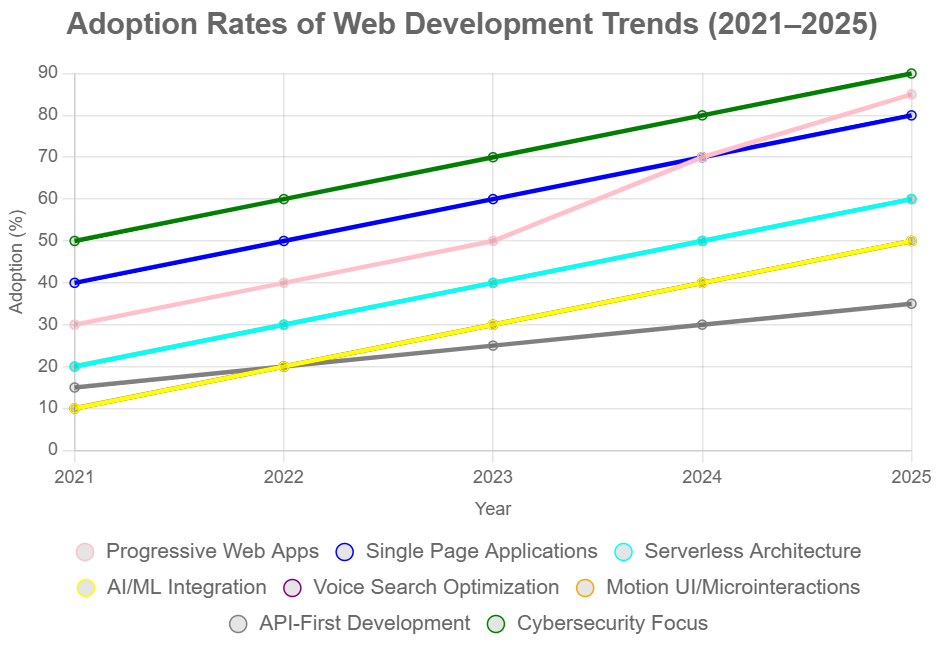
    Adoption rates of web development trends 2021–2025

    Impact of Web Development Trends on User Engagement
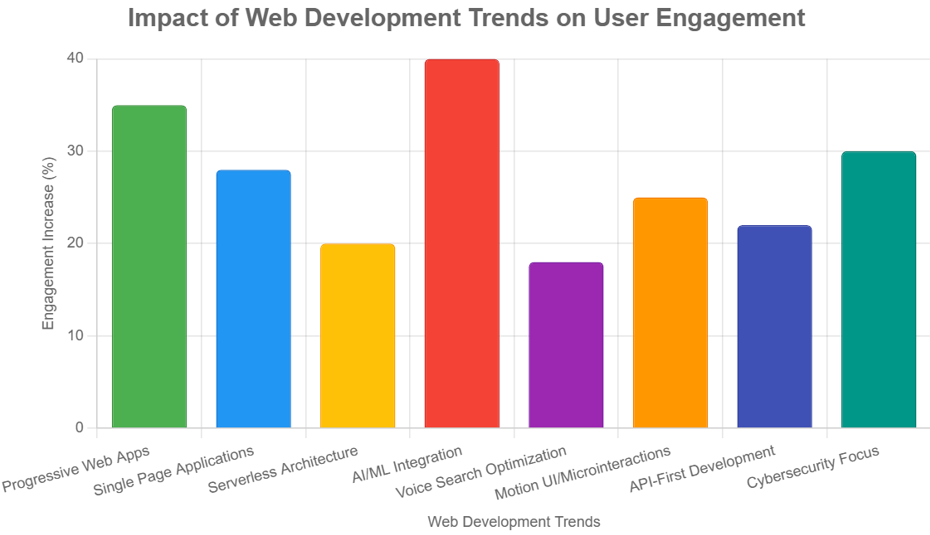
    Impact of web development trends on user engagement

    Implementing Web Development Trends for Business Growth

    Adopting the latest web development trends can significantly impact business growth, customer satisfaction, and brand reputation. Here are actionable steps for integrating these trends into a digital strategy.

    1. Assess Current Website Performance

    Begin by evaluating the current website’s performance, user experience, and security. Identify areas that require improvement and prioritize updates based on business goals.

    2. Prioritize Mobile-First and Responsive Design

    With the majority of users accessing websites via mobile devices, ensuring a mobile-first and responsive design is non-negotiable. Make use of frameworks such as Bootstrap or Tailwind CSS to enhance and expedite the development process.

    3. Integrate Progressive Web App Features

    Enhance the website with PWA features such as offline access, push notifications, and fast loading times. This not only improves user engagement but also boosts SEO rankings.

    4. Leverage AI and Automation

    Implement AI-powered chatbots for customer support, personalized content recommendations, and predictive analytics to gain insights into user behavior.

    5. Optimize for Voice Search

    Update website content to include conversational keywords, structured data, and FAQ sections to capture voice search traffic.

    6. Enhance Security Measures

    Regularly update software, implement SSL certificates, and conduct security audits to protect user data and maintain compliance with regulations.

    7. Adopt API-First Development

    Develop robust APIs to enable seamless integration with third-party services, mobile apps, and other digital platforms.

    8. Focus on Accessibility

    Ensure the website is accessible to all users, including those with disabilities. Adhere to WCAG standards and implement semantic HTML to enhance accessibility.

    Case Studies: Successful Adoption of Web Development Trends

    Case Study 1: E-Commerce Brand Implements PWA

    An e-commerce brand transitioned its website to a Progressive Web App, resulting in a 40% increase in mobile conversions and a 30% reduction in bounce rates. The ability to function offline, along with push notifications, ensured that users remained involved, even during periods of unreliable connectivity.

    Case Study 2: SaaS Company Leverages AI Chatbots

    A SaaS company integrated AI-powered chatbots to handle customer inquiries, reducing response times by 60% and increasing customer satisfaction scores. The chatbots also provided personalized product recommendations, boosting upsell opportunities.

    Case Study 3: Local Business Optimizes for Voice Search

    A local service provider optimized its website for voice search, leading to a 25% increase in organic traffic from voice-enabled devices. The addition of FAQ sections and schema markup improved visibility in voice search results.

    Future Outlook: What’s Next in Web Development?

    The future of web development promises even more innovation, with emerging technologies set to redefine digital experiences.

    1. WebAssembly (Wasm)

    WebAssembly enables high-performance applications to run in the browser, opening the door for complex games, video editing, and other resource-intensive tasks.

    2. Augmented Reality (AR) and Virtual Reality (VR)

    AR and VR are poised to revolutionize web experiences, particularly in e-commerce, education, and entertainment. Interactive 3D models and immersive environments will become more prevalent.

    3. Blockchain Integration

    Blockchain technology offers enhanced security, transparency, and decentralized applications. Its integration into web development will impact industries such as finance, supply chain, and healthcare.

    4. Low-Code and No-Code Platforms

    Low-code and no-code platforms empower non-developers to create and manage websites, accelerating digital transformation and reducing development costs.

    Conclusion

    Web development is an ever-evolving domain that consistently adjusts to new technological innovations and the shifting needs of users. By embracing the latest trends—such as Progressive Web Apps, AI integration, server less architecture, and voice search optimization—businesses can create engaging, secure, and high-performing websites that drive growth and foster customer loyalty.

    For organizations seeking to stay ahead in the digital landscape, partnering with a forward-thinking web development agency is essential. Ravens Digital specializes in leveraging cutting-edge technologies to deliver tailored web solutions that meet the unique needs of each client. Explore more at ravensdigital.com and take the next step toward digital excellence.

    Frequently Asked Questions

    What are the most important web development trends in 2024?

    Key trends include Progressive Web Apps, Single Page Applications, serverless architecture, AI integration, voice search optimization, motion UI, API-first development, and enhanced cybersecurity.

    How can businesses benefit from adopting these trends?

    Adopting modern web development trends leads to improved user engagement, higher conversion rates, better security, and a competitive edge in the digital marketplace.

    What is the ideal frequency for updating a website to remain aligned with current trends?

    Websites should be reviewed and updated at least annually to incorporate new technologies, improve performance, and address security vulnerabilities.

    Get Started with Ravens Digital

    Ready to transform your digital presence? Contact Ravens Digital for a consultation and discover how the latest web development trends can elevate your business. Visit ravensdigital.com for more information.
  • Top 10 Web Development Trends to Watch: Actionable Insights for 2025 and Beyond

    Top 10 Web Development Trends to Watch: Actionable Insights for 2025 and Beyond

    Table of Contents

    Top 10 Web Development Trends Shaping 2025 and Beyond

    The digital landscape is evolving at an unprecedented pace, and web development sits at the heart of this transformation. Businesses, entrepreneurs, and developers must stay ahead of the curve to deliver engaging, secure, and high-performing web experiences. Understanding the latest trends is essential for anyone looking to build or upgrade a website that stands out in a crowded online marketplace.
    This comprehensive guide explores the top 10 web development trends shaping the industry in 2025 and beyond. Each trend is explained in detail, supported by recent statistics and actionable steps to help businesses and developers implement these innovations effectively. Whether launching a new project or optimizing an existing site, these insights will empower decision-makers to create future-ready digital experiences.

    1. Progressive Web Apps (PWAs)

    What Are PWAs?

    By blending the advantages of web and mobile technology, Progressive Web Apps offer users speed, reliability, and seamless engagement directly in their browsers. PWAs work offline, load quickly, and can be installed on a user’s device without visiting an app store.

    Why PWAs Matter

    • According to Google, more than half (53%) of users leave a website if it takes over three seconds to load (Google).
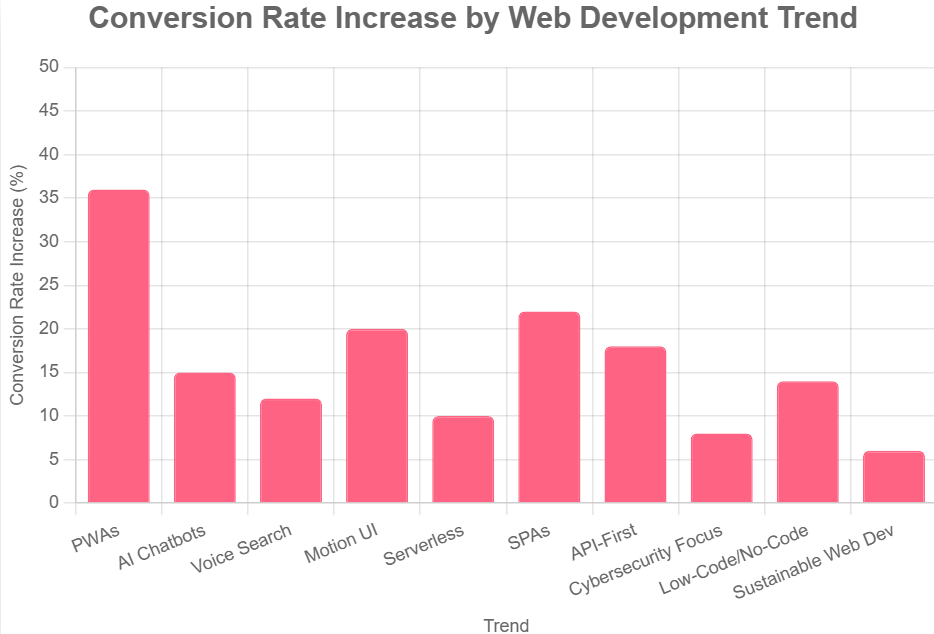
    • PWAs can increase conversion rates by up to 36% (Forrester).

    Actionable Steps

    • Audit your current website for speed and mobile responsiveness.
    • Use frameworks like React, Angular, or js to build PWA features.
    • Implement service workers for offline functionality.
    • Add a web app manifest for installability.

    2. Artificial Intelligence and Chatbots

    The Rise of AI in Web Development

    AI is transforming the way websites engage with their visitors. AI-powered chatbots provide instant support, answer queries, and guide users through the customer journey.

    Key Stats

    • 80% of businesses plan to use chatbots by 2025 (Business Insider).
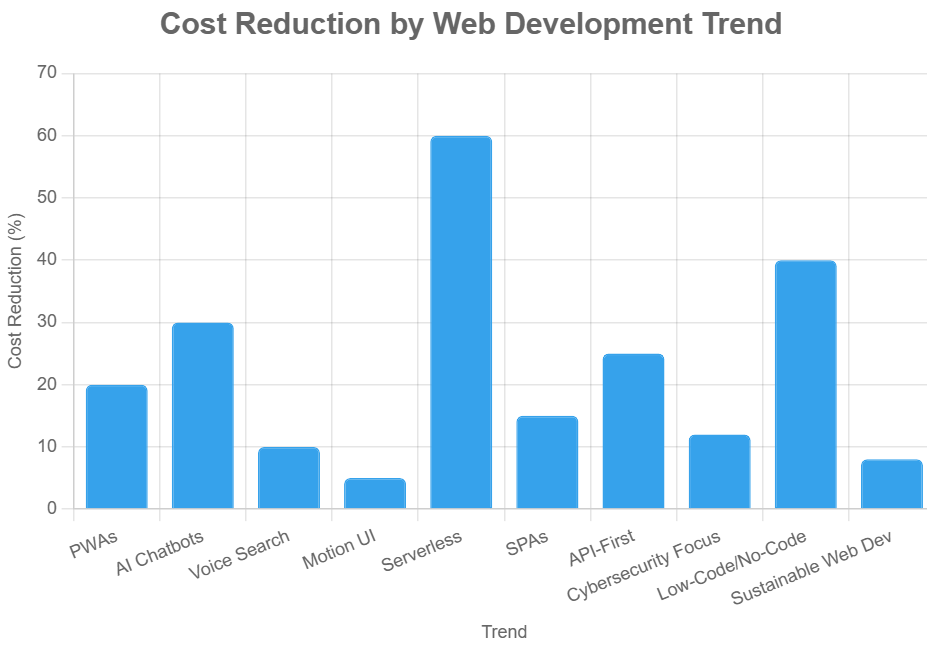
    • AI chatbots can reduce customer service costs by up to 30% (IBM).

    Actionable Steps

    • Integrate AI chatbots using platforms like Dialogflow or Microsoft Bot Framework.
    • Utilize frequently asked questions and customer information to instruct bots for tailored replies.
    • Monitor chatbot performance and update scripts regularly.

    3. Voice Search Optimization

    The Shift to Voice

    As smart speakers and voice assistants become increasingly widespread, it is essential to enhance websites for voice search optimization.  Voice queries are more conversational and often longer than typed searches.

    Key Stats

    • 58% of consumers use voice search to find local business information (Search Engine Watch).
    • By 2025, voice searches are expected to account for 50% of all online searches (Comscore).

    Actionable Steps

    • Use natural language and question-based keywords in content.
    • Optimize for featured snippets and local SEO.
    • Ensure website speed and mobile-friendliness.

    4. Motion UI and Microinteractions

    Enhancing User Engagement

    Motion UI employs animations and transitions to lead users, deliver responses, and craft unforgettable experiences. Microinteractions—small, interactive animations—make websites feel more dynamic and intuitive.

    Key Stats

    • 88% of users are more likely to stay on a site with engaging animations (Adobe).
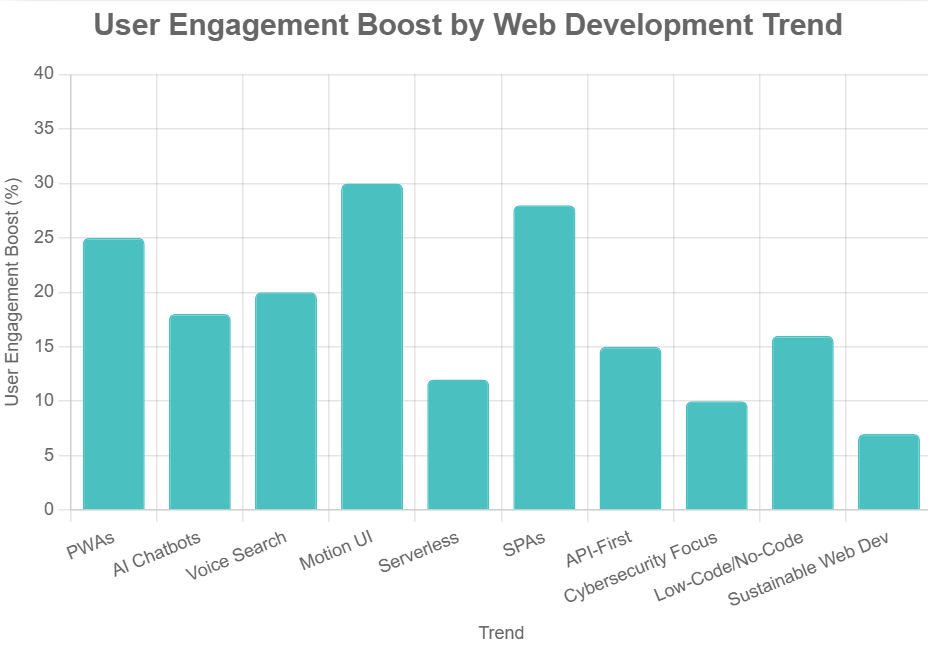
    • Websites with microinteractions see a 20% increase in user engagement (UX Collective).

    Actionable Steps

    • Incorporate subtle animations for buttons, menus, and loading indicators.
    • Use libraries like Framer Motion or GreenSock for advanced effects.
    • Test animations for performance and accessibility.
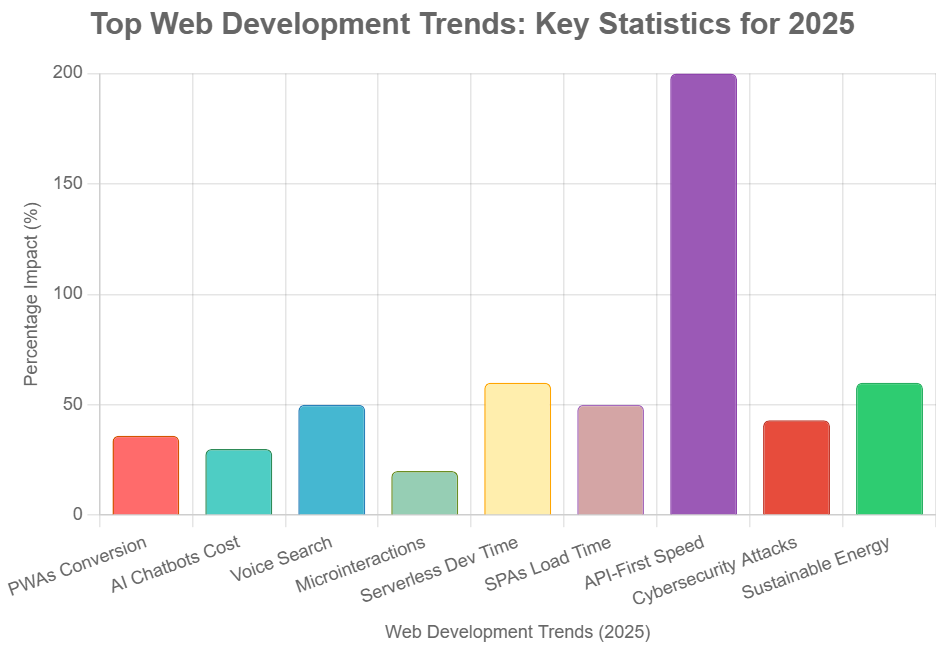
    Bar chart "Top Web Development Trends: Key Statistics for 2025" showing percentage impact of PWAs, AI Chatbots, Voice Search, and more. API-First Speed hits 200%, others range 20-60%, with unique colors.

    5. Serverless Architecture

    What Is Serverless?

    With serverless architecture, applications can be developed and deployed without the burden of server management. Cloud providers handle scaling, maintenance, and security, enabling faster development and reduced costs.

    Key Stats

    • The serverless market is projected to reach $21.1 billion by 2025 (MarketsandMarkets).
    • Companies adopting serverless report a 60% reduction in development time (O’Reilly).

    Actionable Steps

    • Consider adopting serverless technologies such as AWS Lambda, Microsoft Azure Functions, or Google Cloud Functions.
    • Identify parts of your application that can be offloaded to serverless functions.
    • Monitor usage and optimize for cost efficiency.

    6. Single Page Applications (SPAs)

    The SPA Advantage

    Single Page Applications load a single HTML page and dynamically update content as users interact. This approach delivers faster, app-like experiences and reduces server load.

    Key Stats

    • SPAs can improve page load times by up to 50% (Google Developers).
    • 67% of developers prefer SPAs for new projects (Stack Overflow).

    Actionable Steps

    • Use frameworks like React, Angular, or Vue.js to build SPAs.
    • Implement client-side routing for seamless navigation.
    • Optimize for SEO using server-side rendering or pre-rendering.

    7. API-First Development

    Building for Integration

    In API-first development, the focus is on designing strong APIs before constructing the frontend. This approach enables seamless integration with third-party services, mobile apps, and IoT devices.

    Key Stats

    • 83% of web traffic is API-driven (Akamai).
    • Companies using API-first strategies launch products 2x faster (Postman).

    Actionable Steps

    • Design RESTful or GraphQL APIs with clear documentation.
    • Use tools like Swagger or Postman for testing and collaboration.
    • Ensure APIs are secure, scalable, and versioned.
    Person typing on laptop with "Development" workflow (Problem Solving, Analysis, Planning) on screen, desk with charts and water glass.

    8. Cybersecurity and Privacy

    The Security Imperative

    With cyber threats on the rise, robust security measures are non-negotiable. Users expect privacy and data protection as standard.

    Key Stats

    • 43% of cyber attacks target small businesses (Verizon).
    • 85% of consumers won’t do business with a company if they have concerns about its security practices (PwC).

    Actionable Steps

    • Implement SSL certificates and HTTPS.
    • Use secure authentication (OAuth, 2FA).
    • Regularly update software and monitor for vulnerabilities.
    • Comply with privacy regulations like GDPR and CCPA.

    9. Low-Code and No-Code Development

    Democratizing Web Development

    Low-code and no-code platforms empower non-developers to build websites and applications using visual interfaces. This accelerates digital transformation and reduces reliance on specialized talent.

    Key Stats

    • The low-code market is expected to reach $65 billion by 2027 (Forrester).
    • Gartner predicts that by 2025, 70% of new business applications will be built using low-code or no-code platforms.(Gartner).

    Actionable Steps

    • Evaluate platforms like Webflow, Bubble, or Wix for rapid prototyping.
    • Train team members on using visual development tools.
    • Integrate low-code solutions with existing systems via APIs.

    10. Sustainable Web Development

    Building for the Planet

    Eco-friendly web development prioritizes minimizing the ecological footprint of websites. Efficient coding, green hosting, and optimized assets contribute to lower energy consumption.

    Key Stats

    • The internet accounts for 3.7% of global greenhouse emissions (The Shift Project).
    • Optimizing images and code can reduce website energy use by up to 60% (Website Carbon Calculator).

    Actionable Steps

    • Optimize images, videos, and code for faster load times.
    • Choose eco-friendly hosting providers.
    • Minimize third-party scripts and unnecessary plugins.

    Educate users and stakeholders about digital sustainability.

    Visualizing the Trends: Charts and Stats

    Bar chart "Conversion Rate Increase by Web Development Trend" with PWAs at 35%, others 5-25%, pink bars.
    Bar chart "Cost Reduction by Web Development Trend" with Serverless at 60%, others 5-30%, blue bars.
    Bar chart "User Engagement Boost by Web Development Trend" with Serverless at 35%, Motion UI at 30%, others 5-25%, teal bars.

    Action Plan: Implementing the Top Web Development Trends

    1. Assess Current Website:

    Perform a thorough assessment to pinpoint opportunities for enhancement and embrace emerging trends.

    2. Prioritize Trends Based on Business Goals:

    Align trend adoption with strategic objectives such as user engagement, cost reduction, or sustainability.

    3. Develop a Roadmap:

    Create a phased plan to implement selected trends, starting with quick wins and moving to more complex initiatives.

    4. Invest in Training and Tools:

    Upskill teams and invest in the necessary frameworks, platforms, and security measures.

    5. Monitor and Optimize:

    Track performance metrics, gather user feedback, and iterate to maximize the impact of each trend.

    Case Studies: Real-World Impact

    Case Study 1: Retailer Adopts PWAs and AI Chatbots

    A leading online retailer implemented a Progressive Web App and integrated an AI-powered chatbot. The result was a 28% increase in mobile conversions and a 40% reduction in customer service response times.

    Case Study 2: Service Provider Embraces Voice Search and Motion UI

    A local service provider optimized its website for voice search and added microinteractions. Organic traffic grew by 22%, and average session duration increased by 35%.

    Case Study 3: SaaS Startup Goes Serverless and API-First

    A SaaS startup migrated to a serverless architecture and adopted an API-first approach. Development cycles shortened by 50%, and the platform scaled seamlessly during peak demand.

    Frequently Asked Questions

    How can businesses choose which web development trends to adopt?

    Evaluate trends based on business goals, target audience, and available resources. Conduct a comprehensive evaluation to identify areas for improvement and adopt new trends as they arise.

    Are these trends suitable for small businesses?

    Absolutely. Many trends, such as low-code development and PWAs, are accessible and cost-effective for small businesses.

    What is the recommended frequency for updating a website to ensure it remains up-to-date?

    Regular updates are essential. Review and refresh your website at least quarterly, and monitor emerging trends annually.

    What is the biggest risk of ignoring web development trends?

    Falling behind competitors, losing user engagement, and exposing your business to security vulnerabilities.

    Conclusion

    The field of web development is continually evolving, bringing forth fresh trends each year. Staying informed and taking action on these trends is essential for businesses aiming to deliver exceptional digital experiences, drive growth, and maintain a competitive edge. From Progressive Web Apps and AI chatbots to sustainable web development, each trend offers unique opportunities to innovate and connect with users in meaningful ways.

    For expert guidance and tailored web solutions, visit ravens digital. Embrace the future of web development and position your business for long-term success.

  • Taking Action to Build Your Business Website: A Blueprint for Success with Ravens Digital

    Taking Action to Build Your Business Website: A Blueprint for Success with Ravens Digital

    Table of Contents

    Build Your Website. Grow Your Business

    In the digital age of 2025, your business website is not just a virtual storefront—it’s the engine driving your growth. With global e-commerce sales projected to reach $4.32 trillion this year, businesses without a high-performing online presence are missing out on unprecedented opportunities. At Ravens Digital, we don’t just create websites; we craft digital ecosystems that deliver measurable results, helping brands like Nike, Disney, and Salesforce dominate their markets. This article guide to taking decisive action to build or revamp your business website. Packed with actionable steps, real-world success stories, and data-driven insights—including a detailed chart and table—we’ll show you why partnering with Ravens Digital is the key to unlocking your business’s full potential.

    This isn’t about theoretical advice; it’s about empowering you to act now. Your competitors are already leveraging the 71% of small businesses with websites to fuel faster growth. Don’t let them take the lead. Let’s dive into why a website is critical, how to build one that converts, and why Ravens Digital is your ultimate partner.

    Why Your Business Website is Non-Negotiable in 2025

    The digital landscape is evolving rapidly, and a website is your business’s foundation for success. In 2025, 28% of all business activity occurs online, and this share is growing steadily. Yet, 28% of small businesses still lack a website, leaving them invisible to the 99% of consumers who search for local businesses online. For those with a website, the payoff is clear: 81% of U.S. small businesses report that their website has directly contributed to growth, enabling them to reach broader audiences and convert visitors 24/7.

    The mobile revolution amplifies the stakes. By mid-2025, mobile devices are projected to account for 64.35% of global website traffic, a significant increase from 59.7% earlier in the year. However, a significant challenge remains: over half (53%) of mobile users abandon sites that take longer than three seconds to load, directly impacting conversion rates. Businesses with mobile-optimized sites see up to 62% higher sales post-optimization. Meanwhile, e-commerce continues its meteoric rise, with global retail e-commerce sales expected to hit $8.3 trillion in 2025, even with slight economic deceleration.

    At Ravens Digital, we’ve seen this firsthand. Our client, Michael R., CEO of an e-commerce brand, saw a 150% revenue surge in just three months after we overhauled their site. The message is clear: a website isn’t optional—it’s your digital HQ, and the time to act is now.

    The ROI of a Professional Website: Key Statistics

    A professional website delivers tangible returns across sales, visibility, and credibility. To illustrate, here’s a breakdown of critical stats that highlight the impact of a well-crafted site:

    Metric

    Statistic

    Source

    E-commerce Sales Growth

    Global e-commerce sales to reach $4.32 trillion in 2025

    [48]

    Small Business Website Adoption

    71% of small businesses have a website, driving faster growth

    [39, 26]

    Organic Search Traffic

    53.3% of web traffic comes from organic search

    [61]

    Mobile Traffic Share

    64.35% of global website traffic is mobile as of mid-2025

    [67]

    Mobile Load Time Impact

    53% of mobile visits abandoned if load time exceeds 3 seconds

    [8]

    Conversion Rate Boost

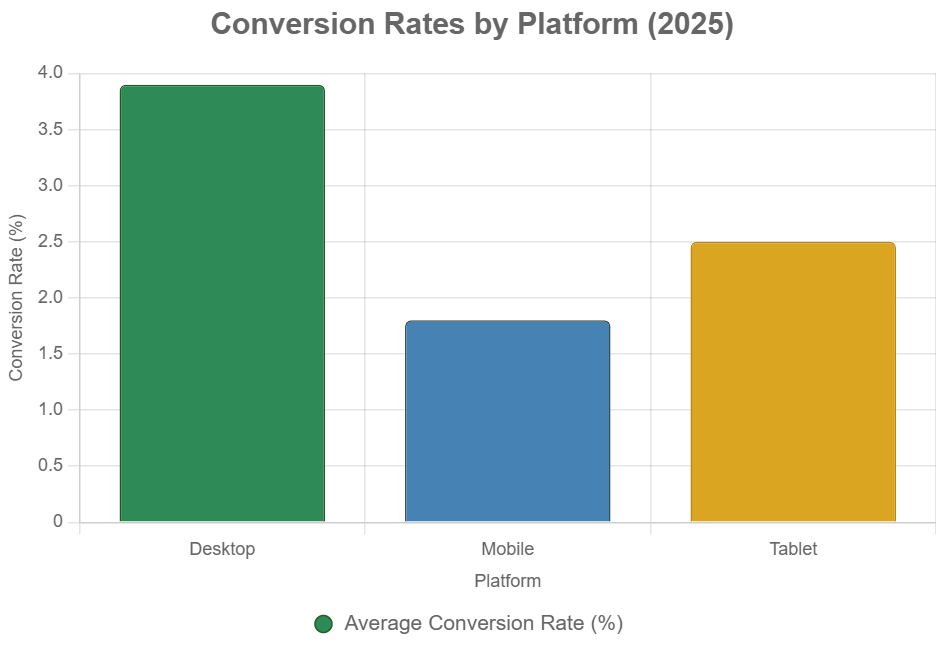
    Optimized sites see 2-4% conversion rates, with desktops at 3.9%, mobile 1.8%

    [30, 36]

    SEO Impact

    A strong 91% of marketers say SEO improves website performance.

    [59]

    Credibility via Design

    75% of consumers judge business credibility by website design

    [12]

    Live Chat ROI

    79% of businesses with live chat see improved sales and loyalty

    [28]

    This chart illustrates the impact of website optimization on conversion rates across various platforms.

    Bar chart comparing conversion rates across desktop, mobile, and tablet platforms.

    This chart underscores the importance of optimizing for all devices, particularly mobile, where conversion rates lag but hold massive potential. At Ravens Digital, we ensure your site maximizes these metrics, driving conversions and revenue.

    Your Action Plan: Building a High-Performance Website

    Ready to take the leap? Below is a step-by-step guide to building a website that delivers results, designed for immediate action and aligned with 2025 trends.

    Step 1: Audit Your Current Digital Footprint

    Start by evaluating your existing online presence. If you’re among the 28% of small businesses without a site, prioritize creation. For those with a site, use tools like Google Analytics to assess traffic, bounce rates, and conversions. A common issue we find is that 70% of small business websites lack clear calls-to-action (CTAs), undermining conversions. Our team at Ravens Digital conducts thorough audits to identify and fix such gaps, ensuring your site is primed for success.

    Step 2: Set Clear, Measurable Goals

    Define what your website needs to achieve—sales, leads, or brand authority. Data guides us here: e-commerce sites average 2-4% conversion rates, but strategic optimization can push this higher. Organic search, accounting for 53.3% of all traffic, makes SEO an indispensable cornerstone. At Ravens Digital, we align your goals with data-driven strategies, ensuring every element of your site serves a purpose.

    Step 3: Invest in Responsive Design and UI/UX

    With 64% of traffic coming from mobile devices, responsive design is critical. A positive user experience (UX) is crucial; 72% of users share good experiences with five or more people, significantly expanding your reach. Avoid DIY solutions; while 32% of small businesses build their own sites, professional designs yield superior ROI. We specialize in minimalist, user-centric designs that engage and convert.

    Step 4: Embed SEO from the Ground Up

    SEO isn’t an afterthought—it’s foundational. Since 68% of online experiences begin with a search engine, and 91% of marketers report SEO’s positive impact, optimization is non-negotiable. Fast-loading sites retain 47% more visitors, so we prioritize speed alongside keyword strategies. Our client, Sarah L., saw a 300% organic traffic increase after we optimized their site for SEO.

    Step 5: Incorporate Conversion-Driven Features

    Features like live chat (boosting loyalty by 79%), targeted PPC landing pages, and compelling content are essential. Google Ads conversions average 7.52%, but our PPC campaigns consistently outperform, as seen with Emily R., who doubled leads while halving ad costs. We integrate these elements seamlessly to maximize ROI.

    Step 6: Launch, Monitor, and Optimize

    Launch your site, but don’t stop there. Use analytics to track performance and iterate. A/B testing can improve conversions by up to 30%. Our team monitors KPIs like traffic sources (53.3% organic) and conversion rates, ensuring continuous improvement.

    Pitfalls to Avoid When Building Your Website

    Building a website without a strategy can backfire. Here are common mistakes and how Ravens Digital sidesteps them:

    • Ignoring Mobile Optimization: With 64% of traffic from mobile, unoptimized sites lose 53% of visitors. We ensure responsive designs across all devices.
    • Neglecting SEO: Missing out on 53.3% of organic traffic is a death knell. Our SEO strategies keep you visible.
    • Poor UX Design: 88% of users won’t return after a bad experience. Our UI/UX expertise ensures intuitive navigation.
    • Weak CTAs: 70% of small business sites lack clear CTAs. We embed compelling CTAs to drive action.
    • Overlooking Security and Speed: Slow or insecure sites deter users. We prioritize speed (under 3 seconds) and robust security.

    Why Choose Ravens Digital?

    At Ravens Digital, we are not just an agency; we are your growth partner. Our services—Design & Development, SEO, PPC, Digital Marketing, Online Reputation Management, and Content Writing—are tailored to deliver results. Trusted by industry giants like J.P. Morgan, Chanel, and Airbnb, we’ve earned our reputation through proven outcomes.

    Our clients’ success stories highlight our impact:

    • Michael R., CEO, E-Commerce Brand: “Ravens Digital transformed our business! Revenue soared by 150% in three months with their data-driven strategies.”
    • Sarah L., Marketing Director, SaaS Company: “From buried in search results to dominating Google’s first page with a 300% traffic increase.”
    • James W., Founder of a Tech Startup, declared, “Best decision we made—now we lead search rankings.”
    • Emily R., Marketing Director at a Digital Agency, achieved significant results: Leads doubled, and ad costs were cut in half. They turn clicks into customers.”
    • Focus on the action and result: “Benjamin R., a Marketing Strategist at Growth Hub, revolutionized our marketing by optimizing ad spend.”
    • Alexander T., Business Consultant, Enterprise Solutions: “A game-changer for attracting customers while reducing costs.”

    Our approach combines data-driven precision with creative firepower, ensuring your site doesn’t just exist—it dominates.

    Real-World Impact: Ravens Digital’s Success Stories

    Consider our e-commerce client who struggled with low conversions. After a mobile-optimized, SEO-driven site revamp, they saw a 150% revenue increase, aligning with the 62% sales boost from responsive designs. A SaaS company we worked with went from obscurity to Google’s first page, achieving a 300% traffic surge. A tech startup leveraged our PPC expertise to double leads while cutting costs, mirroring industry trends where optimized campaigns maximize ROI.

    These results aren’t outliers—they’re what we deliver consistently, leveraging 2025 trends like AI personalization and voice commerce, which are reshaping how consumers interact online.

    Take the Leap with Ravens Digital

    The data is undeniable: with e-commerce projected at $7.4 trillion in 2025 and 73% of small businesses leveraging websites for growth, you can’t afford to wait. Your website is your best salesperson, working 24/7 to drive conversions, build credibility, and dominate your market.

    Partner with Ravens Digital to transform your online presence into a revenue-generating powerhouse. Visit https://ravensdigital.com/ and use our support chat or contact form to get started. Your competitors are moving—don’t let them redefine your market. Let’s build your digital empire together.

  • Understanding the Role of a Website in Your Business Strategy

    Understanding the Role of a Website in Your Business Strategy

    Table of Contents

    Why Your Business Website Matters More Than Ever

    In today’s digital-first world, your website is far more than a static online presence. It is the foundation of your brand’s digital identity, the central hub for customer interaction, and one of the most powerful assets in your overall business strategy. Whether you’re a startup, a local business, or an established enterprise, understanding the role of a website in your business strategy is not optional — it’s essential.

    A strategically developed website can increase your brand’s visibility, build trust with customers, capture leads, drive conversions, and offer ongoing support. From design and user experience to SEO and conversion optimization, each element of your website plays a vital role in shaping how customers engage with your brand.

    At Ravens Digital, we specialize in crafting purpose-driven websites that go beyond aesthetics. We build digital platforms designed to meet business goals and deliver measurable results.

    Section 1: The Website as Your Business’s Digital Headquarters

    Your Website Is Your First Impression

    Usually, the first place potential customers go to discover information about your business is your website. It’s your digital storefront — open 24/7, accessible from anywhere, and capable of influencing decisions in mere seconds.

    An outdated, slow, or non-mobile-friendly website will likely cause visitors to leave before reading anything. On the other hand, a well-designed, user-friendly website immediately builds credibility and gives users a reason to stick around.

    Your Website: Beyond Just Marketing.

    Your website isn’t just a marketing tool — it’s an operational asset. It can:

    • Handle customer service via chatbots or help centers
    • Offer eCommerce capabilities to process transactions
    • Act as a recruiting platform with job boards
    • Provide educational content to train clients or partners
    • Serve as a reporting hub with dashboards for customers or internal teams

    Whether you’re collecting leads, managing orders, publishing blog content, or distributing information, your website is the platform where it all happens.

    Business strategy enhanced through an effective website

    Section 2: Key Strategic Roles a Website Plays in Business

    1. Branding and Positioning

    Your website sets the tone for your brand. Through color schemes, typography, voice, and design, your website tells users what kind of business you are and what they can expect from you. Branding consistency across your homepage, service pages, blog posts, and calls to action helps establish trust and authority.

    A website that effectively communicates your brand:

    • Highlights your Unique Value Proposition (UVP)
    • Reinforces your mission and values
    • Positions you competitively in the marketplace

    2. Lead Generation and Conversion

    The best websites don’t just inform — they convert. This means converting visitors into leads and then into paying customers. Effective lead generation tools embedded within your site include:

    • Contact forms
    • Newsletter signups
    • Free downloadable resources
    • Webinars or appointment bookings
    • Chatbots that qualify prospects

    Optimizing your website with the right funnel structure and compelling CTAs (Calls-to-Action) can significantly boost your lead conversion rate.

    3. Sales Enablement

    Your website is a silent salesperson that works around the clock. It can:

    • Showcase products or services through visual demos
    • Provide detailed pricing or value-based packages
    • Offer customer testimonials and case studies
    • Host a knowledge base or FAQ to reduce objections

    Well-designed product/service pages paired with persuasive copy and trust signals help your website close more deals.

    4. Data Collection and Customer Insights

    Modern websites come equipped with tools for tracking user behavior. From Google Analytics to heatmaps and CRM integration, you can analyze:

    • Visitor demographics and locations
    • Time spent on page and bounce rates
    • Conversion paths and drop-off points

    This data helps you improve UX, identify what content resonates, and make informed decisions about marketing, sales, and product development.

    Section 3: Integrating the Website with Broader Business Objectives

    Aligning Website Goals with Business Goals

    A website that isn’t aligned with your business goals can easily become a vanity project — pretty to look at, but ineffective.

    Start with clarity around your business objectives:

    • Want to increase online sales? Optimize your product pages and checkout process.
    • Looking to boost local visibility? Prioritize local SEO and Google Maps
    • Trying to educate prospects? Build out a robust blog and learning center.

    When your website is purpose-built to support business priorities, it becomes a revenue-generating asset.

    Website as Part of the Customer Journey

    Your website should support all stages of the customer journey:

    • Awareness Stage – Blog posts, infographics, and landing pages help attract attention.
    • Consideration Stage – Comparison charts, testimonials, and downloadable guides support research.
    • Decision Stage – Clear pricing, compelling CTAs, and trust signals drive conversions.
    • Post-Purchase Stage – Account portals, FAQs, and feedback forms help with retention and satisfaction.

    Mapping your site content to this funnel ensures users are guided from curiosity to commitment.

    Integrating with Your Tech Stack

    To maximize effectiveness, your website should integrate with other tools in your business ecosystem:

    • CRM (Customer Relationship Management) platforms like HubSpot or Salesforce
    • Marketing Automation tools like Mailchimp, ActiveCampaign, or Klaviyo
    • eCommerce Platforms like Shopify or WooCommerce
    • Analytics Tools like Google Analytics or Hotjar
    • Scheduling & Booking Tools like Calendly or Acuity

    Integrations turn your website into a connected system that streamlines operations, automates tasks, and enhances marketing precision.

    Section 4: Core Features of a Business-Ready Website

    Here’s what every strategically designed business website must include:

    1. Mobile Responsiveness

    Mobile devices account for over 60% of web traffic. A mobile-friendly design ensures that your content is accessible and engaging across all screen sizes.

    2. Fast Load Times

    Speed is essential for both UX and SEO. Google considers site speed as a ranking factor, and users expect pages to load in under 3 seconds.

    3. Search Engine Optimization (SEO)

    Optimizing for search is a must. SEO-friendly sites are built with:

    • Keyword-optimized content
    • Structured data/schema markup
    • Clean URL structures
    • Meta titles and descriptions
    • Fast and secure hosting (HTTPS)

    4. Security

    Website security is non-negotiable. SSL certificates, firewalls, and routine updates protect user data and build customer trust.

    5. Accessible Design

    Your site should meet WCAG accessibility standards, ensuring that it can be used by everyone, including those with disabilities.

    6. Content Management System (CMS)

    A scalable CMS like WordPress allows you to easily update content, add blog posts, or launch new pages without relying on developers for every change.

    Section 5: Common Business Website Types and Their Strategic Use

    Different businesses require different types of websites. Every component has a distinct purpose within a strategic plan.

    Informational Websites

    For consultants, service providers, and local businesses — these websites highlight expertise, provide contact info, and build trust.

    eCommerce Websites

    Retail and product-based businesses use online stores to sell directly to consumers. Integrated inventory, payment gateways, and CRM make these powerhouses of digital sales.

    Portfolio Websites

    Ideal for creatives like designers, photographers, or writers. These sites showcase past work and include inquiry forms or direct booking.

    SaaS or App-Based Platforms

    Software companies often rely on websites to offer demos, signups, documentation, and subscription management.

    Landing Pages and Microsites

    Used for targeted campaigns or product launches, these are conversion-focused and often tied to paid advertising efforts.

    Website driving business growth and strategic success

    Section 6: Real Business Benefits from a Strategic Website

    Let’s summarize the key benefits a well-designed website brings to your business:

    • Brand Awareness – A professional online presence makes your brand discoverable and memorable.
    • Customer Trust – A clean design, secure browsing, and clear messaging boost credibility.
    • Sales and Revenue – Optimized sales funnels and eCommerce capabilities drive direct conversions.
    • Cost Savings – Automating services like booking, FAQs, and support reduces manual workload.
    • Marketing Reach – Integrated with SEO and PPC, your website becomes a marketing engine.
    • Scalability – Easily add features or expand services without rebuilding from scratch.
    • Analytics and Data – Monitor behavior and optimize your strategy with real-time data insights.

    Section 7: What Sets Ravens Digital Apart

    At Ravens Digital, we don’t just build websites — we craft digital growth platforms that align with your long-term business strategy. Our process includes:

    1. Discovery & Research – Through discovery and research, we understand your goals, audience, and competitive landscape.
    2. Strategy-First Design – Every design decision is based on achieving business outcomes.
    3. Custom Development – No cookie-cutter templates. We build what your business needs.
    4. SEO & Speed Optimization – You get a site that looks great and performs in search.
    5. Ongoing Support – We help you grow, improve, and evolve your platform over time.

    Whether you’re a local business looking to increase leads or an enterprise brand building digital infrastructure, we can help you build a website that becomes a strategic asset — not just a brochure.

    Conclusion:

    In 2025 and beyond, a modern, strategically designed website is essential, not optional. Your website is your business card, storefront, salesperson, customer service rep, and data analyst all rolled into one.

    Treating your website as a living part of your business strategy — something that evolves with your goals — is how brands thrive in a competitive, digital-first marketplace.

    If you’re ready to transform your online presence into a revenue-driving engine, Ravens Digital is here to help.

  • Why Every Business Needs a Website: The Digital Foundation for Growth and Credibility

    Why Every Business Needs a Website: The Digital Foundation for Growth and Credibility

    Table of Contents

    The Website Every Business Must Have

    In our profoundly interconnected world, the primary concern is no longer whether one needs a website—it’s “Why don’t I have one yet?”

    Whether you’re a local business owner, a startup founder, or the head of a growing company, having a website is not a luxury—it’s a necessity. Yet, thousands of businesses still operate without one, losing out on visibility, customers, credibility, and revenue every single day.

    At Ravens Digital, we specialize in helping businesses across industries design and develop custom websites that generate leads, establish trust, and fuel long-term success. This article breaks down, in simple and clear terms, why every business—big or small—needs a website and how it can be the single most powerful tool in your marketing and growth toolkit.

    What Is a Business Website (and What Should It Do)?

    Your business website is your company’s digital storefront, open 24/7. It’s the online space where customers can learn about what you offer, why you’re the best choice, and how to take action (contact you, book a service, make a purchase, etc.).

    But a truly effective website delivers results. It should:

    • Reflect your brand identity
    • Explain your products or services
    • Attract new customers through search engines
    • Build trust through professional design
    • Convert visitors into leads or sales

    Whether you’re offering HVAC repairs, running a salon, managing an eCommerce store, or providing consulting services, your website is your home base in the digital world—and every business needs one.

    Digital growth through business website

    The Modern Business Landscape: Why a Website Matters More Than Ever

    More than 80% of consumers now research a business online before making a decision.

    So what happens when they look for you—and find nothing?

    In an age where smartphones are within arm’s reach 24/7, and where the customer journey often begins with a Google search, having no website makes your business practically invisible. Social media alone won’t cut it. And relying on word of mouth or foot traffic is like fishing in a puddle when you could have an entire ocean.

    Let’s explore the major reasons why having a website is essential for every business—and why waiting any longer is costing you.

    1. Visibility: Be Where Your Customers Are Looking

    “If you’re not online, you don’t exist.”

    Most customer journeys today begin on search engines like Google or Bing. Whether someone is searching for “plumbers near me,” “best coffee in town,” or “custom t-shirt design,” they’re looking online.

    If you don’t have a website:

    • You’re not showing up in search results.
    • You’re missing out on thousands of potential local and global leads.
    • Your competitors who do have websites are winning your customers.

    Even a simple, well-structured website built by Ravens Digital can position your brand to rank higher in local SEO, Google Maps, and organic search—putting you in front of the people who are actively looking for you.

    2. Credibility: First Impressions Are Now Digital

    “Would you trust a business without a sign, phone number, or storefront?”

    In 2025, your website is often your customer’s first impression. A well-designed, mobile-responsive website communicates:

    • Professionalism
    • Legitimacy
    • Stability
    • Trustworthiness

    On the other hand, having no website (or a poorly designed one) makes you seem outdated—or worse, untrustworthy. Studies show that 75% of consumers judge a business’s credibility based on its website design.

    At Ravens Digital, we create websites that don’t just look good—they build trust instantly with clean layouts, fast loading speeds, and content that answers your audience’s questions.

    3. Control: Your Brand, Your Way

    “Social media can vanish overnight. Your website is yours forever.”

    Many small businesses rely entirely on Facebook, Instagram, or TikTok for their digital presence. But these platforms:

    • Change algorithms constantly
    • Limit your content reach
    • Can suspend your account without warning
    • Don’t give you control over design or structure

    Your website is the one platform where you have full control. You decide:

    • What information to showcase
    • How your brand is presented
    • How people contact you
    • What the user journey looks like

    And unlike social media, your website can’t be taken away by someone else’s policy update. It’s a long-term investment in digital independence.

    4. Marketing: Your Website Is the Hub for All Campaigns

    “Every marketing strategy points back to your website.”

    Whether you’re running Google Ads, Facebook campaigns, email marketing, or SEO, all traffic needs a central destination—and that’s your website.

    Without one, your marketing efforts:

    • Lose impact
    • Lack consistency
    • Can’t convert leads effectively

    A strong website built by Ravens Digital integrates seamlessly with your marketing efforts. It’s where you send traffic, capture leads with forms, offer downloadable content, promote discounts, and track conversions.

    Consider it your digital headquarters; without it, your marketing efforts become disjointed and less impactful.

    5. Sales: Your 24/7 Salesperson

    “Your website works while you sleep.”

    A great website doesn’t just inform—it sells.

    Whether you have an eCommerce shop or offer professional services, your website can:

    • Accept payments and bookings
    • Generate leads through CTAs and forms
    • Educate prospects with FAQs and service breakdowns
    • Guide users through a sales funnel

    Unlike a physical store or team member, your website never takes breaks. It’s a 24/7 lead generator that scales with your business.

    With features like contact forms, chatbots, product galleries, and online booking—Ravens Digital websites are built for sales performance.

    6. Customer Service: Answer Questions Before They Ask

    “An informative website reduces support burden.”

    One overlooked benefit of having a website is reducing the time spent answering repetitive questions. By including:

    • FAQs
    • Contact info
    • Product/service explanations
    • Customer guides
    • Appointment booking tools

    …you give your customers what they need without tying up your phone lines or inbox.

    You can even integrate automated tools like chatbots, contact forms, and knowledge bases to streamline support—improving customer satisfaction while saving your team time

    7. Analytics: Know Your Customers Better

    “You can’t improve what you don’t measure.”

    When you have a website, you also gain access to powerful insights like:

    • Where your traffic is coming from
    • Which pages are most visited
    • What keywords bring users in
    • How long people stay on your site
    • What content converts best

    With tools like Google Analytics, Hotjar, or HubSpot, you can fine-tune your content, marketing, and customer journey based on real user data—not guesswork.

    At Ravens Digital, we help our clients set up analytics dashboards so they can measure success and improve ROI.

    8. Scalability: Grow Without Limits

    “Your website grows with your business.”

    Unlike a physical space, your website is infinitely scalable. As your business grows, you can:

    • Add new service pages
    • Expand into eCommerce
    • Launch new locations with dedicated landing pages
    • Offer online appointments
    • Integrate CRM or email marketing tools

    Your website adapts to your business’s evolution—and becomes a central pillar of growth.

    Ravens Digital offers custom, scalable website solutions designed to evolve as your needs do.

    9. Competitive Advantage: Stay Ahead, Not Behind

    “No website? Your competitor wins”

    In any industry, customers compare businesses. If they’re choosing between a company with a fast, polished website and one with nothing online—guess which one earns their trust?

    Having a website puts you ahead of businesses that haven’t adapted. It helps you:

    • Build a stronger brand
    • Appear in search results
    • Communicate value clearly
    • Convert visitors into leads or buyers

    And if your competitors already have websites? You need one that’s better, faster, and more persuasive—and Ravens Digital can help you make that happen.

    10. Affordability: It Costs Less Than You Think

    “A great website offers incredible ROI.”

    The idea that building a website is expensive is a common myth. But in 2025, creating a high-performance website is more accessible and affordable than ever.

    With services like those offered by Ravens Digital, you can get:

    • Custom design that matches your brand
    • Built-in SEO foundations
    • Mobile responsiveness
    • Hosting and support
    • Performance optimization

    …all at a price point that makes sense for your business size and goals.

    Even better—your website becomes a revenue-generating asset, not just a cost.

    What If You Already Have a Website?

    If you already have a website but it’s outdated, slow, or not delivering results—it’s time for an upgrade.

    Ask yourself:

    • Is your site mobile-friendly?
    • Is it optimized for search engines?
    • Does it clearly explain what you do?
    • Is it fast, secure, and easy to navigate?
    • Is it bringing in leads or sales?

    If the answer is “no” to any of the above, Ravens Digital can help you revamp or rebuild it from the ground up—tailored to your audience, industry, and goals.

    How Ravens Digital Helps Businesses Thrive Online

    At Ravens Digital, we don’t just build websites—we create digital growth engines.

    Our process includes:

    1. Strategy & Discovery

    We thoroughly understand your goals, audience, and brand to create a successful plan.

    2. Custom Design

    We build mobile-responsive, conversion-focused designs that look great and load fast.

    3. Development & Optimization

    From CMS integration to SEO best practices, we handle all the tech.

    4. Launch & Support

    We don’t disappear after launch. We offer ongoing updates, optimization, and support.

    Whether you’re launching your first site or need a redesign that finally delivers results, we’re your partner in digital transformation.

    Final Thoughts: Your Website Is Your Future

    In a world driven by digital discovery, your website is your single most important business asset. It’s your salesperson, your storefront, your reputation, your lead generator—and your growth multiplier.

    If your business doesn’t have a website, it’s not just missing an opportunity—it’s leaving money on the table.

    Don’t wait another day to make your business visible, credible, and scalable.

  • What Is Backend Development? Start Here to Master the Core of the Web

    What Is Backend Development? Start Here to Master the Core of the Web

    Table of Contents

    Backend Development: The Ultimate Beginner’s Guide

    In the digital era, websites, apps, and platforms have become essential tools for businesses and consumers alike. But while the visuals and interfaces catch the eye, it’s the backend that powers everything behind the scenes — from storing user data to processing transactions, managing content, and ensuring your site works flawlessly.

    So, what exactly is backend development, and why does it matter?

    Whether you’re a startup founder, business owner, marketer, or aspiring developer, this in-depth guide — brought to you by the experts at Ravens Digital — will walk you through everything you need to know about backend development, how it works, the technologies involved, and why it’s absolutely essential to your digital success.

    What Is Backend Development?

    It refers to the server-side of a website or application. It’s the behind-the-scenes system that handles logic, databases, user authentication, server configuration, and integrations — everything users don’t directly see but rely on every time they use a digital product.

    Imagine an online store. While the frontend shows products and allows you to click “Buy Now,” it’s the backend that:

    • Stores the product information
    • Calculates taxes and shipping
    • Processes your payment
    • Sends confirmation emails
    • Updates inventory

    Without a properly built backend, websites and applications are just pretty interfaces with no functionality.

    Why Backend Development Matters for Your Website or App

    Backend development isn’t just technical jargon. It directly affects your business goals and customer experience.

    Here’s why the backend is critical:

    • Performance: A fast, scalable backend keeps your site loading quickly — vital for both UX and SEO.
    • Security: User data, transactions, and login systems rely on secure backend architecture.
    • Functionality: From contact forms to user accounts and APIs, all interactive features depend on backend logic.
    • Data Management: Your backend communicates with databases, organizing everything from blog content to product catalogs.
    • Integration: CRMs, payment gateways, marketing tools — your backend handles it all.

    At Ravens Digital, we engineer backend systems that are fast, secure, and tailored to your business’s unique needs — ensuring your digital presence doesn’t just look good, but works flawlessly.

    Code powering the backend development

    Frontend vs Backend: What’s the Difference?

    Before diving deeper, let’s clarify the distinction between frontend development and backend development:


    Feature

    Frontend (Client-Side)

    Backend (Server-Side)

    What it does

    Controls the visual layout and user interface

    Handles logic, databases, authentication, server calls

    Languages used

    HTML, CSS, JavaScript

    PHP, Python, Node.js, Ruby, Java

    Runs on

    User’s browser

    Web server

    Example features

    Buttons, menus, images, responsive design

    Login systems, content management, APIs, checkout

    Tools

    React, Vue, Tailwind, Bootstrap

    Express, Django, Laravel, MySQL, MongoDB


    Simply put: frontend is the face, and backend is the brain.

    The Three Pillars of Backend Development

    Backend systems are typically built on three core components:

    1. Server

    A server is a machine or cloud service that hosts your website or app, processing user requests and delivering data.

    • Example: When a user submits a login form, the server validates their credentials.
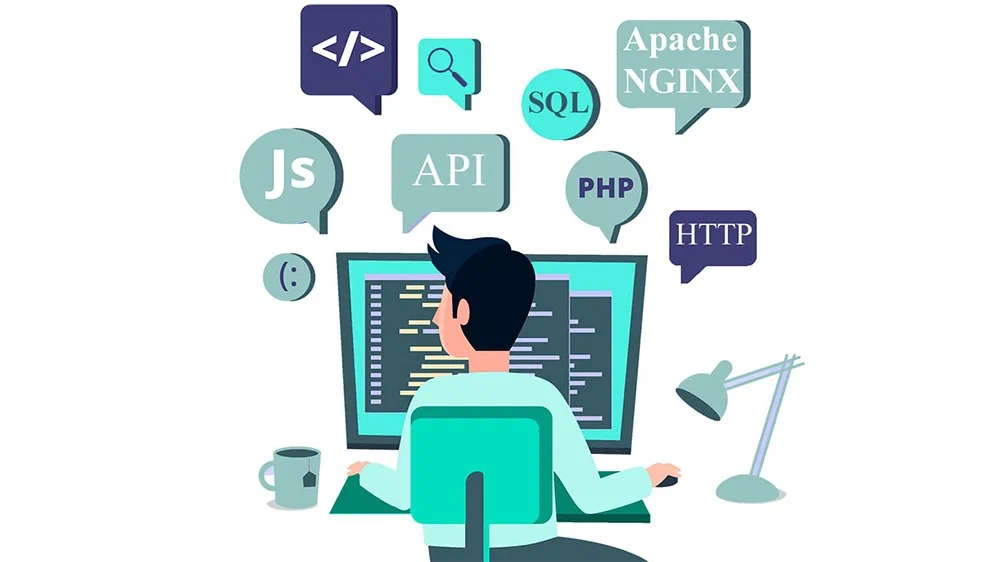
    • Tools: Apache, NGINX, AWS, DigitalOcean

    2. Database

    The database stores your application’s data — such as user profiles, product information, blog posts, or orders.

    Types:

    3. Application (Logic Layer)

    This is where the business logic resides — the actual code that tells the application what to do with incoming data or requests.

    • It receives inputs, processes them, interacts with the database, and sends responses.
    • Examples: Calculating cart totals, validating passwords, returning search results

    Key Technologies Used in Backend Development

    Backend development requires mastery of several technologies. Here’s a breakdown of the most important ones:

    A. Programming Languages

    These are the building blocks for writing backend code:

    • PHP: Popular for WordPress and Drupal, known for its easy deployment.
    • Python: Clean syntax; used with Django, Flask
    • js: JavaScript-based; ideal for real-time apps
    • Ruby: Used with Rails framework for rapid development
    • Java: Robust and enterprise-grade

    B. Backend Frameworks

    Frameworks streamline development by providing pre-written code, structure, and tools.

    • js (Node.js)
    • Django (Python)
    • Flask (Python)
    • Laravel (PHP)
    • Ruby on Rails

    Each framework is suited for different types of projects and developer preferences.

    C. Databases

    Backend systems often require both relational and non-relational databases depending on data structure needs.

    • SQL: Structured data — MySQL, PostgreSQL
    • NoSQL: Flexible data — MongoDB, CouchDB

    D. APIs (Application Programming Interfaces)

    APIs allow your backend to communicate with other applications or services, such as:

    • Payment gateways (Stripe, PayPal)
    • Email marketing tools (Mailchimp)
    • Third-party CRMs or ERPs
    • Social logins (Google, Facebook)

    RESTful APIs and GraphQL are common methods used to expose backend functionality.

    How Backend Development Works (Step-by-Step)

    Here’s a simplified version of the backend development lifecycle:

    Step 1: Planning the Architecture

    • Define the site’s structure and backend requirements
    • Choose languages, frameworks, and database types
    • Plan endpoints, routes, and server logic

    Step 2: Building the Server

    • Set up a web server (local or cloud-based)
    • Configure environments (development, testing, production)

    Step 3: Writing Application Logic

    • Develop code that handles user requests
    • Connect business logic with frontend requests
    • Write controllers, services, and utilities

    Step 4: Creating & Managing the Database

    • Define data models and relationships
    • Write CRUD operations (Create, Read, Update, Delete)
    • Test data input and retrieval

    Step 5: API Development & Integration

    • Build REST or GraphQL APIs
    • Connect to third-party platforms
    • Ensure secure data transfer with tokens, keys, or OAuth

    Step 6: Testing & Optimization

    • Conduct unit, integration, and load testing
    • Monitor performance
    • Optimize queries and response times

    Step 7: Deployment

    • Push code to production servers
    • Monitor errors and logs
    • Ensure backups and updates are in place

    The Role of a Backend Developer

    Backend developers specialize in creating a web application’s server-side logic.

    Their responsibilities include:

    • Writing clean, efficient, and secure code
    • Designing and maintaining databases
    • Creating APIs and integrations
    • Managing hosting and deployment
    • Testing and debugging
    • Optimizing for performance and scalability

    Backend developers often work closely with frontend teams, UI/UX designers, and DevOps professionals.

    Backend development with servers, code, and databases

    Security in Backend Development

    Security is non-negotiable in backend systems. A small vulnerability can lead to data breaches, lawsuits, or loss of user trust.

    Key backend security practices include:

    • Encryption of sensitive data
    • Authentication & Authorization (JWT, OAuth, session management)
    • Robust input validation against SQL injection and XSS.
    • Rate limiting to protect against brute-force attacks
    • Regular updates to frameworks and dependencies
    • HTTPS for encrypted connections

    At Ravens Digital, our backend engineers follow secure coding best practices and conduct regular audits to ensure your platform stays safe and reliable.

    How Backend Development Impacts SEO & Performance

    While SEO is often associated with frontend elements, the backend plays a critical role:

    • Page Speed: Fast server responses boost Core Web Vitals
    • Mobile Optimization: Lightweight APIs improve mobile performance
    • Indexability: Properly structured URLs and redirects
    • Schema Implementation: Often managed through backend logic
    • Content Management: Dynamic content delivery via databases

    Backend development lays the foundation for a fast, discoverable, and scalable site.

    Common Backend Development Challenges

    Backend development can be complex. Here are some of the biggest challenges:

    • Scalability: Can your system handle 10x the traffic tomorrow?
    • Data consistency: How do you manage changes across multiple databases?
    • Downtime: How do you ensure 99.9% uptime?
    • Security threats: How do you stay ahead of hackers?
    • Third-party integration failures: What happens when a payment API goes down?

    That’s why working with an experienced team — like Ravens Digital — makes a difference. We build resilient, maintainable backend systems that grow with your business.

    Why Ravens Digital Delivers Industry-Leading Backend Solutions

    At Ravens Digital, we don’t just build websites — we architect performance-driven digital systems. Here’s what sets us apart:

    ✅ Custom-Tailored Backend Solutions

    We build unique backends suited to your business model — no generic templates.

    ✅ Secure and Scalable Architecture

    Our code is clean, auditable, and future-ready. We ensure your platform grows as your audience expands.

    ✅ Seamless Frontend Integration

    We align backend functionality with elegant frontend interfaces for a seamless user experience.

    ✅ Advanced CMS & API Integration

    Need to manage content or connect to tools? We can build or extend CMS platforms with advanced backend logic.

    ✅ Performance Optimization & Monitoring

    We monitor server load, speed, and uptime — continuously optimizing for better performance.

    Whether you need a custom portal, eCommerce platform, CRM integration, or content management system, we’ve got the expertise to deliver.

    Conclusion:

    Backend development is the unsung hero of every successful website and application. It’s what powers user experiences, ensures security, supports integrations, and scales with growth.

    If you’re serious about digital transformation, backend development isn’t just a tech choice — it’s a business decision.

    At Ravens Digital, we specialize in backend development that aligns with your goals — whether you’re launching a product, expanding your reach, or optimizing your performance.

  • Frontend Development: Everything You Need to Know to Build Beautiful, User-Friendly Websites

    Frontend Development: Everything You Need to Know to Build Beautiful, User-Friendly Websites

    Table of Contents

    Frontend Development: Build Beautiful, High-Performing Websites

    In today’s digital-first world, your website is often your business’s first impression. Whether you’re a startup, a small business in Missouri, or a national brand, creating a high-performing and visually stunning website is no longer optional — it’s essential. That’s where frontend development comes in.

    But what exactly is frontend development? Why is it crucial for modern websites and apps? And how can a digital partner like Ravens Digital help you leverage it for a seamless, engaging online presence?

    Let’s dive into everything you need to know about frontend development in a beginner-friendly, comprehensive way.

    What Is Frontend Development?

    Frontend development focuses on the user-facing aspects of web development, specifically what users see and interact with in their browsers. It involves creating the layout, design, and interactive features of a website or application — everything that shapes the user experience (UX) and user interface (UI).

    Unlike backend development, which deals with databases, servers, and application logic behind the scenes, frontend development ensures that users can see and use a site effortlessly — whether on a laptop, tablet, or mobile device.

    Why Frontend Development Matters for Businesses

    Your website makes an impression on visitors within seconds. If your website is slow, clunky, or visually outdated, they’re likely to bounce — possibly straight into the arms of your competitors.

    Great frontend development makes sure that doesn’t happen.

    Key benefits include:

    • ✅ Stronger first impressions
    • ✅ Faster website loading speeds
    • ✅ Improved mobile responsiveness
    • ✅ Higher engagement and conversions
    • ✅ Better SEO performance
    • ✅ Stronger brand credibility

    At Ravens Digital, we use frontend development to create websites that don’t just look good — they perform exceptionally well across devices, browsers, and screen sizes.

    Frontend developer creating a responsive, user-friendly website interface.

    Core Technologies Used in Frontend Development

    Frontend developers rely on a powerful trio of programming languages to build the web:

    1. HTML (HyperText Markup Language)

    HTML is the backbone of any webpage. It defines the structure — think headings, paragraphs, lists, images, and links.

    2. CSS (Cascading Style Sheets)

    CSS controls the presentation — colors, fonts, layouts, spacing, and animations. It’s what makes websites beautiful and visually cohesive.

    3. JavaScript

    JavaScript adds interactivity and dynamic behavior. From sliders and popups to dropdowns and interactive maps, JavaScript brings your website to life.

    Other modern tools and frameworks built on top of these core technologies include:

    • js – For building dynamic, component-based user interfaces.
    • js – Lightweight alternative to React, ideal for small to mid-sized apps.
    • Angular – A full-featured framework used in enterprise-grade applications.
    • Bootstrap – A CSS framework for fast, responsive design.
    • SASS / SCSS – CSS preprocessors that make styling more powerful and modular.

    How Frontend Development Works: The Step-by-Step Process

    Ravens Digital implements a clear, strategic process for all frontend development. Here’s a simplified breakdown:

    1. Discovery and Planning

    We start by understanding your business goals, user needs, and technical requirements. This ensures the frontend matches your brand and drives performance.

    2. Wireframing and Prototyping

    UX designers sketch the layout and navigation of your website or app. Tools like Figma or Adobe XD help create prototypes to visualize the user journey.

    3. UI Design

    Designers craft the visual style — typography, color schemes, icons, and more — creating a consistent and modern look aligned with your brand.

    4. Frontend Coding

    Frontend developers bring the designs to life using HTML, CSS, JavaScript, and frameworks like React or Bootstrap. Every line of code prioritizes responsiveness, speed, and accessibility.

    5. Cross-Browser & Device Testing

    We test the website across all major browsers (Chrome, Safari, Edge, Firefox) and devices to ensure everything works flawlessly.

    6. Optimization & Launch

    Before launch, we optimize code for speed, mobile usability, and SEO. Then we deploy the site, monitor performance, and make refinements as needed.

    Frontend vs Backend vs Full-Stack Development


    Aspect

    Frontend Development

    Backend Development

    Full-Stack Development

    Focus

    Visual and interactive parts of a website

    Server-side, databases, and application logic

    Combines both frontend and backend

    Tools

    HTML, CSS, JavaScript, React, Bootstrap, etc.

    Node.js, PHP, Python, Ruby, SQL, etc.

    Mix of both toolsets

    User Interaction

    Yes

    No (indirectly affects performance)

    Yes (complete project scope)


    For many clients, Ravens Digital offers full-stack solutions, handling both frontend and backend seamlessly for high-performance websites and applications.

    What Makes Great Frontend Development?

    It’s not just about writing code — it’s about creating a smooth, intuitive experience that delights users and converts visitors into customers.

    A great frontend must be:

    • Visually appealing: Clean, modern, and brand-aligned.
    • Responsive – Works perfectly across mobile, tablet, and desktop
    • Fast-loading – Optimized for speed and performance
    • Accessible – Usable for people with disabilities (WCAG compliant)
    • Interactive – Provides seamless navigation and engaging UI features
    • SEO-Friendly: Structured and coded for easy search engine crawling and indexing.

    These principles are core to every project we deliver at Ravens Digital.

    Real-World Applications of Frontend Development

    E-commerce Websites

    Frontend development is critical for product pages, shopping carts, and user-friendly checkout processes that boost conversions.

    Web Applications

    From CRM dashboards to online booking systems, modern web apps rely on frontend frameworks like React or Vue for a smooth experience.

    Corporate Websites

    Professional services firms, like those in healthcare or finance, depend on sleek, responsive frontends to build credibility.

    Marketing & Landing Pages

    Designed to drive leads and conversions, these pages rely on speed, clarity, and strong calls to action — all driven by effective frontend development.


    Common Frontend Development Challenges (And How We Solve Them)

    Even though frontend development is exciting, it comes with challenges:

    Challenge

    Our Solution at Ravens Digital

    Browser compatibility

    Rigorous cross-browser testing

    Mobile responsiveness

    Mobile-first design approach

    Performance optimization

    Lazy loading, image compression, and clean coding

    Accessibility standards

    WCAG compliance, semantic HTML, and screen-reader-friendly design

    Integration with backend systems

    Seamless coordination between frontend and backend teams for API and data handling


    Seamless coordination between frontend and backend teams is crucial for effective API and data handling during backend system integration.

    Frontend development with clean code and modern UI design

    Why Choose Ravens Digital for Frontend Development?

    Located in Kansas City, Missouri, Ravens Digital offers professional web design and development services tailored for businesses that want to grow. We’re passionate about creating experiences that aren’t just beautiful — they work.

    Here’s what sets us apart:

    • Experienced team of frontend and full-stack developers
    • Custom designs — no cookie-cutter templates
    • Deep understanding of UI/UX best practices
    • Mobile-first, responsive approach to all builds
    • Transparent communication and dedicated support
    • Proven results across industries and business sizes


    Whether you’re building your first website or revamping an outdated one, Ravens Digital is the strategic partner you need for expert frontend development.

    What’s Next? How to Get Started

    If you’re considering a website redesign, app launch, or new digital product, frontend development is where your vision takes shape.

    Want to create a site that not only looks amazing but also delivers real business results?

    📞 Contact Ravens Digital today to schedule a free consultation. Our team will walk you through the possibilities and deliver a custom-built frontend that reflects your brand, resonates with your audience, and drives measurable impact.

    Conclusion:

    Your website serves as your brand’s crucial first impression in the digital realm. Frontend development ensures that handshake is strong, professional, and memorable.

    By focusing on structure, design, and usability, frontend developers make your brand shine online. Whether you’re running a service-based business in Missouri or managing a national brand, investing in frontend development is one of the smartest digital decisions you can make.

    Let Ravens Digital be your guide — from concept to code to conversion.

  • How to Optimize Your Website For a Mobile-First Future

    How to Optimize Your Website For a Mobile-First Future

    Table of Contents

    Think Mobile First: The Smart Way to Optimize Your Website

    As the world grows more mobile-dependent, your website’s performance on smartphones and tablets is no longer optional—it’s essential. A mobile-first strategy ensures your site provides a fast, responsive, and intuitive experience across all mobile devices. Whether you’re a local business or a national brand, optimizing your site for mobile is one of the smartest moves you can make.

    This article explores how to design mobile-friendly websites, why mobile optimization is critical, how to test your site’s mobile performance, and what the future of mobile optimization looks like—all tailored to help your business succeed in a mobile-first digital environment.

    How To Create Mobile-Friendly Web Designs That Delight Users And Meet Google’s Standards

    Designing for mobile isn’t about squeezing your desktop website onto a smaller screen—it’s about rethinking your entire user experience. Here’s how to create mobile-friendly web designs step-by-step:

    Step 1: Embrace Responsive Design Principles

    Responsive design means your website automatically fits any screen, including desktops, tablets, and smartphones. Use flexible grids, scalable images, and media queries in your CSS to ensure your layout adapts gracefully across devices.

    Tip: Use a mobile-first approach by designing the mobile version of your site first, then scale it up for tablets and desktops.

    Step 2: Simplify Your Navigation

    On a smaller screen, a cluttered menu can be overwhelming. Instead:

    • Use a hamburger menu icon to hide and reveal your main navigation.
    • Limit the number of menu items.
    • Prioritize essential links.
    • Consider sticky navigation for easy access to key pages.

    Best practice: Ensure clickable elements (like buttons or links) are spaced adequately for fingers—not just mouse clicks.

    Step 3: Optimize Content For Readability On Small Screens

    Your mobile users don’t have the luxury of a wide screen. Keep content brief and easily scannable.

    • Use large, legible fonts (at least 16px).
    • Break text into short paragraphs.
    • Use bullet points and subheadings for readability.
    • Avoid popups or intrusive interstitials that interrupt the user experience.

    Step 4: Focus On Visual Hierarchy

    On mobile, users scroll quickly. A strong visual hierarchy helps them find what they need fast:

    • Use bold headings to highlight key messages.
    • Use contrasting colors to draw attention to CTAs (calls to action).
    • Keep the most important information (such as offers, contact info, or lead forms) “above the fold.”

    Step 5: Optimize Images And Media

    Heavy media files can slow down your site and frustrate users on limited mobile data plans.

    • Compress all images without sacrificing quality.
    • Use modern formats like WebP for faster loading.
    • Consider lazy-loading for media assets that aren’t immediately visible.

    Step 6: Build With Touch Interaction In Mind

    Mobile users rely on gestures, not mouse clicks. Design elements must support:

    • Tap-friendly buttons (at least 44×44 pixels).
    • Swipe-enabled carousels or sliders.

    Avoid hover effects—they don’t work on most mobile devices.

    Why Mobile Website Optimization Matters For Businesses Competing in Today’s Digital Economy

    Optimizing for mobile isn’t just a design trend—it’s a strategic business decision with real bottom-line impact.

    Step 1: Mobile Usage Is Dominating The Web

    Mobile devices account for more than 60% of all web traffic. If your site isn’t mobile-optimized, you’re turning away the majority of your potential customers—especially if you serve a mobile-heavy market like USA, where people are always on the go.

    Step 2: Google Uses Mobile-First Indexing

    Since 2019, Google ranks websites based on their mobile versions—not desktop. That means your mobile experience directly affects your SEO performance. A slow, hard-to-navigate, or poor mobile user experience directly results in lower search rankings and reduced organic traffic.

    Step 3: Mobile Performance Impacts Conversions

    Studies show that 53% of users abandon a site if it takes more than three seconds to load. On mobile, users expect speed and simplicity.

    • Faster mobile websites increase engagement.
    • Better usability reduces bounce rates.
    • Streamlined checkout processes drive more mobile conversions.

    Whether you’re generating leads, booking appointments, or selling products, a mobile-optimized website converts better.

    Step 4: Enhanced Local SEO And “Near Me” Searches

    Mobile users often search with local intent—terms like “restaurants near me” or “best plumber in Miami.” Google prioritizes mobile-optimized sites in local search results.

    Subpar mobile site performance—whether due to slowness, difficult navigation, or poor UX—will lead to decreased rankings and less organic traffic.

    Step 5: Strengthens Your Brand’s Credibility

    Poor mobile sites harm your brand. In contrast, a well-optimized site:

    • Builds trust with users.
    • Makes your business look modern and professional.
    • Shows customers you care about their experience.

    How To Test Your Website’s Mobile Performance And Uncover Hidden Optimization Opportunities

    You’ve built a mobile site—but is it really performing? Testing helps identify pain points and opportunities for improvement.

    Step 1: Use Google’s Mobile-Friendly Test Tool

    Start with the Mobile-Friendly Test by Google.

    • Simply enter your site URL.
    • Google will highlight issues like text size, clickable elements, and layout problems.

    Step 2: Analyze Site Speed With Google PageSpeed Insights

    PageSpeed Insights gives you performance scores for both desktop and mobile.

    • Review metrics like First Contentful Paint (FCP) and Largest Contentful Paint (LCP).
    • Get actionable suggestions like image optimization, server response times, and unused JavaScript.

    Step 3: Test On Real Devices And Browsers

    Don’t rely solely on simulators. Test your site on multiple:

    • Devices (iPhones, Android phones, tablets)
    • Screen sizes (from small smartphones to phablets)
    • Browsers (Chrome, Safari, Firefox)

    Tip: Use tools like BrowserStack or Responsively App to preview your site across many devices without needing them physically.

    Step 4: Access Google Search Console’s Mobile Usability Report

    This report highlights:

    • Viewport configuration issues.
    • Touch element spacing errors.
    • Content wider than the screen.

    Keep this report clean to ensure long-term mobile indexing success.

    Step 5: Run User Testing With Real People

    Ask real users to navigate your site on their phones. Watch how they:

    • Access menus
    • Fill out forms
    • Make purchases
    • Scroll or interact with content

    User testing reveals UX issues that automated tools can miss.

    The Future of Mobile Optimization and How to Stay Ahead in a Rapidly Changing Landscape

    Mobile-first design isn’t the finish line—it’s the foundation. As technology evolves, businesses need to anticipate where mobile optimization is heading next.

    Step 1: Progressive Web Apps (PWAs)

    PWAs seamlessly integrate the strengths of web and mobile apps. They:

    • Load quickly, even with poor internet
    • Work offline
    • Support push notifications
    • Delivers an app-like experience, no app store required.

    Businesses using PWAs see increased time-on-site, conversions, and user retention.

    Step 2: Voice Search Optimization

    With smart assistants like Siri, Alexa, and Google Assistant, voice searches are exploding. Mobile users frequently search hands-free, especially while driving or multitasking.

    To prepare:

    • Focus on natural language and question-based content.
    • Schema markup helps search engines understand your content.
    • Optimize for local intent (e.g., “Where’s the best taco truck in Miami?”).

    Step 3: AI-Powered Personalization On Mobile

    Modern mobile experiences will be shaped by artificial intelligence:

    • AI can recommend products based on user behavior.
    • It can adjust UX elements based on time, location, or preferences.
    • Chatbots and virtual assistants will streamline customer interactions.

    Incorporate personalization into your mobile strategy to boost user engagement and satisfaction.

    Step 4: 5G and Faster Networks Will Raise User Expectations

    With 5G expanding, mobile loading times will shrink—but so will user patience. Expectations will rise for:

    • Instant loading
    • Real-time functionality (live streaming, chats)
    • AR/VR-enabled mobile experiences

    Now is the time to build performance-optimized, forward-thinking mobile sites.

    Step 5: Accessibility And Inclusive Mobile Design

    The future of mobile is inclusive. Make sure your website:

    • Uses sufficient color contrast for text.
    • Supports screen readers.
    • Provides text alternatives for images.
    • Is navigable without relying on gestures alone.

    Accessible design isn’t just about compliance; it genuinely improves the user experience for everyone.

    Final Thoughts: Why You Should Optimize Your Website Now—Not Later

    Mobile isn’t just the future—it’s the present. Businesses in dynamic, fast-moving markets like USA simply cannot afford to disregard it. Optimizing your website for a mobile-first world isn’t just about better rankings; it’s about providing a seamless, frictionless experience that builds trust, drives action, and grows your business.

    At Ravens Digital, we specialize in mobile-first web design and performance optimization, helping local businesses adapt to a mobile-driven world. Whether you’re launching a new site or revamping an existing one, our team ensures your brand thrives—on every device, every time.

    Ready to future-proof your website for mobile?

    Contact us today at Ravens Digital to schedule a mobile performance audit or website redesign consultation.

  • Web Design vs. Web Development: Understand the Difference and Choose What You Need

    Web Design vs. Web Development: Understand the Difference and Choose What You Need

    Table of Contents

    Web Design vs. Development: Choose the Right Path to Success

    Online presence is now more crucial than ever. Whether you’re launching a business, rebranding an existing one, or simply trying to boost online engagement, your website is your digital storefront—and its success depends heavily on two core disciplines: web design and web development.

    While these two terms are often used interchangeably, they represent distinct skill sets, tools, and outcomes. Knowing the differences between web design and web development will help you choose the right services, hire the right team, and create a website that truly delivers on your goals.

    In this guide, we’ll break down what sets web design apart from web development, explore how the two disciplines complement each other, identify the various roles and skills involved in each, and help you determine which one (or both) you actually need.

    What Is Web Design?

    Web design focuses on the aesthetics, layout, and overall user experience (UX) of a website. It’s the creative side of building a website—the color palettes, typography, spacing, and interactive elements that users see and engage with.

    At its core, web design is about communication. A web designer ensures your brand’s message, personality, and value proposition are clear and consistent across every digital touchpoint.

    Key Aspects of Web Design:

    • Visual Design: Choosing color schemes, fonts, spacing, imagery, and overall branding.
    • User Experience (UX): Structuring the website to be intuitive and user-friendly.
    • User Interface (UI): Designing clickable elements such as buttons, navigation menus, and forms.
    • Responsive Design: Making sure the website looks great and functions well on desktops, tablets, and smartphones.
    • Wireframes & Mockups: Creating visual guides or blueprints for how the final site will look.

    Tools Web Designers Use:

    • Adobe XD, Figma, Sketch (for mockups and wireframing)
    • Photoshop, Illustrator (for graphic assets)
    • InVision (for prototyping)
    • Webflow and Wix are occasionally used for design and light development.

    What Is Web Development?

    Web development deals with building and maintaining the structure and functionality of a website. It’s the behind-the-scenes engineering that brings web designs to life. Developers take the visual designs and transform them into interactive, functional websites through code.

    While designers focus on what users see, developers ensure everything under the hood works smoothly—from page loading speeds to dynamic content and database integration.

    Key Aspects of Web Development:

    • Front-End Development: Coding the parts of the website that users interact with, such as navigation, images, and text.
    • Back-End Development: Managing the server, databases, and applications that power the site.
    • Content Management Systems (CMS): Setting up platforms like WordPress, Drupal, or Shopify.
    • Performance Optimization: Ensuring fast loading times and minimal downtime.
    • Security & Compliance: Adding SSL certificates, anti-spam protection, GDPR compliance, etc.

    Tools Web Developers Use:

    • HTML, CSS, JavaScript (front-end basics)
    • Frameworks like React, Angular, Vue.js
    • Server-side languages like PHP, Python, Ruby, Node.js
    • Databases like MySQL, MongoDB
    • Git, GitHub for version control
    • Web hosting services like AWS, Bluehost, or DigitalOcean

    How Do Web Design & Web Development Inform & Complement Each Other?

    Although web design and development are distinct disciplines, they are inherently interconnected. A great website is the product of both good design and solid development. Here’s how they work together:

    1. Shared Vision, Different Lenses

    Designers visualize the site’s look and feel while developers actualize that vision through code. Collaboration is key: if a designer creates a complex animated interaction, the developer must decide how (and whether) to implement it in a way that maintains performance.

    2. User-Centric Goals

    Designers and developers jointly strive for an exceptional user experience. A designer focuses on clarity, usability, and emotional impact; a developer ensures seamless functionality, speed, and security.

    3. Iterative Workflow

    Design and development often run in tandem. A designer may prototype a feature, hand it off to a developer, who then builds it, tests it, and provides feedback. This ongoing loop ensures the final product is both attractive and high-performing.

    4. Complementary Skill Sets

    Design and development fill each other’s gaps. For example:

    • A designer might suggest a fixed navigation menu.
    • A developer determines how to implement it efficiently without affecting load time.

    At Ravens Digital, our integrated approach to design and development ensures that both sides are in constant communication, which leads to fewer revisions, faster turnaround, and better results.

    Web Designer vs. Web Developer: What Types Are There & What Skills Do They Have?

    Both web designers and developers often specialize in specific areas. Here’s a breakdown of the common types and the skills they bring to the table:

    Web Designers

    UX Designers

    • Focus on how the user feels while using the site.
    • Use research and testing to optimize layouts and flows.
    • Tools: Figma, Adobe XD, usability testing software.

    UI Designers

    • Focus on the aesthetics and interface components.
    • Design buttons, menus, modals, and sliders.
    • Tools: Sketch, InVision, Photoshop.

    Visual Designers

    • Combine UX and UI skills with branding.
    • Craft cohesive color schemes, logos, and typography.

    Interaction Designers

    • Specialize in micro-interactions, animations, and transitions.
    • Work closely with front-end developers to enhance user engagement.

    Web Developers

    Front-End Developers

    • Implement designs using HTML, CSS, and JavaScript.
    • Ensure compatibility across browsers and devices.
    • Often work with frameworks like Bootstrap, React, or Tailwind CSS.

    Back-End Developers

    • Build and manage the databases, server logic, and application architecture.
    • PHP, Python, Ruby, Node.js. (Often used in a “Skills” section sub-list)

    Full-Stack Developers

    • Handle both front-end and back-end responsibilities.
    • Ideal for startups or small teams looking for broad skill coverage.

    CMS Developers

    • Specialize in platforms like WordPress, Joomla, or Shopify.
    • Customize themes, plugins, and back-end integrations.

    Web Design vs. Web Development: How To Establish Which One You Need

    How do you determine whether you need a designer, a developer, or both? Here are some key questions to guide your decision:

    1. Are You Building a Brand-New Website?

    Building a new website requires both a web designer, who handles the visual layout and user experience, and a developer, who constructs the functional site.

    2. Do You Want To Revamp Your Current Site’s Look?

    A web designer is your go-to. They can enhance your branding, layout, color schemes, and overall visual appeal. However, depending on how much redesign is needed, some development may also be required.

    3. Is Your Website Visually Fine, But Not Functioning Properly?

    You need a web developer to fix bugs, speed up loading times, improve SEO, or integrate new tools (e.g., booking forms, eCommerce features, etc.).

    4. Do You Need Ongoing Support & Maintenance?

    A developer (especially full-stack or CMS-focused) can handle plugin updates, security patches, performance tuning, and general tech upkeep.

    5. Are You Planning To Sell Products Online?

    You’ll need:

    • A designer to create a clean, user-friendly eCommerce interface.
    • A developer to integrate payment gateways, shopping carts, product filters, and shipping logic.

    Which Service Is Right for You?

    Here’s a simple breakdown to help you decide:

    You Need…

    Hire a Designer

    Hire a Developer

    A visually stunning layout


    A fully functional website


    An eCommerce store

    Improved site speed


    A mobile-friendly interface

    Brand refresh or redesign

    (optional)

    Fixing broken forms or pages


    At Ravens Digital, we offer full-service web design and development to ensure you don’t have to choose between functionality and aesthetics—you get both, seamlessly aligned to your business goals.

    Final Thoughts

    Grasping the distinction between web design and web development is essential for a website that truly performs and impresses. While design brings your brand to life visually, development makes sure it functions smoothly across all platforms.

    In most cases, successful website projects require a balance of both. Whether you need a custom UI for your startup, a sleek eCommerce site, or a full-scale enterprise solution, knowing who to hire and what each role entails will save you time, money, and frustration.

    At Ravens Digital, our team of expert designers and developers work in harmony to deliver websites that are not only beautiful and user-friendly—but also technically sound and conversion-focused.

    Let’s bring your vision to life. Contact us to find out how our web design and development services can help grow your business.

  • Website Improvement: 7 Common Issues That Might Be Affecting Your Web Performance

    Website Improvement: 7 Common Issues That Might Be Affecting Your Web Performance

    Table of Contents

    7 Website Mistakes That Could Be Slowing Down Your Success

    Your website is your digital storefront—and just like any physical space, it requires consistent upkeep and optimization. Even if you’ve invested in a beautifully designed website, chances are there are still hidden performance issues preventing it from reaching its full potential. Whether you’re losing traffic, struggling with slow load times, or not converting visitors into customers, minor problems can lead to major losses.

    At Ravens Digital, we specialize in professional web development and optimization services, helping businesses in Missouri and across the U.S. turn their websites into high-performing, lead-generating machines. In this guide, we’ll walk you through the most common website issues that may be holding your business back—and how you can fix them.

    Why Ongoing Website Improvement is Key to Your Web Maintenance Strategy.

    Your website isn’t a one-time build. The digital landscape is always changing: search engine algorithms are updated, user behavior shifts, design trends evolve, and new technologies emerge. What worked well a year ago might now be hurting your site’s performance.

    Constant website improvement is crucial for a few key reasons:

    • User Expectations Are Always Evolving: People expect fast, responsive, and user-friendly websites. A site that feels outdated or sluggish can drive visitors away in seconds.
    • SEO Requirements Are Fluid: Search engines like Google constantly update their ranking algorithms. Regular audits and improvements keep your site in compliance and competitive.
    • Technical Issues Can Arise Without Warning: Broken links, outdated plugins, or compatibility issues can surface unexpectedly and harm your site’s reputation or functionality.
    • Security Risks Are Increasing: Cyber threats evolve rapidly, so keeping your website secure with regular updates is non-negotiable.
    • Conversion Optimization Is a Journey, Not a Destination: Even if you’re getting traffic, are you converting that traffic into leads or customers? Tweaking elements like copy, design, and CTAs based on performance data is essential.

    In short, website maintenance and improvement should be part of your long-term digital strategy, not an occasional task.

    7 Website Issues Harming Your Performance & Conversions

    Let’s break down the 7 most common website problems that could be costing you performance, traffic, and conversions.

    1. Slow Page Load Speeds That Frustrate Visitors and Impact SEO

    Page speed is a critical performance factor. Google has stated that site speed (and as of Core Web Vitals, page experience metrics) is a direct ranking factor. But even beyond SEO, users are impatient—if your website takes more than 3 seconds to load, you could be losing over 50% of your visitors.

    Causes of slow load speeds:

    • Large, unoptimized images or video files
    • Bloated code or excessive plugins
    • Poor-quality hosting
    • Unused JavaScript or CSS

    Solution: Use tools like Google PageSpeed Insights or GTmetrix to identify performance bottlenecks. Compress media, reduce plugins, and consider upgrading to a faster hosting solution.

    2. Mobile Responsiveness Problems That Hurt User Experience on Phones and Tablets

    Over 60% of web traffic now comes from mobile devices, so if your website isn’t responsive, you’re likely driving away a significant portion of your audience. A responsive website dynamically adapts its layout and functionality to fit various screen sizes.

    Common signs of poor mobile design:

    • Elements that don’t resize properly
    • Menus that are hard to tap
    • Text that’s too small to read
    • Content that overflows off the screen

    Solution: Use responsive design frameworks and test your site on multiple devices. Tools like BrowserStack or Google’s Mobile-Friendly Test can help you identify issues.

    3. Unclear Navigation and Layout That Confuses Site Visitors

    If visitors can’t find what they’re looking for within seconds, they’ll leave. A poorly structured website with confusing menus or hidden pages leads to high bounce rates and low conversions.

    Signs of poor navigation:

    • Too many menu items
    • No clear hierarchy or page structure
    • Missing search functionality
    • Inconsistent layout across pages

    Solution: Implement a clean, intuitive navigation structure with clear labeling. Group related pages together and include a simple search bar to enhance UX.

    4. Outdated Content or Inaccurate Information That Damages Credibility

    Your website must dynamically reflect your most current offerings, company news, and industry insights. Outdated or irrelevant content will make your brand appear inactive and unprofessional, eroding visitor confidence.

    Problem areas:

    • Old blog posts or news updates
    • Outdated service descriptions
    • Inactive contact info or broken forms
    • Missing product or pricing updates

    Solution: Regularly audit your content. Update pages with fresh data, repurpose older blog posts with new insights, and ensure contact forms or call-to-actions are functional.

    5. Weak SEO Foundations That Limit Your Website’s Visibility on Search Engines

    Without a solid SEO structure, your site won’t rank—even if it looks great. If your meta titles, descriptions, alt tags, and heading structures are missing or poorly written, you’re limiting your reach.

    Common SEO issues:

    • Missing or duplicate meta tags
    • Non-optimized URLs
    • Broken internal or external links
    • No keyword strategy

    Solution: Conduct a full SEO audit using tools like SEMrush, Ahrefs, or Screaming Frog. Ensure all on-page elements are optimized and consistent with your keyword goals.

    6. Weak Call-to-Actions (CTAs) That Fail to Guide the User Journey

    Even with great content, your website needs to guide visitors toward a specific goal. CTAs like “Get a Quote,” “Schedule a Consultation,” or “Download Our eBook” are crucial. Without them, visitors won’t take the next step.

    Problems with CTAs:

    • Too subtle or hard to find
    • Poorly worded or generic (“Click Here”)
    • Not placed strategically

    Solution: Use action-driven language, make CTAs visually distinct, and position them logically across the site—especially on landing pages, service pages, and blog posts.

    7. Lack of Analytics and Goal Tracking That Leaves You Blind to What’s Working

    If you’re not tracking how people interact with your website, you’re flying blind. Google Analytics, Hotjar, and other tools can give you insights into visitor behavior, conversions, and drop-off points.

    Common issues:

    • No goal tracking set up in analytics
    • No heatmaps or click tracking
    • Not measuring form submissions or call clicks

    Solution: Set clear KPIs and use analytics to track them. Monitor bounce rates, session duration, conversion funnels, and form performance. This data will help you make smarter website improvement decisions.

    How To Define Your Website Goals & Stay On Track With Long-Term Improvement

    Before you can truly improve your website, you need to define what success looks like.

    Start With These Key Website Goals:

    • Lead Generation: Are you collecting emails, phone numbers, or quote requests?
    • Sales or Conversions: Is your site helping to close sales or book consultations?
    • Brand Awareness: Does your website reflect your brand authority and build trust?
    • Content Engagement: Are users reading your blog, downloading eBooks, or watching videos?
    • SEO Performance: Are you ranking for key terms in your niche or local area?
    • Once you define your goals, map out a strategy:
    • Set KPIs: Assign measurable targets (e.g., increase form submissions by 25%).
    • Audit Regularly: Review analytics and technical SEO reports monthly or quarterly.
    • Iterate Constantly: Use A/B testing and performance reviews to optimize design, content, and navigation.
    • Partner With Experts: Agencies like Ravens Digital can help you manage and improve your web performance professionally and proactively.

    Website Improvement Takeaways: How to Keep Your Site Optimized for Success

    Let’s recap the key takeaways from this guide on website improvement:

    Website improvement is not optional—it’s ongoing. Regular updates and optimizations keep your site competitive, secure, and user-friendly.

    ✅ Small problems can cause big losses. Don’t ignore issues like slow load speeds, poor mobile design, or outdated content.

    ✅ Data-driven decisions matter. Use analytics and SEO tools to identify what’s working and what needs improvement.

    ✅ User experience is everything. Clean navigation, responsive design, and fast load times directly impact how people perceive your brand.

    ✅ Professional help can accelerate results. At Ravens Digital, we help businesses in Missouri and beyond maximize their online potential with tailored website strategies and development services.

    Ready to Improve Your Website Performance?

    Whether you’re looking to fix critical performance issues, redesign your site, or optimize for better conversions, Ravens Digital is your trusted partner in professional web development and strategic website improvement.

    📞 Get in touch with us today to schedule a free website audit and consultation. Let’s turn your website into a powerful tool for growth.